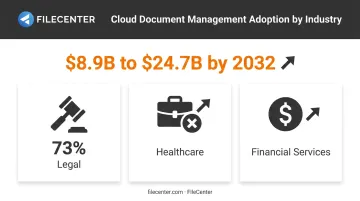
The global document management software market hit $8.9 billion in 2024 and is projected to reach $24.7 billion by 2032, growing at a 13.6% CAGR, according to MarketsandMarkets. That growth reflects a simple reality: remote and hybrid teams need document systems that work from anywhere, with audit trails and access controls paper filing simply can't match.
This guide ranks the top 11 paperless office software tools for 2026, from budget-friendly one-time purchases to enterprise cloud platforms.
Key Takeaways
- Paperless office software digitizes and organizes documents, eliminating manual filing cabinets
- Compare OCR accuracy, PDF editing depth, and integration options against your budget
- Options range from $97 one-time purchases to $40+ per user monthly subscriptions
- Your best fit depends on document volume, team size, and tolerance for recurring costs
Overview of Paperless Office Software in 2026
Paperless office software converts physical documents into searchable digital files, then automates how those files get stored, routed, and retrieved. Businesses handling hundreds or thousands of documents monthly can't rely on manual searches or scattered folders. For these organizations, the right software becomes operational infrastructure.
Adoption varies by sector, but the trend is consistent. In the legal industry, 73% of firms now use cloud-based tools, with document and practice management among the most-adopted categories, according to the American Bar Association's 2025 legal technology survey. Healthcare and financial services show similar momentum toward digital-first document workflows.
The list below ranks 11 tools based on feature depth, pricing transparency, scalability, and how well they perform for real document-heavy workloads.
Top 11 Paperless Office Software Tools of 2026
Selection criteria for this list: OCR accuracy, pricing transparency, feature depth, scalability across business sizes, and verified user reviews.
1. FileCenter
FileCenter is a Windows desktop document management platform built for businesses that want professional-grade PDF editing, OCR, and scanning without a subscription attached to it. It's positioned as the low-cost leader in a category where most competitors charge monthly per-user fees.
What sets it apart is the pricing model itself: one-time purchase, no recurring fees, across three scalable editions. Pro Plus adds OCR through the ReadIris and Tesseract engines, automatic file naming based on scanned text, and network administration tools for multi-user deployments. New users also get a 30-day money-back guarantee and a 15-day fully operational free trial with no credit card required.
| Aspect | Details |
|---|---|
| Pricing | Standard $97, Pro $197, Pro Plus $297 (one-time); 25% off first license for new users |
| Key Features | OCR (Tesseract & ReadIris engines in Pro Plus), automatic document routing, network admin tools, batch PDF conversion |
| Best For | Small businesses, law firms, and accounting practices wanting enterprise-grade features without subscription costs |
2. DocuWare
DocuWare is a cloud-based document management and workflow automation platform now serving 20,000+ customers in over 100 countries, according to DocuWare's official company page. It supports both cloud and on-premises deployment.
Its standout feature is Intelligent Indexing, which uses machine learning to extract and classify data, including line-item details from invoices. Pre-built workflow templates cover invoice processing and HR document management out of the box.
| Aspect | Details |
|---|---|
| Pricing | Subscription-based; custom enterprise quotes, no public U.S. list price |
| Key Features | Cloud/on-premises deployment, AI-driven intelligent indexing, preconfigured workflow templates |
| Best For | Mid-size to large enterprises needing cloud-based ECM |
3. M-Files
M-Files organizes documents by metadata and business context instead of traditional folder structures, which speeds up retrieval for organizations with complex document libraries.
Its AI-powered metadata tagging eliminates the need to remember where a file "lives," since documents surface based on what they are, not where they're stored. This makes it a strong fit for regulated industries like finance and manufacturing.
| Aspect | Details |
|---|---|
| Pricing | Essentials starts at $65/seat/month; Enterprise requires custom quote |
| Key Features | Metadata-based search, workflow automation, compliance tools |
| Best For | Enterprises in regulated industries like finance and manufacturing |
4. Laserfiche
Laserfiche has served as an enterprise content management provider for decades, with a strong footprint among government agencies and large organizations that need complex, multi-department workflows.
Its process automation and no-code forms builder handle approvals, routing, and monitoring without custom development. Customers include county and municipal governments alongside large enterprise clients.
| Aspect | Details |
|---|---|
| Pricing | Professional $73/user/month (5-user minimum); Business $93/user; Business+ $42/user (500-user minimum) |
| Key Features | Records management, e-forms, business process automation |
| Best For | Government agencies and large enterprises with compliance needs |
5. Revver (formerly eFileCabinet/Rubex)
Revver, the product formerly known as eFileCabinet and Rubex, rebranded in 2023 but kept its focus on small-to-midsize businesses needing straightforward document management.
Its secure client portal allows businesses to share documents externally without emailing sensitive files, alongside standard document storage and workflow automation.
| Aspect | Details |
|---|---|
| Pricing | Basic $25/user/month, Essentials $67, Full $87 (volume rates available) |
| Key Features | Cloud document storage, secure client file sharing, AI-enabled data extraction |
| Best For | Small businesses wanting cloud-first document storage with client-facing sharing |
6. Adobe Acrobat (Document Cloud)
Adobe Acrobat remains the industry-standard PDF editor, and its integration with Microsoft 365 makes it a natural fit for businesses already living in Word, Excel, and SharePoint.
The AI Assistant feature can summarize lengthy documents and answer questions about their contents, cutting down review time for contracts and reports.
| Aspect | Details |
|---|---|
| Pricing | Standard $12.99/month (individual), Pro $19.99/month; teams pricing runs $16.99-$23.99/license/month |
| Key Features | PDF editing, e-signatures, AI-powered summarization, deep Microsoft integration |
| Best For | Businesses already embedded in the Adobe or Microsoft ecosystem |
7. Box
Box functions as a cloud content management platform built around security and third-party connectivity, linking with over 1,500 apps including Salesforce and Workday.
Its compliance credentials, including SOC 1/2/3 support and HIPAA readiness, make it a common choice for distributed teams handling sensitive files across departments.
| Aspect | Details |
|---|---|
| Pricing | Business Starter $5/user/month, Business $15, Business Plus $25 (3-user minimum) |
| Key Features | Cloud storage, collaboration tools, extensive security certifications |
| Best For | Distributed teams needing secure file collaboration |
8. DocuSign
DocuSign remains the dominant dedicated e-signature platform, built for businesses processing high volumes of contracts and agreements.
Signatures are legally recognized under the U.S. ESIGN Act, which states a record cannot be denied legal effect solely because it's electronic, per 15 U.S. Code § 7001. Consent, intent, and retention rules still apply, though, so confirm compliance requirements before relying on this for your specific use case.
| Aspect | Details |
|---|---|
| Pricing | Personal $10/month (5 envelopes); Standard $25/user/month; Business Pro $40/user/month (100 envelopes/year) |
| Key Features | E-signatures, contract lifecycle management, Salesforce and Dynamics 365 integration |
| Best For | Businesses with high contract or signature volume |
9. Evernote Business
Evernote built its reputation on note-taking and lightweight document capture, and its mobile scanning tools remain genuinely useful for professionals on the go.
Evernote has since shifted away from its old "Business" tier naming toward Free, Starter, Advanced, and Enterprise plans, so confirm current pricing before assuming legacy figures apply.
| Aspect | Details |
|---|---|
| Pricing | Starter $14.99/month or $99/year; Advanced and Enterprise require checking current plans |
| Key Features | OCR-searchable notes and images, mobile document scanning, web clipping |
| Best For | Individual professionals and small teams needing simple capture tools |
10. PandaDoc
PandaDoc automates the proposal and contract lifecycle for sales teams, combining document creation with signature collection and payment processing in one workflow.
Its analytics track how long recipients spend on each page of a proposal, giving sales reps insight into where deals stall.
| Aspect | Details |
|---|---|
| Pricing | Starter $19/seat/month, Business $49/seat/month, Enterprise custom |
| Key Features | Document templates, built-in e-signatures, engagement analytics |
| Best For | Sales teams automating proposal and contract workflows |
11. Zoho WorkDrive
Zoho WorkDrive fits naturally into the broader Zoho suite, connecting directly with Zoho CRM, Books, and productivity apps like Writer and Sheet.
Pricing sits well below most competitors, making it an easy add-on for businesses already running on Zoho's ecosystem rather than a standalone document management purchase.
| Aspect | Details |
|---|---|
| Pricing | Starter $2.50/user/month, Team $4.50, Business $9 |
| Key Features | Cloud file storage, team folders, Zoho app integration via Zoho Flow |
| Best For | Small businesses already using the Zoho ecosystem |
How We Chose the Best Paperless Office Software
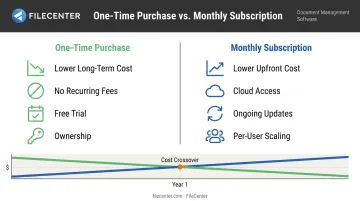
A common mistake when picking document software is choosing based on brand recognition alone, without factoring in total cost of ownership. A $25-per-user monthly subscription can outpace a one-time purchase within a year for a five-person team.
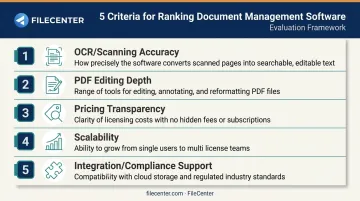
This list weighs five factors:
- OCR and scanning accuracy across varied document types and image quality
- PDF editing depth, not just viewing or basic markup
- Pricing transparency, including hidden costs like implementation fees
- Scalability from solo users to multi-department deployments
- Integration and compliance support relevant to regulated industries
Each factor ties back to a measurable business outcome: hours saved on retrieval, reduced physical storage costs, and fewer compliance headaches during audits.
Conclusion
The right paperless office software depends on your document volume, budget structure, and industry compliance requirements, not just which tool has the longest feature list. A five-person accounting firm and a 500-employee government agency need fundamentally different solutions.
Before committing, weigh ongoing subscription costs against one-time purchases, confirm the platform scales with your team, and check what vendor support actually looks like after the sale.
If you'd rather test a full-featured tool without a subscription commitment, FileCenter's 30-day money-back guarantee makes it a low-risk starting point. It's backed by a 15-day free trial with no credit card required.
Frequently Asked Questions
How does a paperless office solution work?
It digitizes physical documents through scanning and OCR, storing them in a searchable digital repository. From there, automated rules handle routing, naming, and retrieval without manual filing.
How much does it cost to implement a paperless office solution?
Costs range from one-time purchases like FileCenter's $97-$297 editions to subscriptions running hundreds of dollars per user annually. Factor in scanning hardware if you're digitizing an existing paper archive.
Is a paperless office solution the same as a virtual office?
No. A paperless office focuses on digitizing documents and workflows, while a virtual office refers to remote work infrastructure and business addresses. They often overlap but aren't interchangeable terms.
What features should I look for in paperless office software?
Prioritize OCR accuracy, PDF editing capability, automated file naming and routing, security controls, and integration with your existing accounting or email systems.
Can paperless office software integrate with my existing systems?
Most modern tools connect with email, accounting software, and cloud storage platforms like OneDrive or Google Drive. Integration depth varies significantly, so check specifics before purchasing.
Is paperless office software secure for storing sensitive documents?
Reputable tools include encryption, role-based access controls, and audit trails, making them far more secure than unsecured paper filing systems sitting in an unlocked cabinet.