PDF OCR
Convert scanned documents into searchable PDFs so users can quickly locate contracts, invoices, patient records, tax forms, insurance claims, and compliance documents.

Turn scanned PDFs into searchable, usable documents without slowing down your workflow. FileCenter’s Free Online PDF OCR to Make PDF Text Searchable helps professionals convert image-based files into text-searchable PDFs, organize records, and find critical information faster. Built for document-heavy teams, it supports efficient handling of contracts, invoices, tax forms, medical files, and compliance documents.
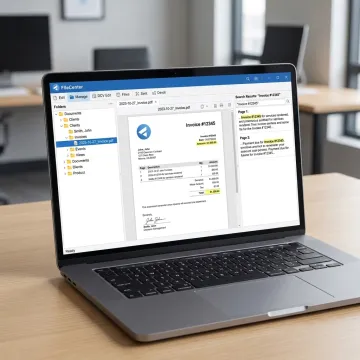
Convert, edit, search, and organize scanned PDFs with practical OCR tools for document-heavy teams.
Convert scanned documents into searchable PDFs so users can quickly locate contracts, invoices, patient records, tax forms, insurance claims, and compliance documents.
Transform Office files into PDFs or convert scanned PDFs into editable Word, Excel, or PowerPoint documents for easier review, editing, and reuse.
Create, edit, annotate, merge, split, and organize PDF documents directly, reducing dependence on expensive third-party PDF tools.
Find documents across large repositories using filenames, metadata, and full-text OCR search to improve productivity and reduce manual lookup time.
Digitize paper documents into organized folders, helping teams move toward paperless records that are easier to search, manage, and retain.
Automate OCR processing, PDF conversion, routing, and filing to reduce repetitive work and keep document-heavy operations moving efficiently.
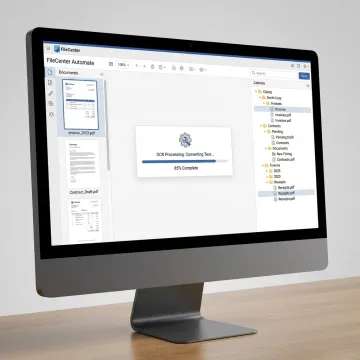
Begin with a scanned PDF, image-based document, or digitized paper file. FileCenter supports workflows for contracts, invoices, tax forms, claims, case records, and administrative documents that need searchable text.
Helping document-heavy teams turn scanned files into searchable, organized, and easier-to-manage digital records.
FileCenter combines OCR, PDF tools, and document management in one affordable platform.
One-time purchase pricing keeps OCR and document management affordable without recurring subscription fees.
Professional PDF editing, OCR, scanning, and search features rival higher-cost enterprise competitors.
ReadIris and Tesseract OCR options in Pro Plus support advanced text recognition workflows.
Automated naming, routing, separation, and folder templates reduce repetitive filing tasks.
Built for professionals managing high volumes of documents.
FileCenter provides document management software for professionals and organizations that need practical, affordable control over growing document volumes. Positioned as the low-cost leader, FileCenter combines professional-grade PDF editing, OCR, scanning, file search, and automation features at a fraction of typical enterprise software costs. Its tools support individual professionals, small businesses, medium enterprises, and larger organizations across legal, accounting, financial services, healthcare, real estate, government, and other compliance-driven industries. With scalable Standard, Pro, and Pro Plus editions, FileCenter helps users move from disorganized paper and scattered digital files to centralized, searchable, structured document workflows without forcing unnecessary complexity or recurring subscriptions.
OCR in a PDF means Optical Character Recognition, a process that detects text inside scanned pages or image-based documents. After OCR is applied, the PDF can be searched, copied, indexed, and organized more easily. This is especially useful for contracts, invoices, tax forms, insurance claims, patient records, and compliance files that were originally scanned as images.
Get guidance on OCR, PDF conversion, and document organization.

Risk-free evaluation across all editions.
Premium recognition accuracy in Pro Plus.
Advanced OCR support for text recognition.
Tell us what you need to OCR, convert, organize, or search, and we’ll help point you toward the right FileCenter edition and workflow.
To help us assist you faster, please include the reason for your message so the relevant team can reach out as soon as possible.
To help us assist you faster, please include the reason for your message so the relevant team can reach out as soon as possible.