Yet adoption still lags behind the hype. A recent survey of 225 mid-market finance leaders found that only 4% have achieved full invoice-to-payment automation, while 89% are stuck somewhere in the middle. Manual data entry costs businesses time, invites errors, and slows down payment cycles.
This guide breaks down the top invoice automation platforms for 2026, how to choose the right one for your business, and what to do when paper invoices refuse to fit neatly into your digital workflow.
TL;DR
- Invoice automation extracts, matches, routes, and posts invoice data without manual entry
- Small businesses need simplicity and cost control, while enterprises need global payments and complex approval chains
- Prioritize extraction accuracy, integration depth, workflow flexibility, and total cost of ownership when comparing vendors
- Paper and scanned invoices still need an OCR digitization step before automation software can process them
Overview of Invoice Automation Software in the Finance & Accounting Industry
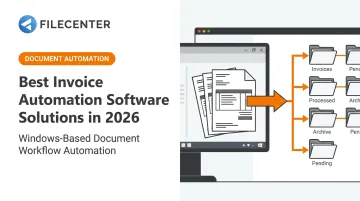
Invoice automation software captures incoming invoices, extracts key data fields, validates them against purchase orders, routes them for approval, and posts them to your accounting system, all without a human retyping a single line item. It's the backbone of a modern accounts payable (AP) workflow.
The financial case is hard to ignore. According to Ardent Partners' 2024 AP Metrics report, the gap between average and top-performing AP teams is stark:
- Cost per invoice: $9.87 for the average organization vs. $2.81 for Best-in-Class companies
- Processing time: 10.1 days on average vs. 3.4 days for top performers
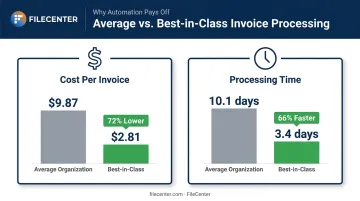
That gap is exactly what automation closes. Below, we cover the platforms best positioned to help businesses of every size close it in 2026.
Top 5 Best Invoice Automation Software Solutions in 2026
We evaluated each platform on four criteria: data extraction accuracy, integration depth, approval workflow sophistication, and cost-efficiency at scale.
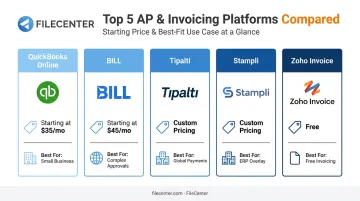
QuickBooks Online
QuickBooks Online remains the default choice for small businesses that want invoicing and accounting under one roof. It's not a dedicated AP platform, but its built-in bill capture and categorization tools handle basic automation needs well.
What sets it apart:
- 800+ business-app integrations, covering everything from payroll to inventory
- Automated categorization rules that learn from past entries
- A tight feedback loop between invoicing and real-time books, so cash flow visibility doesn't lag behind transactions
| Category | Details |
|---|---|
| Pricing | Simple Start $38/month (1 user); Essentials $75/month (3 users, adds AP reports); Plus $115/month (5 users, adds purchase orders); Advanced $275/month (25 users, adds batch expenses and workflow automation) |
| Key Features | OCR-based bill capture, recurring invoices, automated categorization, real-time cash flow dashboard |
| Best For | Small businesses (1-50 employees) wanting invoicing and accounting in one platform |
BILL (Bill.com)
BILL built its reputation on configurable approval workflows. If your business has outgrown "just email the invoice to whoever signs checks," this is where most companies land next.
Its standout capabilities include:
- Tiered, conditional, and parallel approval routing, with automatic escalation when approvals stall past a set time limit
- Built-in comment threads directly on each invoice, cutting down on scattered email chains
| Category | Details |
|---|---|
| Pricing | Essentials $49/user/month (bill entry, standard approvals); Team $65/user/month (automatic QBO/Xero sync); Corporate $89/user/month (custom approval policies, matching); Enterprise custom (multi-entity, API access) |
| Key Features | Multi-step approval chains, audit trails, virtual card payments with rebates, ERP integrations (QuickBooks, Xero, NetSuite) |
| Best For | Growing businesses with complex approval hierarchies and audit/compliance requirements |
Tipalti
Tipalti is built for companies paying vendors across borders and currencies at high volume. It's overkill for a five-person shop, but for global operations, the automated tax compliance alone can justify the switch.
Key differentiators:
- Payments in 120 local currencies across 200+ countries and territories
- Automated tax compliance tracking across jurisdictions
- Built-in W-9 and W-8BEN collection during vendor onboarding
- Three-way matching between invoice, purchase order, and receipt
| Category | Details |
|---|---|
| Pricing | AP plan starts at $99/month with unlimited users; transaction fees and higher tiers are quote-based |
| Key Features | AI-driven OCR capture, multi-currency global payments, multi-level approval routing, NetSuite/SAP/Sage integration |
| Best For | Mid-market and enterprise companies with international vendors and high monthly invoice volumes |
Stampli
Stampli takes a different approach: instead of replacing your ERP, it layers on top of it. That overlay model means faster implementation, since you're not migrating your entire chart of accounts.
Notable features:
- AI-suggested GL coding that improves the more you use it
- Centralized invoice communication threads, so questions about a specific bill stay attached to that bill
- 70+ ERP integrations, using prebuilt APIs or Stampli's Bridge connector for on-premises systems
| Category | Details |
|---|---|
| Pricing | Custom, value-based pricing; no published dollar tiers on official pages |
| Key Features | AI-powered GL code suggestions, 70+ ERP integrations, advanced AP analytics dashboards |
| Best For | Mid-market finance teams with complex GL coding needs running NetSuite, Sage Intacct, or SAP |
Zoho Invoice
Zoho Invoice is the strongest free option available, especially for freelancers and small businesses focused on sending invoices rather than processing incoming vendor bills.
What makes it worth considering:
- A genuinely free plan supporting up to 500 invoices per year
- Automated recurring invoices and escalating payment reminders
- A client self-service portal for viewing and paying invoices online
| Category | Details |
|---|---|
| Pricing | Free plan: 2 users, 3 projects, 500 invoices/year. Paid tiers unlock additional users, projects, and automation through the Zoho ecosystem |
| Key Features | Recurring invoice automation, online payment acceptance, integration with the broader Zoho suite |
| Best For | Freelancers and small businesses (1-10 employees) primarily sending invoices rather than processing incoming vendor bills |
How We Chose the Best Invoice Automation Software
The most common buying mistake? Picking a platform based on brand recognition or the lowest sticker price, then discovering six months in that it doesn't talk to your ERP or handle your approval structure.
We weighted five factors, each tied to a measurable business outcome:
- Extraction accuracy – fewer manual corrections, faster processing
- Integration depth – native connections to QuickBooks, Xero, NetSuite, or Sage without middleware
- Workflow configurability – approval chains that match how your organization actually operates, not a generic template
- Scalability – room to grow from 50 invoices a month to 5,000 without switching platforms
- Total cost of ownership – subscription fees, per-transaction charges, implementation costs, and the labor still required for exceptions
In the mid-market survey referenced earlier, 50% of finance leaders cited cost and integration difficulties as their top adoption barrier. Another 48% reported little to no savings from their current tools.
That's usually a sign the software was chosen on price or reputation alone, without confirming it fit the workflow.
Don't Forget Paper Invoices: Why Document Digitization Still Matters
Not every invoice arrives as a tidy digital file. Legal, healthcare, real estate, and government organizations still receive a meaningful share of invoices as paper documents, scanned PDFs, or email attachments that automation platforms can't read on their own.
Ardent Partners found that 49.7% of invoices arrive in these manual formats industry-wide. Automation software can't extract data from a paper invoice sitting in a file drawer or a low-quality scan buried in an inbox. It needs a digitization step first.
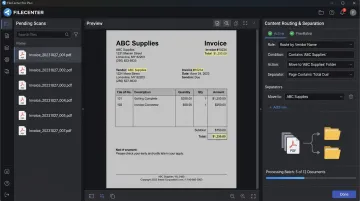
This is where document management software with OCR earns its place in the stack. FileCenter, for example, converts paper and scanned invoices into searchable, editable digital files before they ever reach an AP automation platform. Once digitized, that invoice can be extracted, matched, and routed like any other electronic document.
FileCenter's Pro Plus edition adds:
- Content-based routing that reads scanned text via OCR and sorts documents according to rules you configure
- Automatic document separation, splitting a batch scan into individual invoice files without manual sorting
- Dynamic file naming, pulling identifying details straight from the scanned text
For document-heavy businesses evaluating this step, FileCenter's pricing is a low-risk entry point:
- One-time purchase, starting at $97 for Standard and scaling to $297 for Pro Plus, with no recurring subscription fees
- 30-day money-back guarantee, so you can test it against your actual invoice volume before committing
- 15-day free trial, fully functional with no credit card required, so you can run real invoice batches before you buy
Conclusion
The right invoice automation platform matches your operational reality, invoice volume, integration needs, and approval complexity, not just what's trending or most familiar. A five-person consultancy and a 500-employee multinational have almost nothing in common when it comes to AP needs, and the software shouldn't pretend otherwise.
Before you commit, map out:
- Scalability requirements as your invoice volume grows
- Ongoing costs beyond the sticker price
- A realistic ROI timeline
If your business still handles a mix of paper and digital invoices, pair your automation stack with an affordable digitization tool like FileCenter. It keeps every invoice moving through the same workflow, regardless of format, instead of stalling at intake.
Frequently Asked Questions
Is there a way to automate invoices?
Yes. Invoice automation software extracts data from incoming invoices, matches it against purchase orders, routes it for approval, and schedules payment without manual entry. Dedicated AP platforms and OCR-based document tools often work together to cover the full process.
What is invoice automation software?
It's software that captures, extracts, validates, and processes invoice data end-to-end. The goal is reducing manual entry and the errors that come with it, while speeding up approval and payment cycles.
How much does invoice automation software cost?
Pricing ranges from free small-business tools like Zoho Invoice to custom-quoted enterprise platforms like Tipalti. Cost depends largely on invoice volume, number of users, and how much workflow configurability you need.
What is the best invoice automation software for small businesses?
QuickBooks Online works well if you want invoicing built into your existing accounting system. Zoho Invoice is the better fit if you mainly send invoices and want a genuinely free option.
How accurate is AI-powered invoice data extraction?
Accuracy generally lands in the mid-to-high 90s percent range, depending on document quality and complexity. Handwritten notes, unusual layouts, and low-resolution scans cause most of the remaining errors.
Can invoice automation software work with my existing accounting system?
Most leading platforms integrate natively with QuickBooks, Xero, NetSuite, and Sage. For businesses still receiving paper invoices, a tool like FileCenter can scan and OCR those documents into searchable PDFs before they ever reach your accounting system.