The right paperless tax office software cuts document retrieval from minutes to seconds, slashes storage costs, and keeps you audit-ready year-round. A June 2024 survey of 240 accounting professionals found that 66% now run all or mostly digital operations, with 71% using document-storage software. Firms still relying on filing cabinets are the exception, not the norm.
This guide breaks down the top options for 2026, from dedicated document management tools to full practice management suites.
TL;DR
- Paperless tax office software blends document management, OCR/scanning, and workflow automation to eliminate paper filing.
- The right fit depends on firm size, budget, and needed feature depth.
- FileCenter, TaxDome, Canopy, Karbon, and Drake Tax/ProConnect cover the top use cases for 2026.
- Look for OCR accuracy, PDF editing, security compliance, and clear total cost of ownership.
- Test with a free trial or money-back guarantee before switching mid-season.
Overview of Paperless Tax Office Software
Paperless tax office software digitizes and organizes client tax documents, securing them for easy retrieval — replacing filing cabinets, sticky notes, and manual document routing with searchable digital files.
The category covers a wide range of tools:
- Dedicated document management/OCR platforms like FileCenter, built for scanning, filing, and PDF handling.
- Full practice management suites like Karbon and TaxDome, which bundle document storage with workflow, billing, and client portals.
- Tax preparation software like Drake Tax and ProConnect, which handle paperless filing as part of the return process.
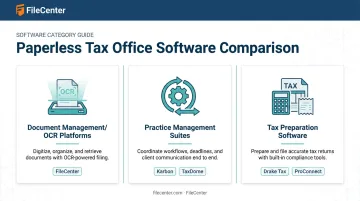
Some firms need one focused tool. Others need an entire ecosystem. Below, we break down the top solutions U.S. tax offices rely on for going paperless in 2026, and where each one fits.
Top Paperless Tax Office Software for 2026
We evaluated each tool on OCR/document accuracy, ease of use, pricing transparency, security, and fit for tax-specific workflows : think multi-monitor return prep, client document intake, and IRS compliance requirements.
FileCenter
FileCenter is a document management platform built around OCR-based scanning, native PDF editing, and centralized digital filing. It's purpose-built for document-heavy professionals, including tax and accounting firms that need to process hundreds of client files during busy season without adding software overhead.
What sets it apart from most competitors on this list:
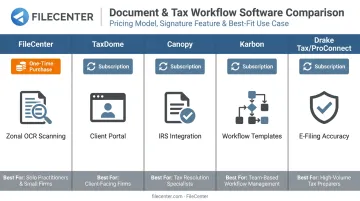
- One-time purchase pricing, with no subscriptions or recurring seat fees.
- Zonal OCR with automatic file naming, so scanned tax forms get sorted without manual tagging.
- ScanSnap integration for high-speed batch scanning, plus interval separation that can split a single scan run into individual client files automatically.
- 30-day money-back guarantee, which removes most of the risk from switching mid-season.
| Aspect | Details |
|---|---|
| Pricing | Standard $97, Pro $197, Pro Plus $297 (one-time purchase). 25% discount on first license for new users (up to $74 off), plus multi-user and competitor-migration discounts available. |
| Key Features | OCR/Zonal OCR, automatic document routing, native PDF editing and annotation, network sharing for team collaboration, cloud sync with Google Drive, OneDrive, Dropbox, and SharePoint. |
| Best For | Tax and accounting firms wanting affordable, professional-grade scanning and OCR without ongoing subscription costs. |
TaxDome
TaxDome is an all-in-one client portal and workflow platform widely used by tax and bookkeeping firms that want client communication and document handling under one roof.
Its strongest features are unlimited document storage, built-in PDF editing, and a client-facing mobile app that lets taxpayers upload documents directly instead of emailing PDFs back and forth. The trade-off: pricing is billed upfront annually, which can be a bigger commitment for smaller firms.
| Aspect | Details |
|---|---|
| Pricing | Annual subscriptions from roughly $700 to $1,200 per seat, per year, depending on plan tier and contract length (Essentials, Pro, Business). |
| Key Features | Client portal, unlimited standard e-signatures, workflow automation, unlimited document storage, native PDF editing. |
| Best For | Firms wanting a single platform for client communication plus document handling. |
Canopy
Canopy is a modular practice management platform with a particular strength in tax resolution work. Firms add document management, billing, and client management as separate modules rather than one bundled package.
Its standout differentiator is IRS integration: automated transcript pulls, version comparisons, and notice tracking built specifically for resolution cases. Document management, however, is not included by default: it's a paid add-on layered on top of the base plan.
| Aspect | Details |
|---|---|
| Pricing | Standard $74, Plus $109, Premium $149 per user/month (billed annually). Tax Resolution add-on runs an additional $50 per user/month. |
| Key Features | Document management add-on, IRS transcript integration, tax resolution case tools, task and project management. |
| Best For | Firms handling tax resolution cases that need deep IRS-linked functionality. |
Karbon
Karbon is a practice management platform combining tax workflows, document management, and client communication in one system, aimed at growing firms rather than solo preparers.
Its strengths are workflow templates and firm-wide visibility. Karbon publishes 170+ tax workflow templates, along with activity timelines that show exactly where every client file stands. The catch: onboarding takes longer than plugging in a standalone document tool.
| Aspect | Details |
|---|---|
| Pricing | Team $59/user/month, Business $89/user/month (billed annually; higher on month-to-month terms). |
| Key Features | Cloud document management, 170+ tax workflow templates, client portal (Karbon for Clients), e-signatures via credit bundles. |
| Best For | Mid-sized, growth-focused firms needing full practice management beyond document storage. |
Drake Tax / Intuit ProConnect Tax
Drake Tax and ProConnect Tax are established tax preparation platforms with built-in e-filing, client document portals, and paperless return storage baked into the filing workflow itself.
Their real strength is tax-specific accuracy: calculations, forms, and e-filing rules stay current every season. Drake also password-protects the underlying client data file for added security. Where they fall short is holistic document management: neither is designed to organize non-tax client paperwork the way a dedicated DMS or practice suite does.
| Aspect | Details |
|---|---|
| Pricing | Drake Tax: Desktop Pay-Per-Return $379.99, 1040 Unlimited $2,325, Pro Unlimited $3,145. ProConnect: pay-as-you-go from roughly $76.97/individual return (promotional), or prepaid bundles from around $2,478. |
| Key Features | E-filing, tax planning tools, client document portal, cloud access (Drake Tax Online or hosted; ProConnect is fully cloud-based). |
| Best For | Firms prioritizing tax prep and filing accuracy over broader document management. |
How We Chose the Best Paperless Tax Office Software
We weighed OCR and document accuracy, pricing transparency, security and compliance features, integration depth, and real user reviews. A common mistake firms make is picking software purely on brand recognition, only to end up with a tool that doesn't match their actual document volume.
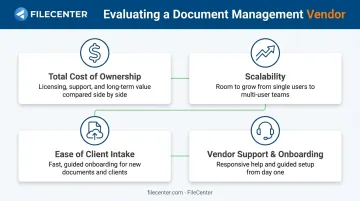
Instead, we prioritized factors tied directly to business outcomes:
- Total cost of ownership: we compared one-time purchase models against ongoing subscription costs over a 3-5 year horizon.
- Scalability (how pricing and setup change as a firm adds staff or client volume).
- Ease of client document intake, meaning how quickly clients can upload files without back-and-forth emails.
- Vendor support and onboarding quality: the setup time required before a tool works during a live tax season.
Conclusion
There's no single "best" paperless tax office software — the right pick depends on your firm's document volume, budget, and how complex your workflows already are. A three-person prep shop and a 40-person firm running resolution cases need very different tools.
Before committing, test your shortlist with a free trial or money-back guarantee, since decisions made under season pressure are hard to undo. Build in a real evaluation window, and reassess your stack annually as pricing and features shift year to year.
If you're looking for a low-risk way to modernize document handling before the 2026 season ramps up, FileCenter's 30-day money-back guarantee makes it easy to test OCR, scanning, and PDF workflows without locking into a subscription.
Frequently Asked Questions
What is the best paperless tax office software?
It depends on your need: FileCenter for affordable OCR and document management without subscriptions, TaxDome or Karbon for full workflow and client portals, and Drake Tax/ProConnect for tax prep-specific filing.
How do I convert my tax office to a paperless workflow?
Start with high-speed scanning of existing client files, then use OCR to make everything searchable and editable. Set up cloud or network sharing for team access, and retire physical files as soon as digitization is confirmed.
Is OCR software necessary for a paperless tax practice?
Yes. OCR converts scanned tax documents into searchable, editable text, which is essential for fast retrieval and cuts down on manual data entry during peak season.
Can paperless tax office software integrate with QuickBooks and tax prep software?
Most modern practice management platforms, including TaxDome, Canopy, and Karbon, offer direct QuickBooks Online integration. Dedicated document management tools like FileCenter typically support import/export compatibility rather than live syncing.
Is paperless tax office software secure for storing sensitive client data?
Reputable software uses encryption, access controls, and defined storage options, whether local or cloud-based. You should verify these features align with IRS data security guidance before choosing a tool.
How much does paperless tax office software cost?
Costs vary widely by model. One-time purchase tools like FileCenter run from $97 to $297 total, while practice management subscriptions like TaxDome or Karbon typically run $700 to $1,200+ per user, per year.