Introduction
Paper is still draining office budgets. A 2025 AIIM survey of 600 enterprises found that 61% of intelligent document processing workflows still involve paper, and 48% of respondents expect paper volumes to climb even higher this year.
That's the paradox heading into 2026: businesses talk digital transformation while paper keeps piling up in the background.
The real cost shows up in lost files, slow document retrieval, compliance headaches during audits, and employees burning hours hunting for a signed contract that should take seconds to find.
The right paperless office software fixes this by scanning, indexing, and securing documents so anyone on your team can pull up what they need instantly.
This guide breaks down the five best paperless office software tools for 2026, comparing features, pricing, and which businesses each one fits best.
Key Takeaways
- FileCenter costs $97-$297 one-time, no subscriptions—ideal for budget-conscious SMBs.
- Adobe Acrobat offers industry-standard PDF editing and e-signature tools from $19.99/month.
- DocuWare and M-Files suit enterprise teams needing workflow automation and compliance controls.
- eFileCabinet (Rubex/Revver) suits accounting and legal firms sharing client files securely.
- OCR accuracy drives search speed and error rates more than brand name when choosing a platform.
Overview of Paperless Office Software in Today's Workplace
Paperless office software captures, organizes, retrieves, and secures business documents digitally, replacing the physical filing cabinet entirely.
The market backing this shift is expanding fast. Fortune Business Insights projects the global document management system market will hit $9.74 billion in 2026, growing at roughly 15% annually through 2034. The Business Research Company puts 2026 figures even higher, at $11.48 billion.
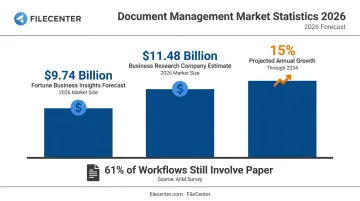
Yet plenty of businesses haven't made the leap. AIIM research confirms this: most document workflows still involve paper somewhere in the process, even at companies that consider themselves "digital first."
Why the gap persists:
- Legacy paper archives feel too time-consuming to digitize
- Teams underestimate OCR search accuracy needs until it's too late
- Compliance requirements vary wildly by industry (legal, healthcare, finance)
- Budget concerns push businesses toward "free" tools that lack real DMS features
The five tools below were selected based on real-world usability across legal, accounting, healthcare, and real estate firms — industries where document volume and compliance stakes are highest.
Top 5 Best Paperless Office Software Tools in 2026
Each tool below was evaluated on OCR accuracy, PDF editing depth, pricing transparency, scalability, and industry trust signals. Some excel at raw document capture. Others focus on workflow automation or enterprise compliance. Here's how they stack up.
FileCenter
FileCenter is a document management platform built for centralized digital filing, OCR-powered search, and professional PDF editing, all at a fraction of what enterprise software typically costs.
What sets it apart:
- One-time purchase pricing. No subscriptions, no annual renewal surprises.
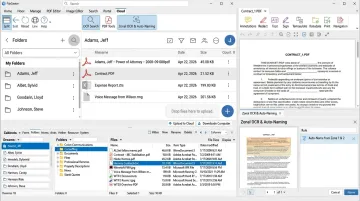
- Zonal OCR with automatic file naming, so scanned documents get named and filed without manual sorting.
- ReadIris and Tesseract OCR engines in the Pro Plus edition for high-accuracy text recognition.
- Network administration tools letting IT admins push shared settings across every workstation.
- 30-day money-back guarantee plus a 15-day fully operational free trial (no credit card needed).
| Category | Details |
|---|---|
| Pricing | Standard $97, Pro $197, Pro Plus $297 (one-time license, no subscription) |
| Key Features | OCR-based search, automated document routing/separation, PDF editing, Bates stamping, barcode support |
| Best For | SMBs, law firms, accounting firms, and healthcare practices needing affordable, high-volume scanning without recurring costs |
New customers can also claim a 25% discount on their first license (worth up to $74), and users switching from competing document management products qualify for migration pricing.
Adobe Acrobat
Adobe Acrobat remains the industry-standard PDF and e-signature platform, and for good reason. It's the tool most people already have some familiarity with, which shortens the learning curve considerably.
Its main strengths lie in ecosystem integration:
- Deep compatibility with Microsoft 365, Teams, SharePoint, and OneDrive
- Native Google Drive support for editing PDFs stored in the cloud
- Built-in e-signature workflows for contracts and approvals
| Category | Details |
|---|---|
| Pricing | Acrobat Pro (individual): $19.99/month. Teams Standard: $16.99/month/license. Teams Pro: $23.99/month/license |
| Key Features | PDF creation/editing, e-signature workflows, cloud sync, OCR, redaction, password protection |
| Best For | Businesses already embedded in the Adobe or Microsoft ecosystem needing frequent PDF collaboration |
Acrobat covers PDF editing exceptionally well. It's less built for true document management: there's no zonal capture or automated filing structure the way dedicated DMS platforms offer.
DocuWare
DocuWare is a cloud-based enterprise content management platform built for automating document-heavy processes across accounting, HR, and sales departments.
The platform has real scale behind it. DocuWare reports well over 20,000 customers globally, adding more than 3,000 new customers in fiscal 2024 alone, with nearly 90% of new sign-ups choosing cloud deployment over on-premises setups.
| Category | Details |
|---|---|
| Pricing | Custom quote based on deployment size, user count, and storage tier |
| Key Features | Intelligent indexing, automated approval workflows, ERP/accounting integrations (SAP, QuickBooks, Sage) |
| Best For | Mid-size to enterprise organizations needing cross-department process automation |
DocuWare's Intelligent Indexing feature stands out for reducing manual data entry on incoming invoices and forms. That said, pricing isn't published as a flat rate, so expect a sales conversation before you get real numbers.
M-Files
M-Files takes a different approach entirely. Instead of organizing files into folders, it uses metadata to classify documents by what they are, not where they're stored.
This context-first architecture pays off for compliance-heavy industries:
- AI-based auto-classification through M-Files Aino, which extracts and summarizes document content automatically
- Audit trails supporting regulatory recordkeeping
- ISO/IEC 27001:2022 and SOC 2 certifications, relevant for legal and financial clients
- Recognition as a Leader in Gartner's 2026 Magic Quadrant for Document Management
| Category | Details |
|---|---|
| Pricing | Essentials: $65/seat/month. Enterprise: custom quote |
| Key Features | Metadata-based search, AI auto-classification, compliance audit trails |
| Best For | Enterprises and regulated industries such as legal, finance, and government |
If your team is drowning in inconsistent folder structures across departments, M-Files solves that specific problem better than most competitors on this list.
eFileCabinet (Rubex)
eFileCabinet (now operating under the Revver brand) built its reputation on small-to-mid-size business needs, particularly accounting and legal firms exchanging sensitive files with clients.
Its standout feature is the secure client portal (evolved from the original SecureDrawer), which lets clients upload and download documents without email attachments floating around unsecured.
| Category | Details |
|---|---|
| Pricing | Basic: $25/user/month. Essentials: $67/user/month. Full: $87/user/month (volume discounts available) |
| Key Features | Client portal, workflow templates, mobile-friendly web access, document retention rules |
| Best For | Small accounting and legal practices needing secure client document exchange |
One note worth flagging: current documentation points to a mobile web shortcut rather than a confirmed native app, so test that on your team's devices before committing budget.
How We Chose the Best Paperless Office Software
Picking a document management system isn't about finding the flashiest brand. TechTarget's evaluation framework points to multisource capture, version control, security, and integration depth as the factors that actually matter — and that's what shaped this list.
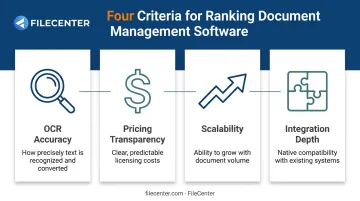
We weighed four things specifically:
- OCR accuracy: tested against real scanned documents, not marketing claims
- Pricing transparency: one-time license versus recurring subscription, and whether the vendor publishes real numbers
- Scalability: can the tool grow from 3 users to 300 without a platform switch?
- Integration depth: does it connect to the accounting, CRM, or ERP systems you already run?
Common buyer mistakes to avoid:
- Choosing based on brand recognition without testing OCR accuracy on your own documents
- Underestimating three-year subscription costs versus a one-time license
- Assuming "cloud-based" automatically means better security than on-premises options
Poor OCR accuracy is the mistake buyers overlook most, and it doesn't just create a minor inconvenience. It results in a digital archive that's technically searchable but practically useless, which defeats the purpose of going paperless.
Conclusion
The "best" paperless software depends on your document volume, industry compliance needs, and pricing preference. A five-person accounting firm and a 200-attorney law practice need very different tools, even if both call themselves "paperless."
Before rolling anything out organization-wide, test-drive your shortlist. Most of these platforms offer free trials or money-back guarantees specifically so you can catch OCR or workflow issues before they become expensive problems.
If you're looking for a low-risk starting point, FileCenter's one-time pricing and 30-day money-back guarantee make it easy to try without committing to years of subscription fees. Download the 15-day free trial and see how it handles your actual documents before deciding.
Frequently Asked Questions
How do I create a paperless office?
Start by auditing your current paper use, then select a document management tool with reliable OCR. Digitize existing files in batches, train staff on the new system, and set up secure cloud backups before decommissioning physical storage.
What is the best software for a very small business?
Small businesses generally do best with affordable, easy-to-deploy tools like FileCenter Standard, which skips recurring subscription fees entirely. It covers core scanning, PDF editing, and file organization without enterprise-level complexity you won't use.
Does Microsoft 365 have a document management system?
SharePoint within Microsoft 365 offers basic storage and version control, but it lacks dedicated OCR, zonal capture, and compliance-grade audit trails found in specialized DMS platforms. OCR is a separate pay-as-you-go Microsoft service, not a built-in feature.
What file types can paperless office software handle?
Most platforms support PDF, TIFF, JPEG, Word, and Excel files. OCR technology converts scanned images into searchable, editable text, turning a digitized archive into something you can actually use.
How much does paperless office software typically cost?
One-time license pricing, like FileCenter's $97-$297 range, avoids recurring fees entirely. SaaS subscription models typically run $110-$880 per month depending on the plan tier and user count, adding up fast over several years.
Is it safe to store sensitive documents digitally?
Reputable document management platforms use encryption, access controls, and audit trails that often exceed the security of a locked filing cabinet. The bigger risk usually comes from weak internal permissions, not the software itself.