PDF Reordering
Move PDF pages into the right sequence using practical organization tools that help clean up scans, client packets, case files, statements, and other multi-page business documents.

Rearrange and reorder PDF pages online with FileCenter’s practical PDF editing and document management tools. Move pages, organize files, merge or split documents, and keep records searchable without relying on expensive third-party software. Built for professionals and document-heavy teams, FileCenter helps turn scattered PDFs into cleaner, better-structured files that are easier to manage, retrieve, and share.

Edit, rearrange, split, merge, convert, and organize PDF pages with practical tools built for document-heavy teams.
Move PDF pages into the right sequence using practical organization tools that help clean up scans, client packets, case files, statements, and other multi-page business documents.
Separate large PDFs into smaller, more useful documents for filing, review, routing, or record retention without disrupting your broader document management workflow.
Combine related PDFs into complete packets while keeping documents organized for accounting, legal, insurance, healthcare, financial, and other document-heavy business processes.
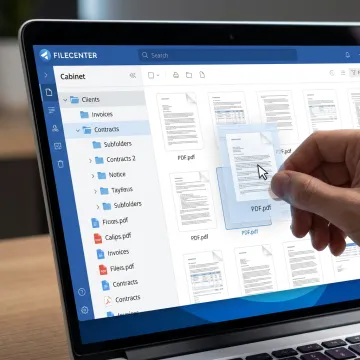
Open your PDF and review the page thumbnails so you can quickly spot misplaced pages, duplicates, blank scans, or sections that need to be split, merged, or reorganized before final filing.
See how better PDF organization helps teams reduce clutter and retrieve important documents faster.
FileCenter gives document-heavy teams practical PDF control without enterprise-level complexity.
Professional PDF editing, OCR, scanning, and filing tools at significantly more affordable pricing.
Rearrange, annotate, merge, split, convert, scan, and organize PDFs within one document workflow.
Use full-text search, OCR, metadata, and filenames to quickly retrieve important business documents.
Standard, Pro, and Pro Plus editions support individuals, small teams, and larger deployments.
Built for professionals who manage documents every day.
FileCenter is built for professionals and organizations that handle large volumes of documents every day. Its approach combines PDF editing, OCR, scanning, conversion, routing, and centralized filing in one practical document management system. Positioned as a low-cost leader, FileCenter delivers professional-grade capabilities that typically appear in more expensive enterprise platforms, while offering one-time purchase pricing and scalable editions for different budgets. From individual professionals to legal, accounting, healthcare, insurance, financial services, real estate, government, and compliance-driven teams, FileCenter focuses on making documents easier to organize, search, retrieve, and manage without unnecessary complexity or recurring subscription costs.
To rearrange pages in a PDF online, open the document in a PDF editing tool, view the page thumbnails, drag pages into the correct order, then save the updated file. FileCenter supports PDF editing and management workflows, including organizing, splitting, merging, annotating, and preparing documents for easier filing and retrieval.
Get guidance on the right PDF workflow for your documents.

Risk-free evaluation for every edition.
Clear pricing without recurring subscriptions.
Editions built for different business needs.
Tell us what you need to organize, convert, or edit, and we’ll help you identify the right FileCenter edition for your workflow.
To help us assist you faster, please include the reason for your message so the relevant team can reach out as soon as possible.
To help us assist you faster, please include the reason for your message so the relevant team can reach out as soon as possible.