Introduction
Law firms handle thousands of contracts, pleadings, and case files every week. One misfiled document can mean a blown deadline, a malpractice claim, or a breach of client confidentiality.
Legal document management systems solve this by centralizing storage and securing access, while making every file instantly searchable. Firms of any size can cut administrative overhead while protecting sensitive client data.
This guide compares five leading legal DMS options. You'll see enterprise platforms built for BigLaw, purpose-built tools for growing firms, and affordable, one-time-purchase solutions like FileCenter for solo attorneys and small practices.
TL;DR
- Legal DMS software centralizes storage, search, security, and version control for case files
- Enterprise platforms (iManage, NetDocuments) suit large firms; LexWorkplace fits smaller teams
- FileCenter offers one-time pricing with OCR and PDF tools for solo/small practices
- Selection hinges on security, search, and cost, plus ease of use
- Below: a side-by-side comparison of 5 top options plus a buyer's checklist
Overview of Legal Document Management Systems
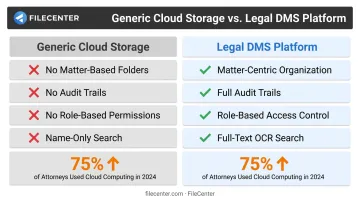
A legal DMS isn't just cloud storage with a law firm logo slapped on it. Unlike a shared drive, it organizes files by client and matter, tracks who accessed what and when, and enforces version control so nobody overwrites an opposing counsel's redline by accident.
Generic tools like Dropbox or a network share don't offer:
- Matter-based folder structures that mirror how lawyers actually work
- Audit trails for compliance and defensibility
- Role-based permissions restricting access on a need-to-know basis
- Full-text search across scanned documents, not just file names
The shift toward cloud-based systems has accelerated quickly. The American Bar Association's 2024 Cloud Computing TechReport found that 75% of attorneys used cloud computing for work tasks in 2024, up from 69% the year before. Confidentiality and security remain the top concern for 74% of respondents. That's exactly why restricting access by matter is so critical.
With that context set, let's break down the top platforms, from enterprise-grade suites to budget-friendly options built for smaller firms.
Top 5 Legal Document Management Systems
We evaluated each platform on security/compliance, ease of use, pricing transparency, scalability, and legal-specific features like OCR and Bates numbering.
FileCenter
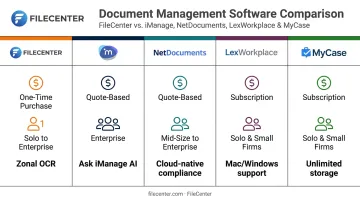
FileCenter positions itself as the low-cost leader in document management, selling software as a one-time purchase rather than a recurring subscription. That structure alone makes it a natural fit for solo attorneys and small firms watching every line item on their overhead budget.
What sets it apart:
- Zonal OCR that extracts text from specific document regions and auto-generates file names
- Bates stamping and barcode recognition for litigation workflows
- Native PDF editing (redaction, stamping, digital signatures, form filling) without third-party tools
- Network administration tools in Pro Plus for small-team collaboration
| Category | Details |
|---|---|
| Pricing | Standard $97, Pro $197, Pro Plus $297 (one-time purchase). New users get a 25% discount (up to $74 off), plus a 30-day money-back guarantee |
| Key Features | Tesseract and ReadIris OCR engines, automatic document routing/separation, Bates stamping, barcode recognition, full native PDF editor |
| Best For | Solo attorneys and small law firms wanting affordable document organization and search without subscription costs |
Firms comparing Windows-only environments should note: FileCenter runs on Windows desktop only, so mixed Mac/Windows offices will want to plan accordingly.
iManage Work
iManage is the name most BigLaw partners already know. It's an enterprise-grade DMS combining document and email management with governance tools built for firms managing enormous document volumes across multiple offices.
Its standout feature is Ask iManage, an AI assistant that searches the entire repository, cites its sources, and summarizes documents, all while honoring existing permissions and governance policies rather than bypassing them.
According to iManage's own data, the platform serves 80% of the Global 100 and 77% of the Am Law 100, making it the default choice at the top of the market.
| Category | Details |
|---|---|
| Pricing | Contact for pricing (quote-based, typically implemented via certified resellers) |
| Key Features | AI-powered search, need-to-know access controls, thorough compliance/governance tooling, ISO 27001 and SOC 2 certifications |
| Best For | Large firms (50+ users) with dedicated IT resources |
The trade-off is opacity. There's no public price list, and implementation runs through partners rather than a self-serve checkout.
NetDocuments
NetDocuments is cloud-native from the ground up, meaning firms never manage on-premise servers. Compliance is built into its core, with FedRAMP authorization plus adherence to HIPAA and GDPR requirements.
Its Microsoft 365 integration is genuinely deep. Recent updates connect Microsoft Copilot directly to NetDocuments content and enhance Outlook email management and Teams collaboration. Firms migrating away from Worldox also have a documented path: NetDocuments acquired Worldox in 2022, and vendor case studies show firms completing that transition with dedicated migration assistance.
| Category | Details |
|---|---|
| Pricing | Contact/quote-led; no published general list price |
| Key Features | Cloud-native architecture, version control, secure external sharing, ndMAX AI suite, geo-aware data storage |
| Best For | Mid-to-large firms needing enterprise cloud security and compliance |
LexWorkplace
LexWorkplace was built exclusively for law firms, which shows in the details. Matter-centric organization is the default, not an add-on you configure later.
Two things make it stand out among cloud DMS options:
- Full native Mac and Windows support (a genuine differentiator, since most competitors in this space are Windows-first)
- Document AI included on all plans, letting users summarize documents and surface key facts without an upsell
| Category | Details |
|---|---|
| Pricing | Starting around $395/month, with a free trial available |
| Key Features | Matter-based organization, full-text search across documents/email/notes, Outlook add-in, Document AI |
| Best For | Cloud-ready law firms with 2–75 users wanting purpose-built simplicity |
Vendor positioning specifically calls out that 2–75 user range as its sweet spot. Confirm it against your own headcount before committing.
MyCase (Documents)
MyCase isn't a standalone DMS. It's a full practice management suite with document management built in, which appeals to solo and small firms trying to consolidate their tech stack rather than run five separate tools.
Document handling here includes unlimited storage at no extra cost and built-in eSignature. Full-text search, however, is only confirmed on the Advanced tier through MyCase Drive. Basic and Pro subscribers don't get that same search depth.
| Category | Details |
|---|---|
| Pricing | Basic $50/user/month (billed annually), Advanced $130/user/month; included in broader MyCase subscription |
| Key Features | Unlimited document storage, built-in eSignature, matter-centric organization, full-text search (Advanced tier only) |
| Best For | Solo to midsize firms wanting one consolidated platform rather than a standalone DMS |
Key Features to Look for in a Legal DMS
Before comparing vendors on price alone, check whether they cover these fundamentals.
Matter-centric organization. Documents, emails, and notes should tie to a specific client/matter automatically, not require manual sorting into generic folders.
Full-text search and OCR. This is where firms get burned. Ordinary full-text search doesn't guarantee scanned images are searchable. The ABA notes that OCR specifically converts image-only scans into machine-readable, searchable case data, a distinct capability from indexing text that's already digital. Confirm your shortlist actually OCRs scans, not just typed PDFs.
Security and compliance. Look for:
- Encryption at rest and in transit
- Role-based access controls
- Audit trails for every document interaction
- Multi-factor authentication
Version control and check-in/check-out. This prevents two paralegals from overwriting each other's edits on the same brief and preserves a defensible history if a document's chain of custody is ever challenged.
Integration and ease of adoption. A DMS that doesn't play well with Outlook and Office creates more friction than it removes. Staff should be productive within days, not weeks.
Cost structure. Weigh recurring subscription costs against one-time-purchase tools. A firm paying $150/user/month for years accumulates far more spend than a single upfront license—something worth modeling out over a 3-5 year horizon.
How We Chose the Best Legal DMS
We prioritized security credentials, implementation ease, pricing transparency, and legal-specific functionality(OCR accuracy, Bates stamping, matter organization) over brand recognition alone.
Common mistakes firms make when shopping for a DMS:
- Chasing flashy AI marketing without checking whether the underlying search or OCR actually performs well on messy scans
- Ignoring Mac/Windows compatibility until after purchase, then discovering half the office can't use the tool
- Underestimating total cost, forgetting reseller fees, implementation charges, and training time that enterprise platforms often require
These missteps usually trace back to one root cause: ignoring firm size and budget as the primary decision drivers. A five-attorney practice doesn't need iManage's governance depth any more than a 300-lawyer firm can survive on a tool with no centralized administration.
Conclusion
The right legal DMS depends on your firm's size, budget, and workflow complexity. A large firm's compliance needs differ dramatically from a solo practitioner's.
Before committing:
- Pilot-test your shortlisted systems with real case files, not demo data
- Calculate total cost of ownership over three to five years, not just year one
- Confirm OCR and search accuracy on your actual scanned documents
Once that due diligence is complete, you'll know which system truly fits your practice. For solo attorneys and small firms seeking affordable, professional-grade document organization, OCR, and PDF tools without subscription fees, FileCenter's 30-day money-back guarantee makes it a low-risk place to start.
Frequently Asked Questions
What is a legal DMS (document management system)?
It's software built specifically to securely store, organize, and retrieve legal documents and emails by client or matter. Unlike basic file storage, it adds version control, audit trails, and compliance features.
What is the difference between a CMS and a DMS for law firms?
A case management system (CMS) tracks workflow, deadlines, and matter status across a case's lifecycle. A DMS focuses specifically on document storage, search, and version control. Many firms use both together.
What features should a legal document management system include?
Essential features include full-text search, OCR for scanned documents, matter-based organization, version control, and role-based security. Anything less leaves gaps in efficiency or compliance.
Is cloud-based or on-premise document management better for law firms?
Cloud-based DMS is now the default for most firms thanks to lower IT overhead and built-in redundancy. On-premise still matters for firms with strict data residency requirements.
How much does legal document management software typically cost?
Pricing ranges widely, from one-time purchases like FileCenter (roughly $97–$297) to enterprise subscriptions running $50 or more per user, per month, plus implementation fees.
Do solo attorneys and small firms need a full enterprise DMS?
Usually not. Smaller practices rarely need enterprise-grade governance tools and can meet their needs with affordable, easy-to-deploy document organization and OCR software instead.