Introduction
Picture this: someone on your team needs last quarter's signed contract, but it's buried somewhere between a shared drive, an email attachment, and a folder labeled Final_v3_ACTUAL. Sound familiar?
This scene plays out in offices every day. Misfiled invoices and version confusion create costly mistakes. Teams waste hours hunting for files that should take seconds to find.
The numbers back this up: 47% of digital workers struggle to find the information they need to do their jobs, according to a 2023 Gartner survey. That's nearly half the workforce, stalled by disorganized files.
A document management system fixes this. This article covers what a DMS actually is, the main types available, key features worth paying for, and how affordable options like FileCenter make professional-grade document management realistic for businesses of any size.
Key Takeaways
- Document management systems replace scattered folders with searchable, secured, centralized document storage
- OCR-powered systems automatically classify and name scanned documents, cutting manual sorting time
- One-time purchase software like FileCenter avoids recurring subscription costs common with enterprise DMS platforms
- Regulated industries like legal, healthcare, and accounting rely on audit trails and permission controls for compliance
- The right DMS scales from solo freelancers to multi-office enterprise teams
What Is a Document Management System?
A document management system is software that captures, indexes, stores, retrieves, and secures digital documents in one centralized environment. The Association for Intelligent Information Management (AIIM) defines it as technology used to store, manage, and track electronic documents and electronic images of paper-based information, according to AIIM's official definition.
In plain terms: it replaces the filing cabinet, and the messy shared drive that replaced the filing cabinet.
Document management has evolved considerably. Early systems simply scanned paper into image files. Today's platforms use OCR (optical character recognition) to turn those images into searchable, editable text, transforming static scans into functional digital assets.
Core Components of a DMS
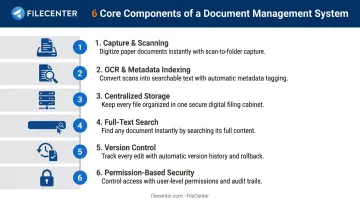
Every capable DMS includes these building blocks:
- Capture and scanning — digitizing paper documents at the point of entry
- OCR and metadata indexing — converting scanned images into searchable text and tagging content for retrieval
- Centralized storage — one location instead of folders scattered across drives and desktops
- Full-text search — finding any document by its content, not just its filename
- Version control — tracking changes so the "final" version is actually final
- Permission-based security — restricting access based on role or department
DMS vs. a Shared Drive: What's Actually Different
A shared drive or cloud folder stores files. A DMS actively organizes, tags, and secures them. Ordinary shared folders offer weak change tracking and limited auditability, according to PCMag's review of document management software. A DMS adds the indexing, retrieval, and control layer that a plain folder structure simply cannot provide.
Industries That Rely Most on DMS Software
- Legal firms managing case files, contracts, and discovery documents
- Accounting practices handling client records and tax documentation
- Healthcare providers integrating clinical documents into patient workflows
- Real estate professionals tracking transaction paperwork and disclosures
- Government agencies meeting formal records retention requirements
Types of Document Management Systems
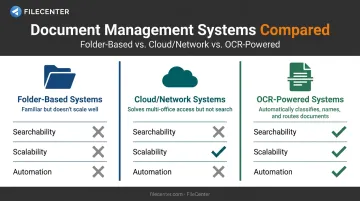
Not every DMS works the same way. Most fall into three practical categories based on how they organize and retrieve content.
Folder-Based (Hierarchical) Systems
This is the classic tree-of-folders approach: cabinets, drawers, subfolders, and files nested inside one another. It's familiar because it mirrors physical filing, which is exactly why so many offices default to it.
The problem shows up at scale. Once you're managing thousands of documents, folder location and naming conventions carry the entire burden of findability. Misfile something one level too deep, and it's effectively lost.
Cloud-Based and Network Systems
These systems let multiple users and offices access the same repository over a network or the cloud. They solve the access problem: everyone sees the same files, from any location.
What they often don't solve is search. A network-shared folder structure still relies on browsing and naming, not content-based retrieval. Structure without a real search layer just moves the filing cabinet online.
Intelligent, OCR-Powered Systems
This category uses OCR, including zonal OCR, to automatically classify, name, and route scanned documents into searchable, editable files. Instead of a human deciding where a document goes, the system reads the content and makes that decision based on predefined rules.
FileCenter's Pro and Pro Plus editions put this into practice with zonal OCR: the software extracts text from a specific region of a document, such as an invoice number in a fixed location, then automatically generates the filename and folder destination from that data.
Pro Plus adds the ReadIris OCR engine for higher-accuracy recognition and barcode-based routing for high-volume environments. Unlike enterprise platforms charging monthly per-user fees, this functionality comes with one-time pricing starting at $197.
Key Features to Look for in a Document Management System
Not all DMS software is built the same. Here's what actually moves the needle.
OCR and text recognition converts scanned paper into searchable, editable text. Instead of retyping a contract to search it, OCR makes every page instantly findable by content.
PDF editing and annotation lets you edit, merge, redact, and stamp documents without buying separate software. For legal and compliance teams, Bates numbering (sequential document identifiers required in discovery and regulatory submissions) is essential.
Full-text search and metadata indexing means finding any document in seconds, even across a repository of thousands of files. This is the feature that separates a true DMS from a folder tree.
Automated document routing, separation, and naming eliminates manual sorting. FileCenter uses "separators," which function like virtual fax cover sheets, to split a scanned batch into individual documents, name each one, and route it to the correct folder automatically. A law firm can scan an entire stack of case documents at once and let the software sort everything by matter number.
Security, permissions, and audit trails matter most in regulated industries. Look for:
- Role-based access controls that restrict who sees what
- Audit logging that records document access and edits
- Permission inheritance from existing Windows security settings
FileCenter bundles all five of these capabilities, OCR, PDF editing, full-text search, automated routing, and role-based security, across its Standard ($97), Pro ($197), and Pro Plus ($297) editions. That's professional-grade functionality at a fraction of typical subscription costs, backed by a 30-day money-back guarantee.
Benefits of Implementing a Document Management System
Time Savings
Interaction workers spend an estimated 19% of their workweek searching for and gathering information, per McKinsey's 2012 social economy research. While that figure predates modern DMS tools, it still illustrates the scale of the search problem that full-text indexing and OCR are built to solve.
Cost Savings
Digitizing document workflows reduces reliance on printing, physical storage, and manual administrative work. Consider the impact:
- Retiring a filing cabinet frees floor space and cuts paper costs
- Scanning an invoice eliminates one manual data-entry task per document
Compliance and Audit Readiness
Automated audit trails and retention controls simplify regulatory reviews. FileCenter Pro Plus includes audit logging that tracks document access and modifications, plus Bates stamping and barcode support, features that matter for HIPAA, SEC, and FINRA-regulated workflows. When an auditor asks who accessed a file and when, you want an answer in seconds, not a scramble.
Document Management System vs. File Management System: What's the Difference?
A file management system (FMS) stores and organizes any type of file in folders and drives. A DMS manages the full document lifecycle, including editing, approval routing, and compliance tracking.
| Feature | File Management System | Document Management System |
|---|---|---|
| Organization | Folders, drives, and file paths | Metadata, indexed fields, and full-text search |
| Version control | Manual, prone to overwrites | Check-in/check-out and revision history |
| Search | Filename and location based | Content-based, across thousands of files |
| Compliance | Minimal built-in controls | Audit trails, retention, and permission tracking |
Signs you've outgrown basic file management include:
- Growing document volume that overwhelms folder structures
- New compliance requirements that demand audit trails
- The need to automate approval workflows instead of chasing signatures manually
If your team spends more time locating files than working with them, that's the tipping point.
How to Choose the Right Document Management System for Your Business
Assess Document Volume and OCR Needs
High-volume, document-heavy industries, think legal discovery or accounting season, need reliable scanning and accurate OCR. Test any system against your actual document types, including messy scans and varied layouts, before committing.
Compare Pricing Models
After confirming a system's document-handling accuracy, cost is the next hurdle. Subscription-based enterprise DMS platforms charge recurring per-user fees that compound over time. One-time purchase software flips that math.
FileCenter's tiered structure gives you a lower-risk alternative:
- Standard ($97): core file management and PDF editing for individuals
- Pro ($197): adds OCR, document separation, and automated routing
- Pro Plus ($297): includes network administration, barcode routing, and the ReadIris OCR engine
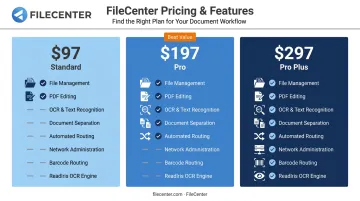
All three come with a 30-day money-back guarantee, so you're not locked into a decision before knowing it works for your workflow.
Evaluate Integration, Network Sharing, and Scalability
With pricing settled, confirm the system supports multi-user access and connects with tools you already use. FileCenter stores files in standard Windows folders rather than a proprietary database, which means compatibility with Google Drive, OneDrive, and Dropbox for remote access. Pro Plus adds dedicated network administration tools for organizations rolling this out across departments.
Frequently Asked Questions
What are the main types of file management systems?
Most systems fall into three practical categories: folder-based hierarchical systems, cloud or network-shared systems, and intelligent OCR-powered systems. Each offers different tradeoffs between familiarity, accessibility, and search capability.
What is the difference between a document management system and cloud storage like Google Drive or Dropbox?
Cloud storage offers basic file sharing and syncing across devices. A DMS adds OCR, metadata indexing, permission controls, and audit trails — features that actively organize and secure content rather than just store it.
How much does a document management system typically cost?
Enterprise DMS platforms often charge ongoing per-user subscription fees that add up over years. One-time purchase options like FileCenter start at $97, with no recurring costs.
Is a one-time purchase DMS better than a subscription-based system?
For businesses that don't need constant cloud-hosted updates, one-time licensing typically saves money over a 3-5 year period. Compare total cost over that period instead of focusing solely on the sticker price.
What is OCR and why is it important in document management?
OCR (optical character recognition) converts scanned paper images into machine-readable, searchable text. Without it, a scanned document is just a picture, unsearchable and impossible to edit as text.
Can a small business or individual professional benefit from a DMS?
Yes. Scalable editions, like FileCenter's Standard tier, make document management practical for solo professionals and freelancers, not just large enterprises with IT departments.