Introduction
Windows' File Explorer search still comes up empty more often than it should. Type in a keyword, and you're often left scrolling through folders hoping you remember what you named that contract three years ago.
This isn't just an annoyance. Interaction workers spend nearly 20% of their workweek just looking for internal information or the right colleague to help them find it, according to McKinsey's research on workplace productivity.
That's a full day, every week, lost to searching instead of working.
Document management software fixes this by layering full-text search, OCR, and smarter organization on top of the Windows folder structure you already know. Below, we rank the best DMS tools for Windows in 2026 based on OS compatibility, Microsoft integration, and pricing transparency.
TL;DR
- FileCenter tops our list for Windows compatibility and subscription-free pricing.
- The best DMS tools combine full-text search, OCR, and Microsoft Office/OneDrive integration.
- Selection criteria: Windows version support, ease of use, pricing model, and file-format compatibility.
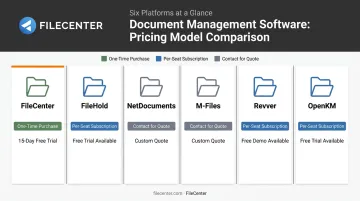
- Pricing spans one-time purchases starting around $97 to per-user monthly subscriptions.
- A dedicated methodology section below explains how we evaluated each tool.
Overview of Document Management Software for Windows in 2026
Document management software (DMS) organizes, indexes, and secures digital files, sitting on top of your existing Windows environment rather than replacing it. For Windows-based teams, this means:
- Overlays folder structures without disrupting Windows' native layout
- Integrates with File Explorer for drag-and-drop and right-click actions
- Delivers search far beyond File Explorer's built-in tools
This deeper integration explains growing demand for these tools.
AIIM estimated the broader content-management sector at $24–110 billion in 2025 (reflecting varying market definitions), projecting growth to $31–150 billion by 2028, an estimated 14.1% CAGR, according to AIIM's 2025 market analysis. Much of that growth is driven by hybrid deployments: tools that blend on-premise control with cloud accessibility. That combination matters most for Windows users who need both local speed and remote access.
The list below ranks the top Windows-compatible DMS tools by integration depth, pricing structure, and day-to-day usability.
Top Document Management Software for Windows in 2026
Each tool here was evaluated through one lens: how well it works inside the Windows ecosystem, not just alongside it. That means native OS support, Microsoft 365 integration, OCR accuracy, and whether the pricing page tells you anything useful before you talk to a salesperson.
FileCenter
FileCenter positions itself as the low-cost leader for document management, delivering PDF editing, OCR, and scanning tools without the enterprise price tag. It's built specifically for Windows, with no cloud-only version to fall back on.
What sets it apart:
- One-time purchase pricing — no recurring subscriptions, ever
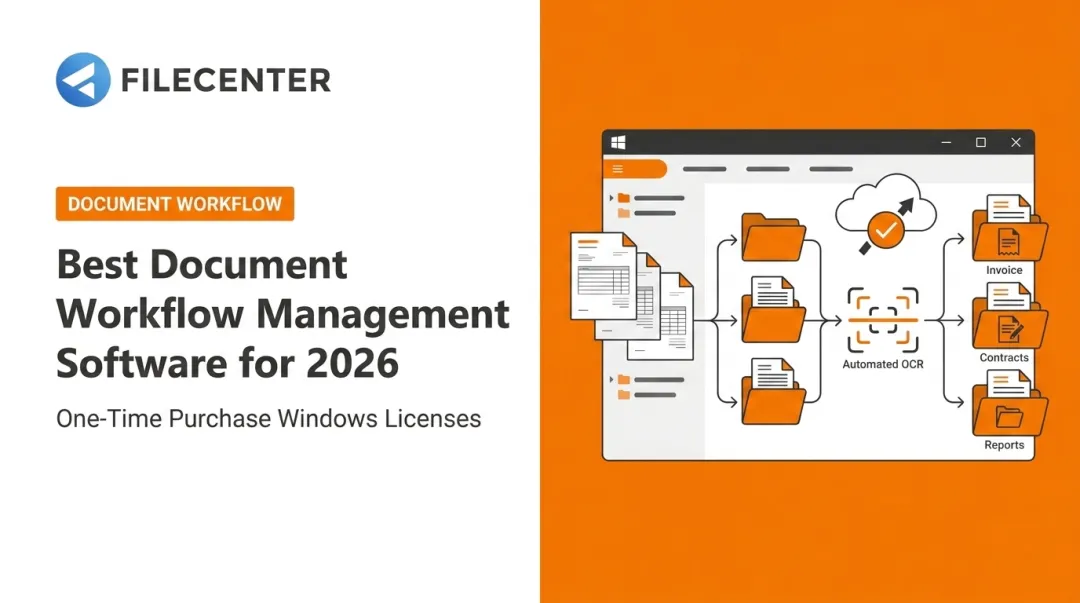
- Three OCR engines: Tesseract (Pro and Pro Plus), ReadIris premium accuracy (Pro Plus only), and Zonal OCR with automatic file naming (Pro Plus only)
- Full-text search on scanned PDFs, so a scanned invoice becomes as searchable as a native Word file
- Cloud compatibility with Dropbox, Google Drive, and OneDrive since FileCenter stores files in regular Windows folders instead of a proprietary database
- A 30-day money-back guarantee and a 15-day free trial with no credit card required
- 25% off the first license for new users, worth up to $74
| Category | Details |
|---|---|
| Pricing | Standard $97, Pro $197, Pro Plus $297 (one-time, no recurring fees) |
| Key Features | OCR scanning, full-text search, automatic document routing (Pro Plus), PDF editing/annotation, Bates stamping |
| Best For | SMBs and document-heavy industries (legal, accounting, healthcare) wanting enterprise-grade features without enterprise pricing |
Support and maintenance stay free for the first year, then renew optionally at roughly 25% of the license price annually. You're never forced to renew, but doing so keeps you eligible for upgrades.
FileHold
FileHold builds deep Microsoft Office and Teams integration into a Windows-friendly DMS, with metadata search that works a lot like Google's own search bar.
- Simple and advanced metadata search, with saved searches reusable as reports
- Microsoft Teams integration, allowing documents to move between Teams and FileHold
- Custom electronic forms built in Word, HTML, or Adobe Acrobat, with data auto-extracted into metadata fields
The tradeoff: that level of customization means setup takes longer than a plug-and-play tool.
| Category | Details |
|---|---|
| Pricing | Contact for quote; 2-week free trial |
| Key Features | Metadata search, MS Teams integration, custom electronic forms |
| Best For | Businesses wanting a highly bespoke, customizable workflow |
Note: FileHold's current desktop requirements list Windows 10 and 11 only, so Windows 7 and 8 users should look elsewhere.
NetDocuments
NetDocuments is a cloud-based DMS built around the ndOffice add-in, letting users edit, save, and version documents directly inside Word, Excel, and PowerPoint.
- ndMail links Outlook folders to NetDocuments locations, auto-filing emails as they arrive
- ndSync keeps content available offline and syncs changes once connectivity returns
- Power Automate connector for building custom workflows
- OCR converts image-based PDFs and common image formats into searchable text
| Category | Details |
|---|---|
| Pricing | Contact for quote; review sites report no free trial |
| Key Features | OCR-to-PDF, ndSync two-way file sync, Power Automate workflows |
| Best For | Legal teams needing tight Outlook and Office integration |
Much of the platform's messaging targets law firms specifically, so smaller businesses outside legal or professional services may find it overbuilt for their needs.
M-Files
M-Files pairs an offline-capable Windows 11 desktop client with an AI assistant called Aino, built to work inside Microsoft 365 rather than beside it.
- Go Offline mode lets users view and edit content without a connection, syncing changes once back online
- Aino AI assistant extends into Teams, Outlook, SharePoint, and Copilot for document context and automation
- Google Workspace connector exposes Drive content and lets users save from Gmail directly into M-Files
| Category | Details |
|---|---|
| Pricing | From $65/seat (Essentials); 30-day free trial |
| Key Features | Offline mode, AI-assisted document management, SharePoint module, Teams integration |
| Best For | Enterprises already embedded in the SharePoint ecosystem |
M-Files publishes actual entry-level pricing, a rarity on this list, though larger deployments still require a custom quote.
Revver
Revver is a cloud DMS built for large-scale collaboration, with unlimited storage included on every license tier.
- Unlimited storage for all new customers, regardless of plan
- Real-time co-authoring through Office 365 integration, with version checks to prevent overwrites
- eSignature workflows with reusable templates
- Document Requests, letting users define where uploaded files land after submission
| Category | Details |
|---|---|
| Pricing | Public pricing available; 14-day free trial, no credit card required |
| Key Features | Unlimited storage, e-signatures, document request workflows |
| Best For | Teams needing large-file collaboration and audit-ready workflows |
One caution from user reviews: migrating existing data into Revver can take substantial time and planning, so budget accordingly before switching over.
OpenKM
OpenKM leans into automation, with browser-based AutoCAD/DWG preview built for engineering and design teams working on Windows machines.
- CAD preview with zoom, rotation, and layer visibility, plus text and metadata extraction for search
- Optical mark recognition (OMR) for pulling data out of scanned and photocopied forms
- Version control with side-by-side comparison
| Category | Details |
|---|---|
| Pricing | Contact for quote; 7-day free trial |
| Key Features | CAD support, optical mark recognition, version control |
| Best For | Engineering and design teams working with CAD documents |
As a web-based system, OpenKM doesn't document a full offline repository mode, worth checking if your team works from job sites with unreliable connectivity.
How We Chose the Best Document Management Software for Windows
We tested each tool against four criteria:
- Native Windows version support: from Windows 7 through 11, since not every vendor still supports older systems
- Microsoft ecosystem integration depth: Office, OneDrive, Outlook, and Teams compatibility, not just a checkbox claim
- OCR and search accuracy: how well each tool turns scanned paper into searchable text
- Total cost of ownership: the real number after trials end, including hidden renewal or per-seat fees
The most common mistake we see buyers make? Choosing a DMS based on brand recognition rather than actual Windows compatibility or pricing clarity. A well-known name doesn't guarantee it runs cleanly on your OS version, and vague "contact for quote" pricing often hides subscription costs that add up fast.
A similar trap shows up with overly complex platforms: teams buy a powerful system, then spend months in onboarding instead of actually using it.
Conclusion
Basic Windows Explorer search wasn't built for growing document volumes. It searches file names, paths, and some indexed content, but it has no version control built for a repository of thousands of files. That gap is exactly why growing teams outgrow Explorer and turn to dedicated document management software.
Before committing to a DMS, weigh these factors:
- Windows compatibility across the versions your team actually runs
- Integration depth with Microsoft Office and OneDrive
- Pricing model — whether a subscription or one-time purchase fits your budget better
If you want to test the waters without financial risk, FileCenter's 15-day free trial and 30-day money-back guarantee let you confirm fit before you spend a dollar. Affordable, full-featured document management for Windows shouldn't require a leap of faith.
Frequently Asked Questions
What is the best way to manage documents?
The best approach combines centralized digital storage, consistent naming and metadata tagging, and OCR-enabled full-text search. Manual folder sorting alone breaks down once your document volume grows past a few hundred files.
Does Microsoft have a document management system?
Microsoft offers SharePoint and OneDrive as built-in document tools, with version history and OCR for image-based PDFs. However, third-party format search depends on whether a parser exists for that file type, so coverage isn't universal.
Is Windows File Explorer enough for document management?
File Explorer indexes file names, paths, and some file contents, but it has no OCR engine, no metadata tagging system, and no version control. That's fine for a few dozen files, not for a growing repository.
What is the best document management software for small businesses on Windows?
Small businesses benefit most from affordable, easy-to-learn tools that overlay familiar Windows folder structures. FileCenter fits this well since it uses a cabinet paradigm that mirrors Windows Explorer, with no database setup required.
How much does document management software for Windows cost?
Pricing ranges from one-time purchases like FileCenter, starting at $97, to per-user monthly subscriptions. According to Capterra's 2026 document management software guide, entry-level subscriptions run $5.75 to $27+ per user, per month.
Does document management software integrate with Microsoft Office and OneDrive?
Most modern DMS tools offer native integration with Word, Excel, and OneDrive for syncing and editing. FileCenter stores files in standard Windows folders instead, making it compatible with Dropbox, Google Drive, and OneDrive alike.