For compliance-heavy fields like legal, accounting, and healthcare, this isn't a nice-to-have. It's how firms cut manual data entry, speed up document retrieval, and keep audit trails intact. With dozens of tools out there, ranging from free built-in utilities to enterprise suites, picking the right one comes down to your document volume, budget, and existing workflow. This guide breaks down the top options for 2026.
Key Takeaways
- Adobe Scan works best for teams already living inside the Adobe ecosystem
- ABBYY FineReader leads on language support with 198 recognized languages
- FileCenter bundles OCR with full document management at a one-time price
- Readiris offers a lifetime license as a budget-friendly alternative to subscriptions
- Tesseract, Genius Scan, and CamScanner cover free, open-source development and quick mobile captures
Pricing ranges from completely free to $99-plus per year in subscription fees. Accuracy, language coverage, and how well a tool fits your existing document workflow matter more than brand recognition, and we'll unpack why below.
Overview of OCR Software in the Document Management Market
OCR, short for optical character recognition, converts scanned images or PDFs into machine-readable text you can search, copy, and edit. That's the whole point: eliminating the paper-based bottleneck where documents exist but can't be found or reused.
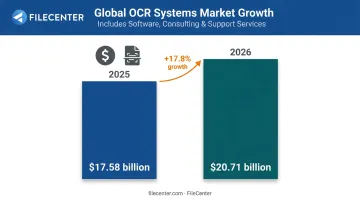
Demand for this technology keeps climbing. The global OCR systems market, which includes software plus related consulting and support services, is projected to reach $20.71 billion in 2026, up from $17.58 billion the year before. That works out to a 17.8% jump in just twelve months.
The tools below span personal use to enterprise deployment. We compared them on pricing, accuracy, and the specific use case each one fits best.
Top OCR Software of 2026
We evaluated each tool on recognition accuracy, language support, pricing structure, and whether it's built for personal use or business workflows. Here's how the leading options stack up.
Adobe Scan
Adobe Scan is the mobile scanning arm of the broader Adobe ecosystem, built to turn phone photos into cleaned-up PDFs. It's free to download, with paid tiers unlocking deeper functionality.
The free version handles OCR on documents up to 5 pages. Premium subscribers get that limit raised to 100 pages, plus access to Adobe's AI Assistant for asking questions about scanned documents, editing recognized text, and exporting to Word, Excel, and PowerPoint.
The tradeoff is cost: casual users may not need the subscription, but anyone scanning longer documents regularly will hit that 5-page wall fast.
| Pricing | Free with in-app purchases; Premium runs $9.99-$14.99/month or $49.99-$69.99/year |
| Key Features | AI document assistant, extended OCR page limits, multi-format export |
| Best For | Individuals and teams already using Adobe Acrobat or Creative Cloud |
ABBYY FineReader
ABBYY has built OCR engines for decades, and FineReader PDF reflects that experience with AI-driven recognition tuned for accuracy across a huge range of languages.
What sets it apart is scale: FineReader PDF 16 for Windows recognizes 198 languages, with 53 supported by full dictionaries for spell-checking. The Corporate edition adds Screenshot Reader for pulling text off any part of your screen, plus document comparison across 37 languages, and PDF security tools including redaction and digital signing.
| Pricing | $99/year (Standard) or $165/year (Corporate); monthly plans at $16-$24 |
| Key Features | 198-language OCR, Screenshot Reader, document comparison, PDF signing/security |
| Best For | Multilingual teams and businesses needing enterprise-grade licensing |
FileCenter
FileCenter takes a different approach: instead of bolting OCR onto a scanning app, it builds OCR into a full document management system, sold as a one-time purchase with no subscription.
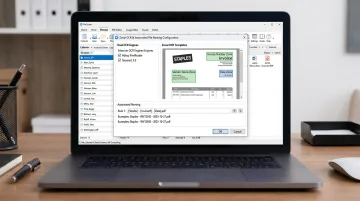
The Pro edition ($197) includes the open-source Tesseract engine for reliable everyday text recognition. Pro Plus ($297) adds more:
- Dual OCR engines: Tesseract plus the commercial-grade ReadIris engine
- Zonal OCR that reads specific regions of a scanned document to generate file names automatically
- Network administration tools for multi-user rollouts
- Bates stamping (Pro and Pro Plus) and barcode support (Pro Plus only) for legal and compliance workflows
| Pricing | One-time cost: Standard $97, Pro $197, Pro Plus $297; 30-day money-back guarantee |
| Key Features | Zonal OCR with auto file naming, dual OCR engines, Bates stamping, barcode support |
| Best For | Law firms, accounting practices, and SMBs wanting OCR bundled with document management |
Readiris
Readiris has stuck with lifetime licensing since long before subscriptions became the norm, making it a straightforward budget option for anyone tired of recurring fees.
Readiris 17 covers 138 OCR languages and processes documents fast, with batch conversion available on the higher editions. It also supports voice annotations, letting users record and replay verbal comments directly on scanned files, and exports to more than 40 formats including Word, Excel, and PDF/A.
| Pricing | Lifetime license: Pro at $69, Corporate at $139 (one PC) |
| Key Features | Batch processing, voice annotations, 40+ export formats |
| Best For | Windows and Mac users wanting a low-cost, one-time OCR purchase |
Tesseract OCR
Tesseract is the open-source engine running under the hood of many commercial tools, including FileCenter's own Pro editions. It's operated through the command line or embedded via its C/C++ API, which makes it a developer's tool rather than a consumer app.
It's completely free under the Apache 2.0 license, runs locally without sending files anywhere, and recognizes more than 100 languages right out of the box.
- No cost, no vendor lock-in
- Scriptable for batch processing across large document sets
- Local processing keeps sensitive files off third-party servers
| Pricing | Free and open source |
| Key Features | Local processing, scriptable automation, 100+ languages |
| Best For | Developers embedding OCR into custom apps or workflows |
Genius Scan / CamScanner (Mobile OCR)
For quick, on-the-go capture, mobile scanning apps beat lugging a document to a desktop scanner. Genius Scan and CamScanner both auto-crop photos into clean scans and sync to cloud storage.
- Genius Scan: Basic tier is free but doesn't include OCR; Ultra unlocks searchable PDFs for $39.99/year
- CamScanner: Free base app with OCR in 41 languages; paid tiers run $9.99/month or $59.99/year
- Both integrate with Dropbox, Google Drive, and OneDrive for automatic backup
| Pricing | Free base plans; OCR unlocked via paid tiers ($39.99-$59.99/year) |
| Key Features | Auto-crop, searchable PDF creation, cloud storage sync |
| Best For | Individuals and small teams digitizing receipts and paperwork on the go |
How We Chose the Best OCR Software
The most common mistake buyers make is choosing OCR software on price alone, without ever testing it against their own real documents. A tool that reads clean printed invoices flawlessly might stumble on faded receipts or handwritten notes.
We weighted each pick on the factors that matter once you're testing with real files:
- Language support for multilingual documents
- Pricing model, whether subscription-based or one-time purchase
- Performance on batch and high-volume scanning jobs
- Workflow integration, so the tool fits into existing systems instead of creating a new silo
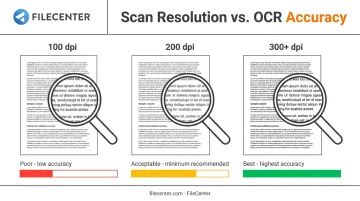
Scan quality matters too. Google's Document AI guidance recommends at least 200 dpi, with 300 dpi or higher producing the best results. No tool overcomes a blurry, low-resolution scan.
Conclusion
There's no single "best" OCR software here. The right pick depends on matching accuracy, pricing model, and document volume to your actual workflow, not on whichever brand shows up first in search results.
Before committing, test a free trial or demo on your own documents. Weigh long-term cost too: a $99/year subscription adds up fast compared to a one-time purchase.
If recurring fees aren't appealing, FileCenter's one-time pricing and 30-day money-back guarantee offer a low-risk alternative. You get professional-grade OCR and document management without a subscription clock running in the background.
Frequently Asked Questions
Does Windows have a built-in OCR tool?
Yes. Windows includes free OCR through PowerToys Text Extractor and the Windows 11 Snipping Tool's Text Actions feature. Both let you copy text straight from a screenshot or image.
What is the best OCR software for Windows?
It depends on your needs. Free built-in tools work fine for occasional use, while dedicated software like FileCenter or ABBYY suits regular business-grade scanning and document management.
What is Optical Character Recognition (OCR) used for?
OCR converts scanned images and PDFs into searchable, editable text. Businesses commonly use it to digitize contracts, invoices, and archived records for faster retrieval.
Is OCR software accurate enough for business documents?
Accuracy depends heavily on scan quality and the engine used. Dedicated engines like Readiris or Tesseract generally outperform basic phone camera scans, especially at 300 dpi or higher.
Can OCR software recognize handwritten text?
Most tools handle printed text reliably, but handwriting recognition remains inconsistent. Recent studies report error rates ranging from roughly 14% to over 50%, depending on the handwriting sample and language.
Is there OCR software with one-time pricing instead of a subscription?
Yes. FileCenter and Readiris both offer lifetime, one-time-purchase licenses, giving you an alternative to recurring annual subscription costs.