Document Management
Organize digital and scanned documents in a Windows-based filing system that keeps business records easy to store, manage, and retrieve without relying on proprietary databases.

FileCenter helps Windows users turn scattered documents, scanned paperwork, PDFs, and client files into a clean, searchable digital filing system. With automated naming, OCR, folder templates, PDF tools, and fast retrieval, it gives professionals and teams a practical way to organize large file volumes without costly enterprise software or recurring subscription fees.
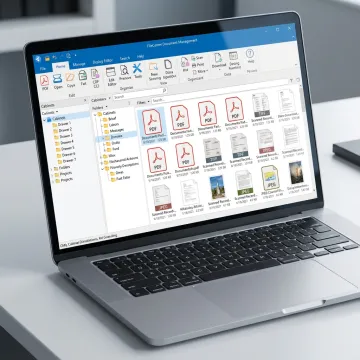
FileCenter combines filing, scanning, OCR, search, PDF tools, and automation for organized Windows document workflows.
Organize digital and scanned documents in a Windows-based filing system that keeps business records easy to store, manage, and retrieve without relying on proprietary databases.
Automatically name files using document contents, barcodes, or OCR zones, then route them into the right folders for consistent, low-effort organization.
Create reusable folder structures for clients, cases, departments, or projects so every user follows the same filing standards across recurring document workflows.
Find documents quickly using filename, metadata, and full-text OCR search across large repositories, reducing time spent hunting for misplaced records.
Convert scanned documents into searchable PDFs so contracts, invoices, claims, tax forms, and records can be discovered by their actual text.
Create, edit, annotate, merge, split, and organize PDFs directly inside your document workflow without needing expensive third-party PDF software.
The best file organizer for Windows should fit the way you already work. FileCenter combines folder-based document management, OCR, scanning, PDF editing, automated routing, and Microsoft Office integration in one affordable platform. Instead of forcing teams into a complex enterprise system, it keeps files accessible, searchable, and organized while supporting professional workflows across accounting, legal, healthcare, insurance, and financial services.
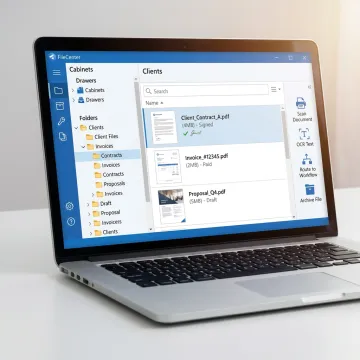
Professionals use FileCenter to replace scattered folders with searchable, standardized document workflows.
FileCenter brings enterprise-style document management features into an affordable, familiar Windows workflow.
One-time purchase pricing helps teams avoid recurring subscription costs and enterprise software expense.
OCR, scanning, PDF tools, and search work together in one Windows-focused filing platform.
Automated naming, routing, templates, and separation reduce repetitive sorting and manual filing.
Standard, Pro, and Pro Plus editions support individuals, teams, and multi-user deployments.
Practical document software built for Windows professionals.
FileCenter is built for professionals who need powerful document management software at a price they can afford. Its platform focuses on practical Windows workflows: scan documents, organize them into familiar folders, convert them with OCR, edit PDFs, and retrieve files fast. Rather than forcing businesses into expensive enterprise systems, FileCenter delivers professional-grade features through scalable Standard, Pro, and Pro Plus editions. The product is especially aligned with document-heavy industries such as legal, accounting, insurance, healthcare, real estate, financial services, and compliance-driven organizations. Its vision is straightforward: make digital filing simpler, more searchable, and more cost-effective for individuals, small businesses, and larger teams.
The best way to organize lots of files is to use a consistent folder structure, clear naming rules, searchable text, and automation wherever possible. FileCenter supports reusable folder templates, OCR for scanned documents, automated naming, and full-text search, so teams can file documents consistently and find records quickly without manually sorting every PDF, scan, invoice, case file, or client document.
Get practical guidance on organizing your documents and workflows.

Risk-free evaluation for every edition.
No recurring subscription fees required.
Advanced OCR for searchable digital documents.
Tell us how you manage files today, and we’ll help you identify the FileCenter edition and features that best fit your workflow.
To help us assist you faster, please include the reason for your message so the relevant team can reach out as soon as possible.
To help us assist you faster, please include the reason for your message so the relevant team can reach out as soon as possible.