Paperless document management software fixes this by centralizing every file into a searchable digital system. Instead of hunting through folders, employees pull up documents in seconds using keyword search. Instead of manually filing scanned pages, OCR software reads and sorts them automatically.
This guide ranks the best paperless document management software of 2026 — from budget-friendly one-time-purchase tools to free open-source platforms — so you can pick a system that fits your budget, industry, and document volume.
Key Takeaways
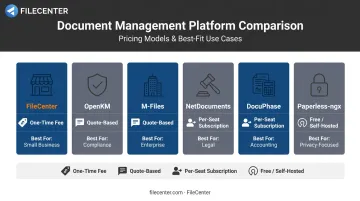
- FileCenter offers one-time pricing from $97-$297, the top value pick for subscription-averse small businesses
- OpenKM suits compliance-driven teams, while M-Files fits enterprise knowledge-work environments
- NetDocuments targets legal teams; DocuPhase automates accounting and AP/AR workflows
- Paperless-ngx delivers a free, self-hosted option for privacy-focused users comfortable with Docker
- Pricing models range from $0 for open-source to $65+ per seat/month for enterprise subscriptions
Overview of Paperless Document Management Software in 2026
Paperless document management software (DMS) converts physical paperwork and scattered digital files into a searchable, centrally stored system. It replaces filing cabinets, shared drives full of unlabeled PDFs, and the endless "does anyone have the latest version?" email chain.
The category is growing fast. The global document management software market reached $8.32 billion in 2025, with a forecasted climb to $9.74 billion in 2026 and a projected 15% CAGR through 2034, according to Fortune Business Insights' 2025 market report.
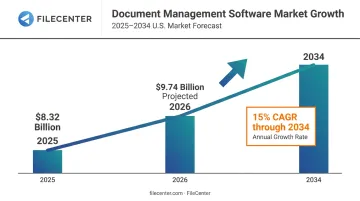
That growth reflects a simple reality: businesses are done losing time to paper.
Below, we rank the top platforms based on:
- Pricing transparency: subscription vs. one-time cost
- OCR and search accuracy: how reliably scanned text becomes searchable
- Deployment ease: cloud, self-hosted, or desktop installation
- Industry fit: legal, accounting, compliance, or general small-business use
Top Paperless Document Management Software in 2026
Each platform below was evaluated on affordability, OCR/search accuracy, ease of deployment, and how well it serves a specific industry or use case.
FileCenter
FileCenter is a Windows-based DMS built for small-to-medium businesses and document-heavy industries like legal, accounting, and real estate. It bundles scanning, OCR, and PDF editing into one package, so you're not stitching together three separate tools just to digitize a filing cabinet.
What sets it apart:
- One-time purchase pricing with no recurring subscription fees
- Three scalable editions to match team size and feature needs
- **ReadIris and Tesseract OCR engines** (Pro Plus) for high-accuracy text recognition
- **Zonal OCR with automatic file naming** for intelligent document sorting
- Files stored in standard Windows folders, so they sync natively with Google Drive, OneDrive, Dropbox, and SharePoint, with no proprietary database lock-in
- 30-day money-back guarantee on every edition
One customer testimonial sums up the impact: a week of paperwork that used to take hours now takes about 15 minutes, with better results.
| Category | Details |
|---|---|
| Pricing | One-time fee: Standard $97, Pro $197, Pro Plus $297. 25% discount available on first license |
| Key Features | Full-text OCR search, automatic document routing/separation, PDF editing, Bates stamping and barcode support (Pro Plus), network sharing |
| Best For | Small businesses, legal/accounting firms, and organizations wanting professional-grade DMS features without subscription costs |
Bates stamping and barcode support are Pro Plus-exclusive features, which makes that tier especially relevant for legal and compliance teams managing litigation documents or high-volume intake. You can test the full feature set with a 15-day fully operational free trial, and no credit card is required.
OpenKM
OpenKM centers on knowledge management and regulatory compliance, placing more weight on document retention than on general filing convenience.
Where it stands out:
- Automated retention policies and disposition scheduling
- Bulk ZIP file uploads for migrating large archives
- Thesaurus-style categorization that simplifies audit prep
| Category | Details |
|---|---|
| Pricing | 14-day free trial; custom quote-based pricing (free Community edition also available) |
| Key Features | Automatic email attachment sorting, document locking, retention scheduling, template library |
| Best For | Compliance-driven organizations (government, regulated industries) needing strict retention control |
M-Files
M-Files skips traditional folder structures entirely. Instead, it uses AI-driven metadata to classify and surface documents, so employees search by what a document is rather than where it was saved.
Key differentiators:
- Natural-language document organization without manual foldering
- Workflow automation for approvals and version tracking
- AI-assisted classification that reduces filing errors
| Category | Details |
|---|---|
| Pricing | 30-day free trial; Essentials starts at $65/seat/month, Enterprise is quote-based |
| Key Features | Metadata-based search, OCR, DocuSign integration, cloud access for remote teams |
| Best For | Enterprises and knowledge workers managing large, cross-referenced document libraries |
NetDocuments
NetDocuments is a cloud-native DMS purpose-built for legal teams juggling case files, client communications, and privilege concerns.
Standout capabilities:
- Email archiving tied directly to case files
- Offline-to-cloud sync for attorneys working outside the office
- Analytics dashboards tracking document collaboration and access
| Category | Details |
|---|---|
| Pricing | No free trial; custom quote-based pricing (demo available) |
| Key Features | NetKnowledge cross-app search, e-signature integration, document heat-map analytics |
| Best For | Law firms and legal departments needing secure, case-specific document control |
DocuPhase
DocuPhase (now also operating under the onPhase brand) digitizes and reconciles accounting documents, with a heavy focus on eliminating manual invoice entry.
Core strengths:
- Intelligent data capture pulling header and line-item details from invoices
- Drag-and-drop form building for custom AP/AR workflows
- Rules-based approval routing with 2-, 3-, or 4-way matching
| Category | Details |
|---|---|
| Pricing | No free trial; custom quote-based pricing (demo available) |
| Key Features | E-invoice reconciliation, custom financial forms, granular file permissions |
| Best For | Accounting and finance departments automating month-end close processes |
Paperless-ngx
For anyone comfortable running Docker, Paperless-ngx delivers a free, self-hosted, open-source DMS with complete control over where the data lives.
Why users choose it:
- Automatic OCR (via OCRmyPDF) and document classification
- REST API for building custom automations
- No licensing fees, ever, since it's community-supported under GPL-3.0
| Category | Details |
|---|---|
| Pricing | Free (self-hosted); optional paid managed-hosting from third parties |
| Key Features | Full-text OCR search, tag/correspondent auto-classification, mobile-friendly interface, email import |
| Best For | Freelancers, IT-capable small teams, and privacy-focused users wanting a no-cost, customizable DMS |
How We Chose the Best Paperless Document Management Software
We compared each platform on pricing transparency, OCR/search accuracy, deployment ease, and scalability, testing free trials and demos wherever available.
A common buyer mistake: choosing software based on brand recognition alone, without checking OCR accuracy or hidden subscription costs.
Entry-level DMS pricing commonly runs $5.75-$27+ per user/month, according to Capterra's 2026 buyer data, while some enterprise platforms exceed $65 per seat. That gap adds up fast across a 20-person team.
We weighted evaluation factors against real business outcomes, not feature checklists:
- Faster document retrieval: does full-text search actually work on scanned files?
- Lower total cost of ownership, comparing one-time license pricing against multi-year subscription math
- Compliance readiness, covering retention policies, audit trails, and access controls
Conclusion
The "best" paperless DMS matches your document volume, budget, and industry compliance requirements, not popularity rankings. A solo real estate agent doesn't need NetDocuments' case-management analytics, and a 200-attorney firm probably won't run Paperless-ngx on a home server.
Once you know which factors matter most, test-drive your shortlist before committing. Free trials exist for a reason, and weighing one-time cost against years of subscription fees often changes the decision entirely.
If you want a low-risk starting point, consider FileCenter. Its one-time pricing and 30-day money-back guarantee let you try it, use it, and pay only if it earns a permanent spot on your desktop.
Frequently Asked Questions
What is paperless document management software?
It's software that digitizes, stores, and organizes documents electronically, replacing physical filing systems with searchable digital files. Most platforms combine OCR, tagging, and full-text search to make retrieval instant.
How much does document management software typically cost?
Pricing ranges from free open-source tools like Paperless-ngx to monthly per-user subscriptions of roughly $5.75-$65+, or one-time license fees like FileCenter's $97-$297 editions. The right model depends on whether you prefer predictable subscriptions or a single upfront payment.
Is paperless document management software secure?
Reputable DMS platforms use encryption, role-based access controls, and backup protocols to protect stored documents. That same protection should extend to OCR technology: scanned documents need to run through a secure, access-controlled environment rather than an open shared drive.
Can paperless document management software convert scanned paper into searchable files?
Yes. OCR (Optical Character Recognition) technology scans images of text and converts them into machine-readable, searchable content. This is what lets you search a scanned contract by keyword instead of flipping through pages.
What's the difference between a DMS and an EDMS?
DMS is the broader term covering any system that stores and tracks electronic documents. EDMS typically refers to enterprise-scale systems with advanced workflow, retention, and compliance features, though in practice the two terms are often used interchangeably.
Do I have to pay a monthly subscription for document management software?
No. While many DMS platforms use subscription pricing, options like FileCenter offer one-time purchase licenses with no recurring fees, which can cost far less than a subscription once you factor in several years of monthly fees.