The right scanner software fixes that. It turns a messy paper process into digital files you can find in seconds instead of digging through a cabinet.
Windows ships with a free scanning app, but it stops at "picture of a document." Most businesses need OCR, PDF editing, or real document management layered on top. Below, we compare the top scanner software options for Windows in 2026 - from free tools to full document management suites - so you can pick the one that actually matches how you work.
TL;DR
- Windows Scan offers free basic captures but skips OCR, PDF editing, and file organization
- 2026 options range from free tools (NAPS2) to document suites (FileCenter) and OCR specialists (ABBYY)
- Match software to OCR accuracy, pricing, PDF depth, and network support, not brand recognition
- FileCenter bundles scanning, OCR, and PDF editing into one one-time purchase, undercutting subscriptions
Overview of Scanner Software for Windows in 2026
Scanner software is any application that talks to your scanning device and turns a physical page into a digital file. That's the baseline.
But the category stretches far beyond simple capture. Some apps just save an image, while others read the text on the page, file it automatically, and make it searchable across an entire office network.
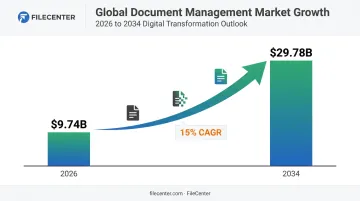
The push toward paperless workflows isn't slowing down. According to Fortune Business Insights, the global document management market is valued at $9.74 billion in 2026 and is projected to reach $29.78 billion by 2034 — a 15% compound annual growth rate.
That growth reflects a simple reality: businesses are still buried in paper, and they're finally investing in tools to dig out.
For a small accounting office, that might mean turning tax forms into searchable PDFs. For a law firm, it means Bates-stamping exhibits and routing scans into the right client folder without touching each one manually.
The list below spans that entire range: from the free tool already sitting on your Windows PC to full document management suites built for teams. Each entry is evaluated the same way: OCR accuracy, pricing structure, PDF capability, and how well it scales past a single user.
Top Scanner Software for Windows in 2026
This list blends free and native Windows tools with premium software, scored on OCR accuracy, pricing transparency, PDF capability, and business scalability.
FileCenter
FileCenter is document management software built specifically for scanning, OCR, and PDF editing , positioned as a lower-cost alternative to enterprise document management platforms that charge monthly per seat.
What separates it from a basic scan-to-PDF app:
- Dual OCR engines - Tesseract in the Pro edition, plus the ReadIris engine in Pro Plus for higher-accuracy text recognition
- Zonal OCR that reads specific regions of a document (like an invoice number field) and uses that text to auto-name the file
- Automatic document routing and separation, so incoming scans sort themselves into the correct client or project folder
- Network sharing and administration tools (Pro Plus) for offices running FileCenter across multiple workstations
- Barcode support for automated document classification (useful in legal and compliance-heavy workflows)
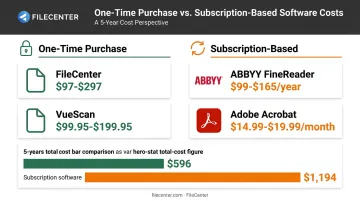
Unlike Adobe or ABBYY, FileCenter sells licenses outright. Standard, Pro, and Pro Plus are one-time purchases, not monthly charges, and every edition includes a 30-day money-back guarantee plus a 15-day fully operational free trial that doesn't require a credit card.
| Category | Details |
|---|---|
| Pricing | One-time fee across three editions: Standard ($97), Pro ($197), Pro Plus ($297), no subscription |
| Key Features | Zonal & full-text OCR, PDF editing/annotation, automatic scan routing, network administration tools |
| Best For | Small businesses, law firms, and accounting/healthcare offices needing centralized, searchable document filing |
Windows Scan (Built-in Microsoft App)
Windows Scan is the free, native scanning app included with Windows 10 and 11, downloadable through the Microsoft Store if it isn't already installed.
It handles the basics well:
- Works with flatbed scanners, document feeders, and auto-configured sources
- Exports to JPEG, PNG, TIFF, and Bitmap formats
- Lets you adjust the destination folder before scanning
What it doesn't do matters just as much. There's no OCR, so scanned pages stay as static images rather than searchable text. Microsoft's own documentation doesn't list PDF as an output format, and there's no batch processing or organization beyond dropping files into a folder.
| Category | Details |
|---|---|
| Pricing | Free, pre-installed or downloadable from the Microsoft Store |
| Key Features | Basic scan-to-file, flatbed/feeder support, multi-format export |
| Best For | Occasional users who need to digitize a single document without OCR or editing |
NAPS2 (Not Another PDF Scanner 2)
NAPS2 is free, open-source scanning software known for supporting more scanner drivers than Windows Scan: WIA, TWAIN, and SANE, depending on your setup.
Where it pulls ahead of the built-in app:
- Batch scanning - single runs, repeated scans on a timer, or prompted multi-page jobs
- PDF merging and page rearranging through its desktop editor or command-line tool
- Built-in OCR via Tesseract, which prompts a language-pack download on first use
Because it's GPL-licensed, there's no cost barrier for individuals, nonprofits, or anyone testing whether OCR is worth paying for before committing to premium software.
| Category | Details |
|---|---|
| Pricing | Free and open-source |
| Key Features | Batch scan-to-PDF, multi-driver support, integrated OCR |
| Best For | Budget-conscious users who want more control than Windows Scan without paying for premium software |
ABBYY FineReader PDF
ABBYY FineReader PDF is premium OCR and PDF software recognized for accurate text recognition across 198 languages, more than any other tool in this comparison.
It's built as an OCR specialist, not a full document management suite. There's no automatic routing, no network administration layer, no Zonal OCR for auto-naming files.
What you get instead is deep conversion of scanned text into editable Word or Excel files, plus a document comparison tool (Corporate edition only) that flags differences between two versions of a contract.
Pricing runs on subscription tiers: FineReader PDF Standard starts around $99/year, Corporate around $165/year, with no perpetual license currently offered.
| Category | Details |
|---|---|
| Pricing | Subscription-based, tiered by Standard and Corporate editions |
| Key Features | Advanced OCR engine, PDF editing, document comparison (Corporate) |
| Best For | Users needing highly accurate text recognition for complex or multilingual documents |
VueScan
VueScan is universal scanning software that replaces manufacturer drivers entirely, supporting 8,089 scanners from 42 manufacturers, according to Hamrick Software's current compatibility list.
That breadth is the whole point. When a manufacturer stops updating drivers for new Windows versions (common on older flatbeds and slide scanners), VueScan keeps that hardware working. It also includes basic OCR and image restoration tools for reviving faded photo scans.
VueScan sells as a one-time license (Standard around $99.95, Professional around $199.95), lower than most document management suites, though monthly and annual plans exist too.
| Category | Details |
|---|---|
| Pricing | One-time license, lower than most document management suites |
| Key Features | Universal driver support, image restoration tools, basic OCR |
| Best For | Users with older or discontinued scanner hardware needing continued Windows compatibility |
Adobe Acrobat (Scan & OCR Tools)
Adobe Acrobat's scan-to-PDF and OCR tools live inside its broader PDF ecosystem, and its brand familiarity (as the software that defined the PDF standard) is a big reason it shows up on so many shortlists.
Acrobat functions as an all-purpose PDF tool rather than a dedicated document management system. There's no Zonal OCR, automatic file naming, or document routing here. What it offers instead is scan-to-PDF capture, OCR for searchable text, e-signature requests, and cloud connectors for Dropbox, OneDrive, SharePoint, and Google Drive.
The tradeoff is cost structure: Acrobat runs on subscription, with Standard at $14.99/month and Pro at $19.99/month on annual plans, an ongoing cost that adds up next to one-time-purchase alternatives.
| Category | Details |
|---|---|
| Pricing | Subscription-based (monthly/annual) |
| Key Features | Scan-to-PDF, OCR, e-signatures, cloud storage integration |
| Best For | Users already invested in the Adobe ecosystem needing PDF-centric workflows |
How We Chose the Best Scanner Software
Most "best software" lists rank tools by brand recognition alone. That approach misses what actually matters: OCR accuracy, hidden subscription costs, and whether the software can handle ten people scanning into the same network folder.
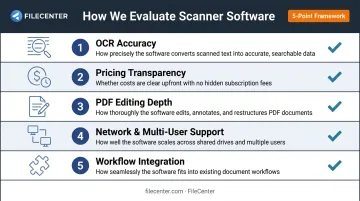
We weighed each tool against factors tied to real business outcomes, not marketing claims:
- OCR accuracy - how reliably scanned text converts into searchable, editable content, since poor OCR means retyping documents by hand
- Pricing transparency - one-time purchase versus subscription, and whether the advertised price holds up in year two
- PDF editing depth - basic viewing versus real annotation, form-filling, and page manipulation
- Network and multi-user support - whether a team shares one filing system or works in isolated folders
- Workflow integration - how well the tool fits existing email, cloud storage, and filing habits instead of forcing a new one
A tool that scores well on OCR but locks a team into a per-seat subscription isn't necessarily the better buy for a five-person office watching its software budget. Time saved retrieving documents and paper storage costs eliminated matter more than a familiar logo.
Conclusion
There's no single "best" scanner software for Windows in 2026 - only the one that matches your document workflow. A solo user digitizing the occasional receipt doesn't need Zonal OCR or network administration tools. A law firm processing hundreds of exhibits a month does.
Before committing, weigh the long-term cost. A $14.99-a-month subscription adds up to roughly $180 a year, every year, while a one-time purchase pays for itself once and stops there. Factor in whether the tool scales as your team grows, too.
If you want to test a full-featured scanning, OCR, and document management setup without that ongoing cost, FileCenter offers a 15-day free trial that requires no credit card. Every edition also comes with a 30-day money-back guarantee, giving you a low-risk way to see if it fits before you buy.
Frequently Asked Questions
Is Windows Scan free?
Yes. Windows Scan is a free app available on Windows 10 and 11, either pre-installed or downloadable at no cost from the Microsoft Store. It doesn't include OCR or advanced editing tools.
How do I get the Windows Scan app?
Search "Windows Scan" in the Start menu; it's often already installed. If it isn't, download it directly and free from the Microsoft Store.
Does Windows have a scanner app?
Yes. Windows includes the native Windows Scan app for basic scanning, plus a legacy Windows Fax and Scan utility available as an optional feature on some configurations.
What is the best free scanner software for Windows?
Windows Scan is the strongest built-in option for basic scans. NAPS2 offers more flexibility, including batch scanning and basic OCR, for anyone needing more without paying.
Do I need OCR software if I already have the Windows Scan app?
Yes, if you need searchable or editable files. Windows Scan only saves image filesand doesn't recognize text, so tools like FileCenter or ABBYY are necessary for that.
Can scanner software convert scans into editable or searchable files?
OCR-enabled software like FileCenter converts scanned paper into searchable, editable text-based PDFs or Word documents, something basic scan-to-image tools can't do.