Introduction
Enterprises are generating more unstructured data than ever, and most IT teams are struggling to keep pace.
Contracts, compliance records, invoices, and hybrid-work files scattered across laptops and cloud drives are piling up faster than most IT teams can organize them. Forrester predicted that unstructured data managed by enterprises would double in 2024, and that growth hasn't slowed since.
For legal teams, finance departments, healthcare providers, and government agencies, disorganized data creates boardroom-level risk. A missing audit trail or an unsecured client file can trigger compliance penalties, lost billable hours, or reputational damage.
The right enterprise document management system (DMS) fixes this. It centralizes files and automates retrieval, while enforcing the access controls regulators expect. This guide ranks the top enterprise DMS platforms for 2026, from massive ECM suites to affordable, feature-rich alternatives. Compare them here to find the right fit for your budget and workflow.
TL;DR
- Enterprise DMS platforms centralize, secure, and automate document capture, storage, and retrieval
- Strong platforms strengthen GDPR, HIPAA, and SOX compliance while cutting storage and labor costs
- Prioritize security, OCR/search accuracy, integrations, and total cost of ownership over brand name
- Options range from Microsoft-ecosystem suites to one-time-purchase tools like FileCenter
Overview of Enterprise Document Management in 2026
Enterprise document management is the systematic capture, storage, indexing, and governance of digital and scanned documents across departments, locations, and business units. It's the infrastructure that lets a claims adjuster in one office and a compliance officer in another pull the exact same contract version without emailing PDFs back and forth.
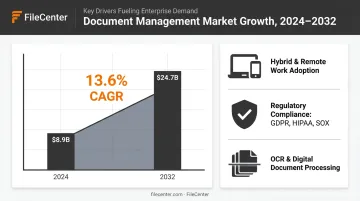
The market reflects how central this has become. The global document management software market reached $8.9 billion in 2024 and is projected to reach $24.7 billion by 2032, growing at a 13.6% CAGR, according to a 2024 MarketsandMarkets report. The broader enterprise content management category, which layers workflow and governance on top of storage, tops $53 billion.
That growth traces back to a few forces:
- Hybrid work spreading documents across personal devices and cloud drives
- Tightening data regulations that demand tighter retention and access controls
- Rising volumes of scanned paperwork in legal, healthcare, and financial services
The rankings below evaluate leading platforms on security, scalability, automation depth, and value, covering everything from Fortune 500 ECM deployments to lean back offices working with tight budgets.
Top Enterprise Document Management Systems for 2026
We evaluated each platform against five criteria: security and compliance features, OCR and search capability, integration ecosystem, scalability, and pricing transparency. Here's how the leading options stack up.
Microsoft SharePoint / Microsoft 365 Content Management
SharePoint remains the default enterprise collaboration suite, tightly wound into OneDrive and the broader Microsoft 365 stack most enterprises already run. Its real advantage is ubiquity: real-time co-authoring, Purview sensitivity labels, conditional access, and retention policies all work natively where employees already spend their day.
| Category | Details |
|---|---|
| Pricing | Bundled within Microsoft 365 subscriptions. Business plans run $7-$22 per user/month, and Enterprise E3/E5 plans run $39-$60 per user/month under Microsoft's 2026 pricing update |
| Key Features | Real-time co-authoring, metadata tagging, retention policies, Teams integration |
| Best For | Large enterprises already standardized on the Microsoft ecosystem |
OpenText Content Management (Documentum)
OpenText's Documentum platform has served regulated industries, including financial services, government, and life sciences, for decades. What sets it apart now is Content Aviator, an AI assistant that answers natural-language questions against governed content, plus flexible deployment paths from on-premises environments to private cloud.
| Category | Details |
|---|---|
| Pricing | Custom enterprise licensing, typically quote-based for large deployments |
| Key Features | AI content assistant, records management, ERP/CRM integrations (SAP, Salesforce) |
| Best For | Large, regulated enterprises needing global-scale governance and compliance |
IBM FileNet Content Manager
FileNet is built for high-volume, high-compliance document workflows, think insurance claims processing or government records at scale. It's cloud-native, deployable on any cloud, and can federate content across existing repositories and file shares. Pair it with IBM Enterprise Records for retention enforcement, and it connects to watsonx for AI-assisted document summarization.
| Category | Details |
|---|---|
| Pricing | Enterprise/custom pricing based on volume and deployment model |
| Key Features | Content capture, compliance-driven retention, hybrid cloud deployment |
| Best For | Large enterprises with complex regulatory and records management needs |
M-Files
M-Files flips the traditional folder structure on its head. Instead of organizing files by where they're saved, it organizes by what a document actually is: a contract, an invoice, an employee record, using metadata. AI auto-classification tags documents automatically, and workflow rules route approvals without anyone building a folder tree first.
| Category | Details |
|---|---|
| Pricing | Subscription-based, tiered by users and features (quote required) |
| Key Features | Metadata-driven search, AI classification, workflow automation, e-signature integration |
| Best For | Mid-size to large enterprises wanting intelligent, folderless document organization |
DocuWare
DocuWare targets mid-market and growing enterprises that need to automate document-heavy processes fast: invoicing, HR onboarding, accounts payable. It deploys as cloud, on-premises, or hybrid, with preconfigured workflow templates and integrations for SAP, Sage, QuickBooks, and Microsoft Dynamics that shorten implementation timelines considerably.
| Category | Details |
|---|---|
| Pricing | Subscription/SaaS-based, scaled by storage and user count |
| Key Features | Cloud storage, workflow automation, invoice processing, mobile access |
| Best For | Growing enterprises needing fast cloud deployment and process automation |
FileCenter
Most enterprise DMS platforms lock you into per-user subscriptions that compound year over year. FileCenter doesn't. It's a one-time-purchase document management system that delivers OCR, PDF editing, and network-ready file organization without a recurring bill.
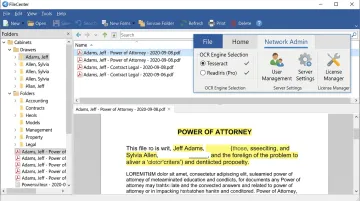
Two OCR engines set it apart:
- Tesseract, included from the Pro edition upward, for reliable everyday text recognition
- ReadIris, a premium commercial-grade engine exclusive to Pro Plus, built for high-accuracy recognition on dense or complex scans
Pro Plus also adds network administration tools, letting IT centrally deploy and manage FileCenter across every workstation in the office. Automatic document routing, barcode support, and cloud sync with Google Drive, OneDrive, and Dropbox round out the enterprise-grade toolset.
| Category | Details |
|---|---|
| Pricing | One-time purchase: Standard $97, Pro $197, Pro Plus $297, with multi-user and competitor-migration discounts available |
| Key Features | Dual OCR engines, automatic document routing, barcode support, network administration tools, cloud sync |
| Best For | Small-to-medium enterprises, legal, accounting, and document-heavy industries wanting enterprise-grade capability without subscription costs |
Because files live in standard Windows folders instead of a proprietary database, FileCenter also sidesteps the migration headaches common with database-locked competitors. A 30-day money-back guarantee removes most of the adoption risk that keeps teams from testing new software in the first place.
How We Chose the Best Enterprise DMS
Most buyers make one of two mistakes: chasing brand recognition, or fixating on sticker price while ignoring what happens in year three. A "free" migration to a big-name ECM suite can balloon into six-figure implementation and integration costs. A cheap subscription can double in price at renewal.
We evaluated every platform on:
- Security and compliance certifications for encryption, access controls, and audit trails suited to GDPR, HIPAA, or SOX obligations
- OCR and full-text search accuracy, meaning how reliably the system turns scanned paper into searchable, usable text
- Workflow automation depth, covering routing, approvals, and retention rules that cut manual handling
- Integration ecosystem compatibility with existing ERP, CRM, and accounting systems
- Deployment flexibility across cloud, on-premises, or hybrid options based on data control needs
- Total cost of ownership over 3-5 years, factoring in licensing plus implementation, training, and renewal costs, not just the sticker price
Conclusion
The best enterprise DMS matches your document volume, your compliance obligations, and how your team actually works day to day. Brand recognition matters less than practical fit.
Before committing, pilot-test your shortlist. Ask vendors about scalability limits, support responsiveness, and what happens to pricing after year one. Calculate the real cost of ownership: a $60-per-user monthly subscription adds up very differently than a one-time license over a five-year horizon.
If you want to test enterprise-grade document management without a long-term contract, FileCenter's 30-day money-back guarantee gives you a low-risk way to try it.
Frequently Asked Questions
What is enterprise document management?
Enterprise document management is the practice of capturing, organizing, securing, and governing an organization's documents across departments and locations. It combines software, storage, and policy to keep files accessible, compliant, and auditable at scale.
What is the difference between ECM and DMS?
DMS is a subset of the broader ECM framework. DMS focuses on storing and retrieving documents, while ECM covers the full content lifecycle, including workflow automation and governance.
What features should every enterprise DMS include?
Look for a centralized repository, version control, granular access permissions, OCR and full-text search, audit trails, and workflow automation. These form the baseline for compliance and productivity.
How much does an enterprise document management system typically cost?
Pricing ranges from roughly $7 to $60 per user monthly for cloud subscriptions to custom quotes for large ECM deployments. One-time purchase options like FileCenter, starting at $97, can lower long-term costs.
Is cloud-based or on-premises DMS better for compliance-heavy enterprises?
On-premises offers maximum data control, which suits strict regulatory environments. Cloud reduces infrastructure overhead and improves remote access. Many enterprises land on hybrid deployment to balance both.
Can smaller businesses access enterprise-grade DMS features without high costs?
Yes. One-time-purchase tools with professional-grade OCR and PDF capabilities, like FileCenter, let SMBs match enterprise-level document handling without recurring subscription fees.