Document Management
Organize digital and scanned legal records in a familiar Windows-based filing system, making case documents, contracts, correspondence, and administrative files easier to store, manage, and retrieve.

Discover how FileCenter helps law firms replace scattered case files, paper records, and disconnected PDF tools with affordable legal document management software built for 2026 workflows. From OCR and scanning to automated routing, full-text search, PDF editing, and cloud-compatible access, FileCenter gives legal teams a practical way to organize, retrieve, and manage documents without enterprise-level costs.
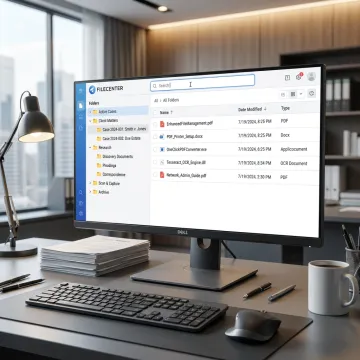
Explore FileCenter features that help law firms organize, digitize, search, edit, and route legal documents efficiently.
Organize digital and scanned legal records in a familiar Windows-based filing system, making case documents, contracts, correspondence, and administrative files easier to store, manage, and retrieve.
Convert scanned pleadings, contracts, invoices, and case materials into searchable PDFs so legal teams can quickly locate content across large document repositories.
Create, annotate, merge, split, edit, and organize PDFs without separate tools, helping law firms manage exhibits, client packets, contracts, and scanned records efficiently.
Automate OCR processing, PDF conversion, document routing, and filing to reduce repetitive manual work and keep legal document workflows moving consistently.
Find legal files quickly using filenames, metadata, and full-text OCR search across large repositories of matters, records, correspondence, and archived documents.
Maintain centralized long-term storage for legal and business records while keeping files searchable, accessible, and ready for audits, compliance checks, or operational needs.
FileCenter gives law firms a practical way to modernize document-heavy work without costly enterprise software. Centralized filing, OCR, PDF editing, automated routing, and full-text search help staff move from intake to archive with fewer manual steps. With scalable editions, one-time pricing, and a 30-day money-back guarantee, firms can choose document control that fits their workflow and budget.

See how document-heavy teams simplify filing, retrieval, scanning, and PDF management with FileCenter.
FileCenter combines practical legal document tools with pricing designed for real-world firm budgets.
One-time purchase pricing helps firms avoid recurring subscription costs and enterprise software overhead.
Built-in PDF editing, OCR, scanning, and search reduce reliance on separate tools.
Automated naming, routing, separation, and OCR help legal staff reduce repetitive filing work.
Standard, Pro, and Pro Plus editions support individual users, small firms, and multi-user deployments.
Practical software built for document-heavy professional teams.
FileCenter focuses on making professional-grade document management accessible to organizations that need powerful tools without enterprise software costs. Its platform is designed for document-heavy industries, including legal services, accounting, financial services, healthcare, insurance, real estate, government, and compliance-driven teams. The product emphasizes practical filing, OCR, scanning, PDF editing, routing, search, and centralized access so teams can reduce disorganization and manual work. With Standard, Pro, and Pro Plus editions, FileCenter gives individual professionals, small businesses, medium enterprises, and larger organizations a scalable way to improve document control while keeping pricing predictable through one-time purchase options.
A document management system for a law firm is software that stores, organizes, searches, edits, and retrieves legal documents in a structured digital filing system. It helps firms manage case files, pleadings, discovery, contracts, correspondence, scanned paper records, and PDFs. FileCenter adds OCR, PDF tools, automated naming, routing, and searchable folders to reduce time spent locating and filing documents.
Get guidance on editions, features, pricing, and legal workflows.

One-time pricing without recurring software subscriptions.
Risk-free evaluation backed by purchase protection.
Features designed for legal and compliance workflows.
Tell us about your firm’s document volume, workflow needs, and preferred edition so you can choose the right FileCenter setup.
To help us assist you faster, please include the reason for your message so the relevant team can reach out as soon as possible.
To help us assist you faster, please include the reason for your message so the relevant team can reach out as soon as possible.