Introduction
Paper piles and shared-drive chaos are finally losing their grip on business operations. In 2026, AI-driven document processing has shifted from a nice-to-have to a baseline expectation for any team managing contracts, invoices, or client files.
The problem? Dozens of DMS vendors offer overlapping features and confusing subscription tiers, making the real ROI hard to pin down. Some platforms charge by the user, others by storage, and a few still let you buy the software outright.
This guide breaks down the top document management software options for 2026, comparing pricing models and feature depth, then matching each platform to the businesses it fits best.
Key Takeaways
- One-time-purchase tools like FileCenter skip recurring fees that cloud subscriptions require.
- OCR accuracy, integration breadth, and pricing flexibility matter more than brand name.
- Compliance-heavy industries (legal, healthcare, finance) need strong audit trails and version control, not just storage.
- Free trials and money-back guarantees lower the risk of a bad purchase decision.
Overview of Document Management Software in 2026
Document management software captures, organizes, stores, and retrieves digital and scanned files, replacing filing cabinets and messy shared drives with searchable, secure repositories. Demand keeps climbing as hybrid work and compliance requirements make "I'll find it eventually" an unacceptable answer.
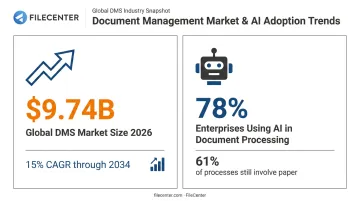
The numbers back this up. According to Fortune Business Insights, the global DMS market will hit USD 9.74 billion in 2026, growing at a 15% CAGR through 2034. That growth isn't just about storage, either.
AI adoption is accelerating fast: a recent AIIM study found 78% of enterprises now use AI in document processing, though 61% of processes still involve paper somewhere in the workflow. Below, we rank the top DMS platforms available today across business sizes and budgets.
Best Document Management Software of 2026
We evaluated each platform on affordability, feature depth, security, integration options, and customer trust signals like guarantees and reviews.
FileCenter
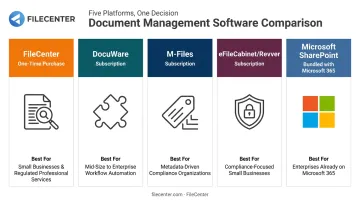
FileCenter has built its reputation on affordability, letting businesses buy powerful document management outright instead of renting it. Founded around the idea that PDF editing, OCR, and file organization shouldn't require a monthly bill, it targets everyone from solo professionals to compliance-heavy firms.
What makes it stand out:
- One-time purchase pricing across three scalable editions, with no subscription lock-in
- Tiered OCR engines, with Tesseract, the premium ReadIris engine, and Zonal OCR all available in Pro Plus for zone-based text extraction from invoices and forms
- Automatic document routing and separation (Pro Plus) that sorts scanned batches without manual sorting
- A 30-day money-back guarantee and a 15-day fully operational free trial, no credit card required
| Details | |
|---|---|
| Pricing | Standard $97, Pro $197, Pro Plus $297 (one-time purchase). Multi-user and competitor-migration discounts available. |
| Key Features | OCR-based full-text search, PDF editing/annotation, automatic file naming from scanned text, network sharing for teams, barcode-based routing (Pro Plus) |
| Best For | Small businesses, legal, accounting, and document-heavy industries wanting enterprise-grade features without recurring costs |
Because FileCenter stores files in standard Windows folders rather than a proprietary database, it also syncs cleanly with Google Drive, OneDrive, and Dropbox. This architectural choice keeps files portable rather than locking them into one vendor's ecosystem.
DocuWare
DocuWare is a cloud-based DMS built around workflow automation, with a particular strength in invoice and accounts payable processing. Its integration ecosystem is one of the largest in the category.
DocuWare separately cites more than 500 integrations and connections to 1,000+ cloud applications through iPaaS (integration platform as a service), so it's worth confirming whether a specific connection is native or requires the integration platform layer.
| Details | |
|---|---|
| Pricing | Subscription-based (Cloud 4, 15, 40, 100 tiers), scaling from 4 users/20GB to 100 users/1,000GB |
| Key Features | Workflow automation, AI-based intelligent indexing, mobile apps, electronic forms and signature integration |
| Best For | Mid-size to large organizations needing deep ERP and accounting integrations |
M-Files
M-Files takes a different approach entirely: no folders. Documents are organized by metadata, meaning what a file is and who it relates to, rather than where it happens to sit in a directory tree.
That structure pays off in large repositories where folder sprawl usually creates chaos. AI-powered classification tags documents automatically at ingestion, cutting down manual filing work.
| Details | |
|---|---|
| Pricing | Essentials starts at $65 per seat monthly (billed annually); Enterprise is custom quote-based |
| Key Features | Metadata-based organization, AI classification, version control, solution templates with retention rules and audit trails |
| Best For | Enterprises managing large, complex document volumes across multiple departments |
eFileCabinet (Rubex) / Revver
eFileCabinet and its Rubex platform rebranded as Revver in 2023, so if you're comparing quotes, make sure you're looking at current pricing rather than legacy sheets. The product still centers on secure file sharing for compliance-heavy industries.
Current documentation confirms encrypted client sharing links, branded guest access, and audit logs that record every search, open, and modification, though the older "SecureDrawer" branding no longer appears on official pages.
| Details | |
|---|---|
| Pricing | Basic $25/user/month, Essentials $67/user/month, Full $87/user/month |
| Key Features | Secure client portals, no-code workflow builder, folder templates, tamper-proof audit trails, mobile capture |
| Best For | Accounting firms, healthcare, and legal offices needing secure client document exchange |
Microsoft SharePoint
SharePoint isn't a standalone DMS purchase for most buyers; it's bundled into Microsoft 365 business and enterprise plans. For organizations already living in Teams and Office apps, that's exactly the point.
Real-time co-authoring works across Word, Excel, and PowerPoint files stored in SharePoint or OneDrive, and managed metadata provides centralized tagging across sites.
| Details | |
|---|---|
| Pricing | Bundled within Microsoft 365 Business (capped at 300 users) or Enterprise plans |
| Key Features | Real-time co-authoring, metadata tagging, granular permissions management, native Teams integration |
| Best For | Organizations already invested in the Microsoft 365 ecosystem |
How We Chose the Best Document Management Software
Ranking these platforms meant testing feature claims against public documentation rather than taking marketing pages at face value. A common buying mistake: picking a DMS because it's a recognizable brand, not because it fits your team size or actual workflow.
We weighed:
- OCR and search accuracy across scanned document types
- Security certifications and audit trail depth
- Pricing model flexibility across one-time purchase, subscription, and quote-based options
- Scalability from solo users to enterprise departments
- Vendor support and consistency across independent reviews
Key Features to Look for in Document Management Software
Not every DMS feature matters equally. Here's what actually moves the needle for day-to-day operations.
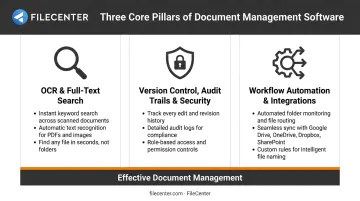
OCR and Full-Text Search
Misfiled and duplicate documents remain one of the most persistent productivity drains in paper-heavy offices. OCR converts scanned pages into searchable text, so instead of digging through folders, you type a keyword and the file appears. Zone-based OCR takes this further, pulling specific data (like invoice totals) from consistent document layouts.
Version Control, Audit Trails & Security
For legal, healthcare, and finance teams, knowing who touched a document and when isn't optional. Version control prevents overwritten files, while audit trails log searches, edits, and deletions — evidence that matters if a regulator ever asks for it.
Role-based permissions and encryption extend that same protection to who can access files in the first place. HIPAA's Security Rule requires audit mechanisms and six-year documentation retention for systems handling electronic health information, and FINRA imposes similar six-year retention on financial records.
Software features support compliance, but they don't guarantee it on their own.
Workflow Automation and Integrations
Auto-routing and approval chains cut out manual sorting entirely. A scanned invoice can move straight to the right approver without anyone dragging files between folders.
That automation only works if the DMS connects to the tools you already use. A system that can't talk to your scanner, email, or accounting software creates a second silo instead of solving the first one. Check integration depth before buying, not after.
Conclusion
There's no universal "best" DMS. The right choice depends on matching features and pricing model to how your team actually works, not which vendor has the biggest marketing budget.
Before committing, weigh:
- Total cost of ownership, not just the sticker price
- Scalability as your document volume grows
- Available trials or guarantees that reduce buying risk
If you'd rather test enterprise-grade document management without a subscription commitment, FileCenter's 30-day money-back guarantee and 15-day free trial make that evaluation low-risk from day one.
Frequently Asked Questions
What does document management software do?
DMS platforms capture, store, organize, and retrieve digital and scanned documents. Most include OCR for full-text search, plus workflow automation for approvals and routing.
What is the best document management software for small businesses?
Small businesses often do best with affordable, one-time-purchase options like FileCenter's Standard edition, which avoids recurring subscription costs while still delivering OCR and PDF tools.
Is document management software worth the cost?
Yes, for most businesses. ROI typically comes from reduced search time, lower physical storage costs, and faster approval workflows, with savings that compound as document volume grows.
What's the difference between cloud-based and on-premises document management software?
Cloud DMS runs on recurring subscriptions with the vendor handling infrastructure and updates. On-premises software involves an upfront license and puts maintenance, backups, and security on your internal IT team.
How much does document management software typically cost in 2026?
Pricing spans a wide range, from one-time licenses like FileCenter's $97 to $297 tiers, to per-user subscriptions such as M-Files' $65/seat/month or Revver's $25 to $87/user/month.
Can document management software integrate with existing scanners and office equipment?
Most modern platforms, including FileCenter, integrate with common scanners and multifunction printers to automate capture. Not every network scanner connects natively, so confirm compatibility before purchasing.