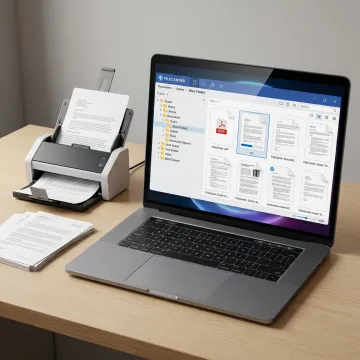
Scan Documents to PDF on Windows

Turn paper documents into organized, searchable PDFs directly on Windows with FileCenter. From scanning and OCR to PDF editing, naming, routing, and filing, FileCenter helps professionals replace cluttered paper workflows with a practical desktop document system that is affordable, efficient, and easy to use across everyday business records.

Scanning documents to PDF on Windows

Our Scan Documents to PDF Services

FileCenter combines scanning, OCR, PDF tools, automation, and Windows document management in one practical system.

Document Scanning

Scan paper records directly into organized Windows folders, helping offices replace physical filing cabinets with searchable digital documents and practical day-to-day PDF workflows.

OCR Processing

Convert scanned documents into searchable PDFs so users can quickly locate text inside contracts, invoices, tax forms, claims, records, and other scanned business files.

PDF Management

Create, edit, annotate, merge, split, and organize PDFs inside FileCenter, reducing the need for separate costly PDF software in document-heavy workflows.

PDF Conversion

Convert Office files into PDFs and transform scanned PDFs into editable Word, Excel, or PowerPoint documents for faster document preparation and reuse.

File Routing

Automatically name scanned documents and route them to correct folders using content, barcodes, and workflow rules for more consistent digital filing.

Document Management

Organize scanned and digital files in a Windows-based electronic filing system that supports simple storage, retrieval, and ongoing business record management.
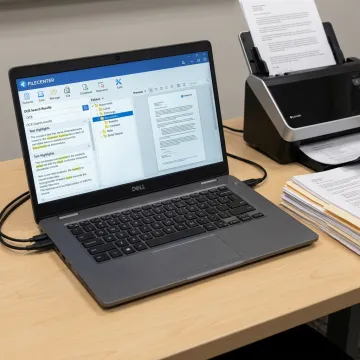
Windows document scanning workflow

A Simple Windows Scanning Workflow

Choose Your Filing Destination

Start by selecting the Windows folder where your scanned PDF should live. FileCenter helps you use structured cabinets and folders so documents are filed where your team expects to find them later.

Scan Paper Documents to PDF

Make PDFs Searchable with OCR

Edit and Organize PDF Files

Retrieve Documents When Needed

Workflow Results

Success Stories

See how document-heavy teams simplify scanning, OCR, PDF editing, and digital filing with FileCenter.

"As a partner in a small business that is very paper intensive, I am thrilled with the capabilities of FileCenter! The system is user friendly, and has allowed us to move documents from print to electronic version quickly, and with simplicity. The system has proven to be reliable, efficient and..."

M. C., LCSW, CMC, CFP

"I have been looking for a program like this forever! I tried M-Files, PaperMaster, PaperPort, as well as some higher end – expensive – programs. I want to say that you have a wonderful product. Your strongest point for me is the fact that I can save a file directly..."

J. G.

"I'm no techie, but I had zero problems setting up FileCenter for my office of four. In fact, it went so smoothly, I took the rest of the day off!"

V. N.

"We certainly hit a home run with FileCenter. It is fast and has many, many more features than PaperPort and is very reasonably priced."

J. S.

"Everybody has jumped on board and is LOVING it! That's really an impressive statement because we've got such a diversity of folks, from public works to public safety - and I am only hearing good things. I think this is truly a first for us."

L. O.

"As a partner in a small business that is very paper intensive, I am thrilled with the capabilities of FileCenter! The system is user friendly, and has allowed us to move documents from print to electronic version quickly, and with simplicity. The system has proven to be reliable, efficient and..."

M. C., LCSW, CMC, CFP

"I have been looking for a program like this forever! I tried M-Files, PaperMaster, PaperPort, as well as some higher end – expensive – programs. I want to say that you have a wonderful product. Your strongest point for me is the fact that I can save a file directly..."

J. G.

"I'm no techie, but I had zero problems setting up FileCenter for my office of four. In fact, it went so smoothly, I took the rest of the day off!"

V. N.

"We certainly hit a home run with FileCenter. It is fast and has many, many more features than PaperPort and is very reasonably priced."

J. S.

"Everybody has jumped on board and is LOVING it! That's really an impressive statement because we've got such a diversity of folks, from public works to public safety - and I am only hearing good things. I think this is truly a first for us."

L. O.

"As a partner in a small business that is very paper intensive, I am thrilled with the capabilities of FileCenter! The system is user friendly, and has allowed us to move documents from print to electronic version quickly, and with simplicity. The system has proven to be reliable, efficient and..."

M. C., LCSW, CMC, CFP

"I have been looking for a program like this forever! I tried M-Files, PaperMaster, PaperPort, as well as some higher end – expensive – programs. I want to say that you have a wonderful product. Your strongest point for me is the fact that I can save a file directly..."

J. G.

"I'm no techie, but I had zero problems setting up FileCenter for my office of four. In fact, it went so smoothly, I took the rest of the day off!"

V. N.

"We certainly hit a home run with FileCenter. It is fast and has many, many more features than PaperPort and is very reasonably priced."

J. S.

"Everybody has jumped on board and is LOVING it! That's really an impressive statement because we've got such a diversity of folks, from public works to public safety - and I am only hearing good things. I think this is truly a first for us."

L. O.
The FileCenter Difference

Why Choose FileCenter?

FileCenter helps Windows users scan, organize, edit, and retrieve PDFs with less friction.

Affordable

One-time purchase pricing delivers professional scanning and PDF tools without recurring subscription fees.

All-in-One

OCR, PDF editing, scanning, routing, and search work together in one Windows system.

Scalable

Standard, Pro, and Pro Plus editions match individual, small business, and enterprise needs.

Risk-Free

A 30-day money-back guarantee lets teams test FileCenter in real document workflows.

Meet FileCenter

Practical document software built for Windows-based teams.

FileCenter is built for professionals and organizations that need powerful document management software at a price they can afford. Its approach centers on practical Windows workflows: scan paper records, convert them into searchable PDFs, organize them in familiar folders, and retrieve them without unnecessary complexity. FileCenter serves individual professionals, small businesses, medium enterprises, and larger organizations across document-heavy industries including legal, accounting, financial services, healthcare, real estate, insurance, government, and compliance-driven operations. By combining scanning, OCR, PDF editing, automated naming, routing, and centralized filing, FileCenter helps teams reduce paper clutter, improve discoverability, and manage records with confidence.

3 EditionsStandard, Pro, and Pro Plus options for different workflow needs.
30-Day GuaranteeRisk-free evaluation on all FileCenter editions.
One-Time PricingAffordable purchase options without recurring subscription fees.

Frequently Asked Questions

How to scan to PDF in Windows 10?

To scan to PDF in Windows 10, connect your scanner, open FileCenter, choose the destination folder, and start a scan from the scanning panel. FileCenter can save the result directly as a PDF, apply OCR to make it searchable, and file it into your Windows folder structure so you do not need a separate scanning and PDF workflow.

Can I scan documents directly into PDF on Windows?

What does OCR do for scanned PDFs?

Can I edit scanned PDFs after creating them?

How does FileCenter help organize scanned documents?

Is FileCenter suitable for business document scanning?

How much does FileCenter cost?

Does FileCenter offer a guarantee?

Still Have Questions About Scanning?

Get practical guidance on scanning, OCR, PDFs, and editions.

Trusted Features

Awards and Recognition

30-day money-back guarantee badge

Money-Back Guarantee

Risk-free evaluation for every edition.

one-time pricing trust badge

One-Time Pricing

Affordable software without recurring fees.

ReadIris OCR engine badge

ReadIris OCR Engine

Premium OCR recognition in Pro Plus.

Ready to Scan Smarter on Windows?

Reach out to learn which FileCenter edition best fits your scanning, OCR, PDF, and document management workflow.

Contact Us Today

To help us assist you faster, please include the reason for your message so the relevant team can reach out as soon as possible.