Introduction
Contracts, pleadings, discovery files, client emails: the volume never stops, and neither do the deadlines attached to them. When those documents live in scattered folders, shared drives, and overflowing inboxes, something eventually slips through the cracks.
Document management software has become the operational backbone of a well-run firm. It organizes matters and closes the gaps that lead to missed filing dates, misplaced privileged documents, or client confidentiality breaches.
This guide compares six options for 2026, from enterprise-grade legal DMS platforms like iManage and NetDocuments to all-in-one practice management tools like Clio and MyCase, down to affordable, dedicated tools like FileCenter.
Whatever your firm's size or budget, one of these six options fits your workflow.
Key Takeaways
- Matter-centric organization replaces scattered folders and email chains with one searchable system
- Security and pricing transparency matter more than brand recognition
- Pricing spans quote-based enterprise platforms to one-time purchases starting at $97
- Firm size and IT resources decide between full case management or simple document organization
Overview of Document Management Software in the Legal Industry
Legal document management software organizes, stores, secures, and makes searchable every file and email tied to a specific client matter. It's built around the professional obligations lawyers already carry: ABA Model Rule 1.1 requires lawyers to understand the technology they use, and Rule 1.6(c) requires "reasonable efforts" to prevent unauthorized access to client information.
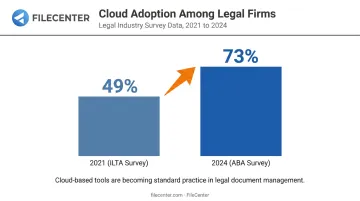
Adoption data tells a mixed story. The most recent DMS-specific figure comes from ILTA's 2021 Technology Survey. It found that 49% of firms had document management or content management systems in the cloud or migrating within 12 months, up 12 points from prior years.
More broadly, the ABA's 2024 Legal Technology Survey found that 73% of firms now use cloud-based legal tools. That figure covers more than document management alone, but it confirms the same upward trend.
The takeaway: cloud adoption is real and growing, but it isn't universal, and plenty of firms are still evaluating their options.
That growth doesn't mean one-size-fits-all, though. Firm needs vary widely:
| Firm Type | Primary DMS Needs |
|---|---|
| BigLaw | Enterprise governance and detailed audit trails |
| Solo practitioners | Reliable scanning, OCR, and PDF tools without enterprise overhead |
The list below covers that entire spectrum.
Top Document Management Software for Law Firms in 2026
We evaluated each platform against five criteria: legal-specific functionality, security and compliance credentials, integration depth, pricing transparency, and fit across firm sizes. Here's how six leading options stack up.
NetDocuments
NetDocuments is a cloud-native document and email management platform built specifically for legal professionals, widely deployed at mid-to-large firms that need matter-centric workspaces.
Its standout feature is deep Microsoft 365 integration: desktop co-authoring in Word, Excel, and PowerPoint, document access inside Teams, and predictive Outlook email filing through its ndMail tool.
It also offers a natively integrated DocuSign eSignature workflow (an integration, not a proprietary signing engine) along with audit trails built for compliance. The catch: pricing is quote-based, and implementation typically requires a certified reseller partner.
| Category | Details |
|---|---|
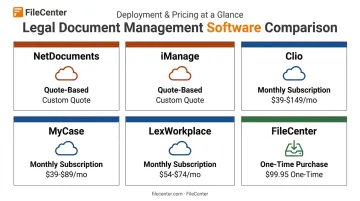
| Pricing/Deployment | Quote-based, cloud-only; implementation via certified partner |
| Key Features | Matter-centric workspaces, Microsoft 365 integration, audit trails, eDiscovery support |
| Best For | Mid-to-large firms needing strong governance and Microsoft-centric workflows |
iManage Work
iManage is the enterprise standard, used by 80 of the Am Law 100 according to iManage's own figures. It's the default choice for large firms and corporate legal departments running complex, high-volume matters.
Its email filing and version control set the benchmark most competitors are measured against. Salesforce and Litify integrations extend it into client relationship and matter-intake workflows, and its Ask iManage tool adds natural-language search across the repository.
The tradeoffs are cost and complexity: deployment (cloud or on-premises) generally requires a certified implementation partner and dedicated IT staff.
| Category | Details |
|---|---|
| Pricing/Deployment | Quote-based, cloud or on-premises; certified implementation partner required |
| Key Features | Outlook/Word add-ins, advanced search, AI-assisted knowledge tools, ethical walls |
| Best For | Large firms with dedicated IT staff and complex compliance needs |
Clio Manage
Clio is an all-in-one practice management platform where document storage is a core, bundled feature rather than the whole product. It's built for firms that want billing, intake, calendaring, and documents in one system.
Pricing starts publicly at $49/user for the entry tier, with higher tiers (Essentials, Advanced, Expand) requiring a quote. Clio now advertises 300+ integrations, unlimited document storage, matter templates, and a client portal.
An optional Clio Draft add-on handles document automation. What it doesn't offer is the matter-governance depth of a dedicated DMS like iManage or NetDocuments.
| Category | Details |
|---|---|
| Pricing/Deployment | Tiered monthly subscription, starts at $49/user; cloud-based; free trial available |
| Key Features | Unlimited storage, templates, client portal, AI-assisted drafting add-on |
| Best For | Small to mid-size firms wanting one consolidated operating system |
MyCase
MyCase combines billing, client communication, and document storage into one platform aimed squarely at solo practitioners and small firms.
Its published pricing is clear: $50, $100, and $130 per user/month on annual billing for the Basic, Pro, and Advanced tiers. MyCase Drive gives desktop access to cloud documents with automatic sync, and the client portal handles secure sharing.
E-signature is available starting on the Pro tier. Where it trails dedicated DMS platforms is search depth and matter-governance controls.
| Category | Details |
|---|---|
| Pricing/Deployment | $50-$130/user/month (annual billing); cloud-based; 10-day free trial |
| Key Features | Client portal, desktop sync via MyCase Drive, e-signature and payments on higher tiers |
| Best For | Solo practitioners and small firms wanting integrated client communication |
LexWorkplace
LexWorkplace is a dedicated cloud DMS purpose-built for law firms, marketed as a simpler alternative to iManage or NetDocuments without the enterprise price tag or reseller requirement.
It offers full native support for both Mac and Windows, integrated Outlook filing, and transparent public pricing sold directly. Its Core plan runs $395/month for three users, and Advanced runs $595/month, adding integrated OCR and document comparison tools. LexWorkplace positions itself for firms of 2 to 75 users.
| Category | Details |
|---|---|
| Pricing/Deployment | $395/month (Core) or $595/month (Advanced), scales by user count; cloud-only, sold directly |
| Key Features | Matter-centric organization, OCR, AI-powered search (varies by plan) |
| Best For | Cloud-ready firms of 2-75 users needing a true DMS without enterprise overhead |
FileCenter
FileCenter takes a different approach entirely: a one-time-purchase document management platform delivering professional-grade OCR, scanning, and PDF editing without a recurring subscription fee.
Both Pro and Pro Plus editions include OCR for turning scanned discovery files and contracts into searchable, editable text. Key capabilities include:
- Pro Plus adds ReadIris and Tesseract OCR engines for advanced text-recognition accuracy
- Automatic document naming and routing sorts files by content, useful for litigation teams processing large scan batches
- Barcode support separates and identifies documents automatically during high-volume scanning
- Bates stamping comes standard in both Pro and Pro Plus for legal document preparation
- Network cabinet search and multi-user administration in Pro Plus support firm-wide, permissions-based deployments
FileCenter also stores files in standard Windows folders rather than a proprietary database, so it syncs naturally with Google Drive, OneDrive, Dropbox, and SharePoint.
Every edition ships with a 30-day money-back guarantee, and new users get a 15-day fully operational trial with no credit card required.
| Category | Details |
|---|---|
| Pricing/Deployment | One-time purchase: Standard $97, Pro $197, Pro Plus $297; no subscription |
| Key Features | OCR-based full-text search, PDF editing/annotation, automatic document naming and routing, Bates stamping |
| Best For | Solo attorneys and small firms needing powerful scanning, OCR, and PDF tools without enterprise DMS complexity |
How We Chose the Best Document Management Software for Law Firms
The most common mistake firms make is chasing brand recognition or a long feature list instead of asking whether a tool actually fits their workflow, budget, and team size. A platform with impressive AI features means little if your staff never adopts it or the implementation cost eats a year's IT budget.
We weighed five factors, each tied to a concrete business outcome:
- Security and compliance credentials - reduces the risk of a confidentiality breach under Rule 1.6(c)
- Matter-centric depth versus general file storage - determines whether documents are truly organized by client and matter, not just dumped in folders
- Integration with Microsoft 365 and case management tools - cuts time lost switching between systems
- Pricing transparency - quote-based enterprise tools often hide migration, training, and storage costs that inflate the real total
- Scalability - whether the platform grows with the firm without forcing a painful re-platform later
Firms that skip this evaluation often end up paying for capacity they don't use, or worse, discover mid-implementation that their chosen platform can't handle their document volume.
Conclusion
There's no single "best" document management software for every law firm. The right choice is the one that matches your firm's operational scale, budget, and document workflows, not the platform with the longest feature list.
Before signing any contract, weigh the true cost of ownership: migration effort, training time, and whether your team will actually adopt the new system. A tool nobody uses is worse than no tool at all.
If your firm wants powerful OCR, PDF editing, and document organization without enterprise pricing or ongoing subscription fees, FileCenter's Standard, Pro, and Pro Plus editions are worth a look. Each edition is backed by a 30-day money-back guarantee.
Frequently Asked Questions
What is the best CMS for lawyers?
"CMS" for law firms usually means case management software, such as Clio, MyCase, or Filevine, not a content management system. The right pick depends on whether you need case tracking, billing, or a combination with document handling.
What is the best PDF software for lawyers?
Lawyers need tools for editing, annotating, redacting, and OCR-converting scanned files. FileCenter offers professional-grade PDF editing and OCR at a one-time cost, well below subscription-based competitors.
What is the best way to organize legal documents?
Use matter-centric folder structures (client, then matter, then document type) with consistent naming conventions. Add OCR for full-text search and centralized network access so everyone works from the current version.
Is document management software different from case management software for law firms?
Yes. DMS focuses on storing, searching, and securing files and email by matter. Case management software runs the broader business of the firm, including billing, intake, and calendaring.
Do law firms need cloud-based document management?
Cloud DMS supports remote work and cuts IT overhead. It also typically offers stronger built-in security than a self-managed server, which is why many firms now favor it over on-premise systems.
How much does legal document management software cost?
Enterprise platforms like NetDocuments and iManage are quote-based, with total costs depending on licenses, storage, and implementation. Practice management tools charge tiered monthly fees per user. FileCenter uses a one-time purchase model starting at $97.