Accountants who automated their data entry reported saving six hours a week, according to an Intapp poll covered by Accounting Today. That's nearly a full workday freed up for client advisory work instead of retyping vendor names and totals.
This guide compares the top OCR platforms built for accounting in 2026, covering pricing models (subscription vs. one-time purchase), core features, and which type of firm each tool fits best.
TL;DR
- OCR extracts vendor, amount, date, and tax data from invoices, receipts, and statements
- Pricing splits into per-user subscriptions (Dext, Nanonets, Rossum) or one-time purchases (FileCenter)
- Choose based on document volume, cloud vs. on-premise control, and your budget for recurring costs
- FileCenter offers professional-grade OCR and document management with no ongoing fees
Overview of OCR Software in the Accounting Industry
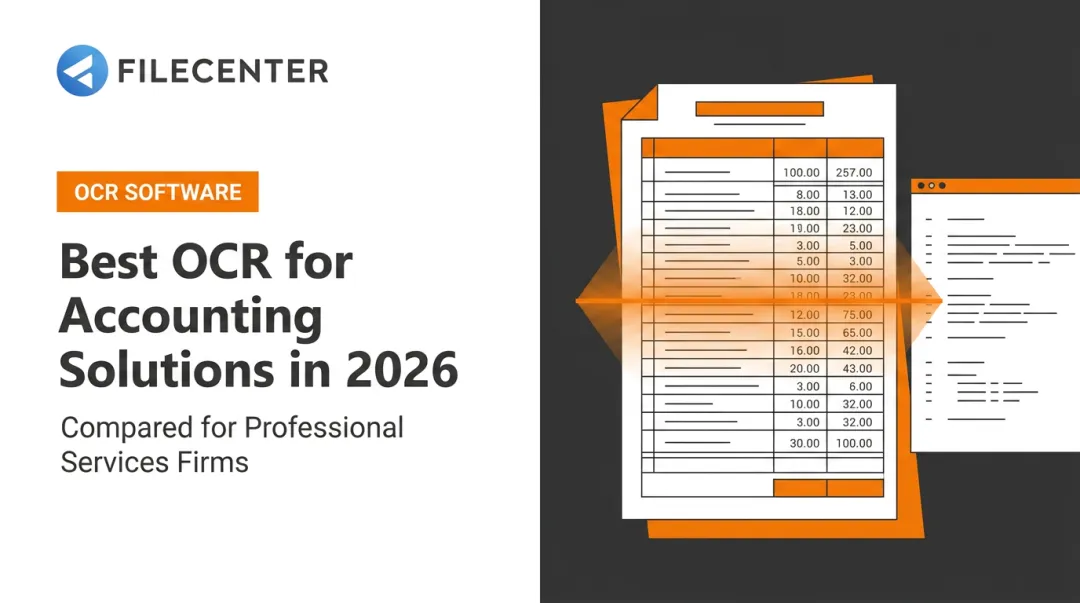
OCR, or Optical Character Recognition, converts paper and PDF documents into text that software can read, search, and edit. For accounting teams, that means turning a scanned invoice into structured data ready to post without anyone retyping it:
- Vendor name
- Invoice number
- Amount and tax
- Due date
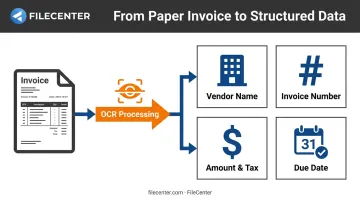
The scale of the problem keeps growing. Accounting firms process invoices, receipts, bank statements, and tax documents on a recurring basis.
The market has responded fast. The intelligent document processing market is projected to grow from $3.0 billion in 2025 to $3.9 billion in 2026, according to Grand View Research, with financial services already the largest single adopter segment.
Below, we compare the top OCR platforms for accounting professionals, from cloud-based AP automation tools to one-time-purchase document management software. Match a tool to your document volume, budget, and workflow.
Top OCR Software for Accounting in 2026
We evaluated each platform on OCR accuracy for financial documents, integration ease, pricing transparency, security, and support for accounting-specific document types.
FileCenter
FileCenter is document management software built for accounting firms, small businesses, and finance teams that want to digitize and organize financial paperwork without paying a monthly SaaS fee. You buy the software once instead of licensing it per user, per month.
Pro Plus users get two OCR engines under one roof. Tesseract, an open-source engine, handles standard recognition tasks in both the Pro and Pro Plus editions. ReadIris, a commercial-grade engine exclusive to Pro Plus, adds stronger accuracy on complex or dense documents like contracts and multi-line invoices.
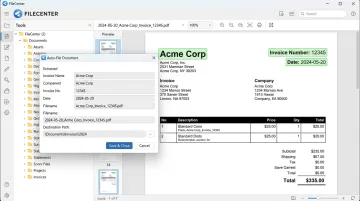
FileCenter also includes Zonal OCR with automatic file naming, so scanned invoices and receipts get renamed and routed based on their content instead of sitting in a generic "Scan001.pdf" folder.
Pro Plus adds network administration tools, letting IT staff deploy and manage the software across every workstation an accounting team uses. This is useful when several bookkeepers need shared access to the same client files.
For firms handling audits or regulatory submissions, Bates stamping (Pro and Pro Plus) and barcode support (Pro Plus only) add sequential page numbering and automated document tracking. FileCenter also syncs with Google Drive, OneDrive, Dropbox, and SharePoint.
| Category | Details |
|---|---|
| Pricing | One-time purchase: Standard ($97), Pro ($197), Pro Plus ($297). No subscription; 30-day money-back guarantee |
| Key Features | Zonal OCR with auto file naming, dual OCR engines (Tesseract, ReadIris), automatic document routing, full-text search, PDF editing/annotation, ScanSnap compatibility |
| Best For | Accounting firms wanting professional-grade OCR and document management without ongoing subscription costs |
New users also get 25% off their first license, and teams switching from a competing DMS can ask sales about migration pricing.
Dext (formerly Receipt Bank)
Dext is one of the most established OCR platforms built specifically for accounting practices. Bookkeepers use it to capture, categorize, and sync receipts, invoices, and bank statements straight into client ledgers.
Its biggest strength is integration depth. Dext connects natively with Xero, QuickBooks, and Sage, plus more than 30 other accounting platforms, and links to over 11,500 banks for automatic feed matching.
The mobile app lets clients photograph a receipt on the spot instead of mailing a shoebox of paper at tax time.
| Category | Details |
|---|---|
| Pricing | Per-client/user subscription; practice plans start around $17.70 per client/month, billed annually |
| Key Features | Automatic transaction categorization, mobile capture, bank feed connections, document storage |
| Best For | Firms serving English-speaking clients that want deep integration with mainstream accounting software |
The tradeoff is cost creep. Pricing scales with client count, so a growing practice can see subscription costs climb quickly.
Nanonets
Nanonets takes a different approach: an AI model that improves its own extraction accuracy as it processes more of your documents. Feed it corrected invoices, and its Instant Learning models retrain on those corrections over time.
It supports more than 200 languages for text recognition, which matters for firms handling international vendors or multi-currency statements. Pricing runs on a credit system rather than flat per-user fees.
| Category | Details |
|---|---|
| Pricing | Credit-based: Starter from $100/month for 100 credits; Growth and Enterprise use custom volume pricing |
| Key Features | Self-learning AI models, 200+ language support, custom model building, real-time analytics |
| Best For | Larger organizations willing to invest time training custom models for complex document types |
Enterprise plans add a dedicated customer success manager and formal support SLAs, with priority tickets targeted for one-hour response times.
Hubdoc
Hubdoc, acquired by Xero in 2018, is bundled free with Xero business-edition subscriptions. For a small business already inside the Xero ecosystem, that makes it the cheapest option on this list by a wide margin.
The catch: Hubdoc extracts header-level data (supplier name, date, total amount, invoice number), but Xero's own documentation confirms it does not automatically pull line-item detail. That's fine for a simple receipt, less so for a multi-line vendor invoice that needs itemized coding.
| Category | Details |
|---|---|
| Pricing | Free with a Xero business subscription; $12/month standalone after a 30-day free trial |
| Key Features | Header-level data extraction, vendor document fetching, direct posting to Xero |
| Best For | Small businesses already on Xero with simple, low-volume receipt processing |
Hubdoc can also fetch statements directly from connected utility and bank accounts, cutting down on manual uploads.
Rossum
Rossum targets a different buyer entirely: large enterprises and financial services firms processing thousands of diverse documents a month. Its intelligent document processing engine extracts and validates data without requiring a template for every vendor's invoice layout.
Documents enter the system through email, API, or manual upload, and Rossum integrates with RPA tools like UiPath and Blue Prism for firms already running automated workflows.
| Category | Details |
|---|---|
| Pricing | Starts at $18,000/year, based on document volume and workflow complexity |
| Key Features | Template-free extraction, smart validation with minimal manual review, API/RPA/email integration |
| Best For | Large enterprises and financial services firms with high volumes of unstructured documents |
That entry price puts Rossum out of reach for most small practices, but for enterprise AP departments processing high invoice volumes, the automation payoff can outweigh the cost.
How We Chose the Best OCR Software for Accounting
The most common buying mistake is picking a tool based on OCR accuracy alone. A platform can read text perfectly and still slow your firm down. It might not integrate with your accounting software, hide per-user costs until the invoice arrives, or lack accounting-specific features like Bates stamping and zonal OCR.
We weighed five factors instead:
- OCR accuracy on financial documents: how well the tool reads invoices, receipts, and statements, not just clean text samples
- Pricing structure and total cost of ownership: subscription creep versus one-time purchase, factoring in per-user or per-client fees
- Integration with existing accounting or ERP systems: native connections reduce double entry and reconciliation errors
- Data security and compliance: encryption, access controls, and audit trails for sensitive client financials
- Ease of use for non-technical staff: a tool bookkeepers will actually adopt, not fight
These factors map to measurable outcomes. Ardent Partners surveyed 190 AP and finance leaders and found best-in-class teams processed invoices in 3.4 days at $2.81 each, compared to 10.1 days and $9.87 for the average enterprise, according to Ardent Partners' AP Metrics report.
| Metric | Average Enterprise | Best-in-Class |
|---|---|---|
| Invoice processing cost | $9.87 | $2.81 |
| Processing time | 10.1 days | 3.4 days |
| Exception rate | 20.7% | 11.1% |
Faster, cheaper processing isn't automatic. It comes from matching the right tool to your document volume and workflow.
Conclusion
The right OCR software for accounting in 2026 depends on your firm's document volume, budget, and integration needs. A high-volume enterprise processing thousands of invoices a month has different priorities than a two-person bookkeeping practice handling client receipts.
Those differing priorities carry different price tags, too, so weigh the long-term math before you commit. A monthly subscription looks manageable in year one, but it adds up fast across multiple users and multiple years, while a one-time purchase gets cheaper the longer you keep using it.
Test-drive your shortlist before you buy. For accounting teams that want professional-grade OCR and document management without recurring fees, FileCenter offers a 15-day free trial and a 30-day money-back guarantee. That combination makes it a low-risk way to see if it fits your workflow.
Frequently Asked Questions
What is OCR software for accounting?
OCR software scans and converts paper or PDF financial documents, like invoices and receipts, into searchable, editable digital data. This eliminates manually retyping vendor names, amounts, and dates into your accounting system.
Which is the best OCR software for accounting?
It depends on your setup. FileCenter suits teams wanting one-time-purchase OCR with built-in PDF editing, while cloud tools like Dext or Nanonets fit firms that prefer subscription-based accounts payable (AP) automation.
How accurate is OCR technology for financial documents?
Modern AI-enhanced OCR typically reads clear, printed invoices with high accuracy. Handwritten notes or low-quality scans still often need manual review, since error rates climb sharply on degraded images.
Is OCR software secure for handling sensitive financial data?
Reputable OCR vendors apply encryption, access controls, and compliance frameworks like SOC 2. Always check a vendor's specific security policy before uploading client financials.
Can OCR software integrate with QuickBooks, Xero, or Sage?
Most cloud-based accounting OCR tools, like Dext and Hubdoc, offer native integrations with these platforms. Desktop tools like FileCenter instead export searchable, structured files that slot into your existing workflow.
Is one-time purchase OCR software better than subscription tools for small firms?
One-time purchase software like FileCenter can lower long-term costs for firms avoiding recurring per-user fees. Subscriptions may still suit firms that need constant cloud access and automatic updates.