Introduction
Picture a claims mailroom on a Monday morning: stacks of ACORD forms, faxed police reports, handwritten adjuster notes, repair shop invoices, and medical bills. Each piece needs to become searchable data before anyone can act on it.
Multiply that by hundreds of claims a week, and manual entry stops being an inconvenience. It becomes a bottleneck.
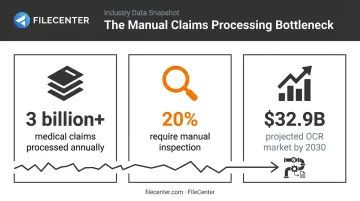
The scale of this problem is measurable. The global OCR market is projected to hit $32.90 billion by 2030, growing at a 14.8% CAGR, according to Grand View Research. Insurance, banking, and healthcare are driving much of that growth.
OCR now sits at the center of faster settlements, fewer transcription errors, and lower per-claim processing costs for carriers, TPAs, law firms, and healthcare billing departments alike.
This guide ranks the top OCR tools for insurance claims processing in 2026, from AI-native platforms built for messy documents to affordable, one-time-purchase software for smaller agencies.
TL;DR
- OCR turns scanned claim forms, invoices, and correspondence into searchable digital data
- Layout preservation matters: ACORD forms and checkboxes need engines beyond plain-text OCR
- Selection hinges on four factors: accuracy, compliance support, pricing model, and integration ease
- FileCenter offers affordable, one-time-purchase OCR for smaller agencies and law firms
- Enterprise platforms like Unstract, Docsumo, ABBYY, and Google Document AI suit high-volume carriers with complex documents
Overview of OCR in Insurance Claims Document Processing
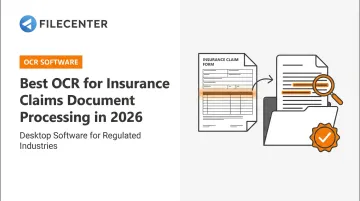
OCR, in the insurance context, is the technology that turns a scanned or photographed claim form, medical bill, or repair invoice into text a computer can search, index, and route. Instead of sitting as a static image in a folder, the document becomes searchable data.
The manual burden this replaces is significant. According to a 2021 policy brief from 1% Steps for Health Care Reform, roughly 20% of received medical claims still require manual inspection, even though US insurers adjudicate more than 3 billion medical claims annually. That manual slice is exactly where OCR earns its keep: pulling structured data out of the documents that don't fit a clean automated path.
Below, we rank the OCR platforms best suited to US insurance claims teams, including:
- Insurance adjusters processing high-volume claim documentation
- Third-party administrators (TPAs) managing multi-carrier claims files
- Law firms handling coverage disputes and litigation discovery
- Healthcare billing departments processing insurance paperwork daily
Top OCR Software for Insurance Claims Document Processing in 2026
We evaluated each platform on five criteria: accuracy on complex or handwritten forms, pricing transparency, integration ease, scalability, and compliance support. Here's how the top contenders stack up.
FileCenter
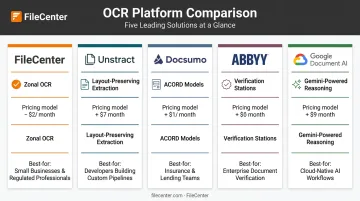
FileCenter is document management software built for law firms, healthcare providers, and small-to-mid insurance agencies, combining OCR, PDF editing, and centralized filing into a single desktop and network tool.
What sets it apart for claims-heavy teams:
- **Zonal OCR with automatic file naming** pulls specific fields from forms and names files accordingly, cutting manual sorting
- Dual OCR engines, Tesseract (open-source, included in Pro and Pro Plus) and ReadIris (commercial-grade, Pro Plus only), give teams flexibility between reliable free recognition and premium accuracy
- Automatic document routing and separation speeds up high-volume mailrooms without per-page fees
- Bates stamping and barcode support help law firms and compliance-driven agencies track claims documents through litigation or audit workflows
| Category | Details |
|---|---|
| Pricing | One-time purchase, three editions: Standard $97, Pro $197, Pro Plus $297. No subscription. 25% off first license; 30-day money-back guarantee |
| Key OCR Features | Zonal OCR with auto-naming, ReadIris & Tesseract engines, automatic routing/separation, Bates stamping, barcode support |
| Best For | Small-to-mid insurance agencies, independent adjusters, and law firms handling claims disputes that want affordable digitization without enterprise IT overhead |
For agencies processing a steady but manageable claims volume, the appeal is straightforward: no per-page costs eating into margins, and no IT team required to deploy it.
Unstract (LLMWhisperer)
Unstract's LLMWhisperer engine is built specifically for messy, unstructured documents, the kind that break traditional OCR.
- Layout-preserving output keeps multi-column tables and checkboxes intact, which matters enormously for ACORD forms
- Handwriting recognition across 12 languages, with printed-text support spanning 300+ languages
- On-premise deployment available for carriers that can't send claims data to a third-party cloud
- Bounding-box coordinates via the Highlight API support source tracing back to the original document
| Category | Details |
|---|---|
| Pricing | Pay-per-page: $1–$15 per 1,000 pages depending on mode; platform tiers start at $499/month for 5,000 pages. Cloud or self-hosted options |
| Key Features | Layout-preserving extraction, form/table modes, handwriting recognition, bounding-box coordinates |
| Best For | Insurers and TPAs needing AI-ready extraction from highly variable, messy claim packets at scale |
Docsumo
Docsumo leans into pre-built familiarity with insurance paperwork rather than general-purpose OCR.
- Six pre-trained ACORD models (ACORD 24, 25, 27, 28, 101, 125) mean less setup time for carriers already working with standard forms
- API-based integration connects directly into claims management systems, Salesforce, or Zapier
- Human-in-the-loop review screen routes low-confidence fields to a reviewer, feeding corrections back into the model
| Category | Details |
|---|---|
| Pricing | 14-day trial with 1,000 pages; Starter $499/month for 5,000 pages and 10 users; custom Business/Enterprise pricing |
| Key Features | Pre-trained ACORD models, structured field extraction, REST API, human-in-the-loop review |
| Best For | Mid-to-large insurers wanting pre-built extraction models without heavy custom configuration |
ABBYY (FlexiCapture / FineReader)
ABBYY has decades of enterprise deployment behind it, and it shows in how deep the platform goes for regulated, high-volume back offices.
- Field Region definitions let administrators draw zones over specific form areas for targeted extraction
- Verification Stations route exceptions to operators who correct data and assembly errors before documents move downstream
- Document classification sorts incoming claims by type before extraction even begins
Note: ABBYY currently splits its offering between FlexiCapture (enterprise automation) and Vantage (low-code IDP), with FlexiCapture Engine reaching end-of-life in October 2024. Buyers should confirm which product line fits their infrastructure.
| Category | Details |
|---|---|
| Pricing | Enterprise/subscription licensing, custom quotes by deployment scale. FineReader PDF (separate desktop product): $165/year |
| Key Features | Zonal OCR, document classification, Verification Stations, legacy system integration |
| Best For | Large enterprise insurers with dedicated IT teams needing deep customization and legacy compatibility |
Google Document AI
Google's managed cloud service brings Gemini's reasoning capabilities into document processing, with pay-per-use pricing that scales with volume.
- Enterprise Document OCR runs $1.50 per 1,000 pages up to 5 million pages monthly, dropping to $0.60 per 1,000 above that
- Gemini-powered Custom Extractor ($30 per 1,000 pages) applies generative-AI reasoning to complex, unstructured claims
- Google customer MediConCen reported 98% field-level accuracy processing medical-insurance claims, cutting processing time from days to hours (Google Cloud, 2025)
One important caveat: Google's catalog doesn't include a dedicated insurance-claims processor, and its native human-in-the-loop feature was deprecated in January 2024. Carriers relying on built-in review workflows should check current documentation before committing.
| Category | Details |
|---|---|
| Pricing | Pay-per-use: $1.50/1,000 pages (OCR) or $30/1,000 pages (Custom Extractor), tiered by volume |
| Key Features | Prebuilt document processors, Gemini-powered reasoning, cloud-native scalability |
| Best For | Enterprises already on Google Cloud needing high-volume, automated document intake |
How We Chose the Best OCR for Insurance Claims Processing
The most common mistake buyers make? Choosing OCR based on price or brand recognition alone, then discovering the tool chokes on handwritten fields, checkboxes, or dense ACORD tables once real claims start flowing through it.
We weighed each platform against factors that actually move claims forward:
- Compliance readiness: whether HIPAA or GDPR obligations apply to the workflow, and whether the vendor supports a business associate agreement or equivalent data processing terms
- Integration ease: how quickly a tool connects to existing claims management or CRM systems without months of custom development
- Pricing transparency: whether costs scale predictably as claim volume grows, or whether they hide behind "contact sales"
- Scalability: can the platform handle a spike in claims volume, such as after a regional weather event, without breaking down
Forrester's research on document-mining platforms found accuracy often starts around 60% on untuned documents and climbs into the high-90% range with proper tuning (Forrester, 2026). That's a useful reminder: out-of-the-box performance and tuned performance are two very different numbers to compare.
Conclusion
The right OCR tool for insurance claims depends on your document complexity and budget, not some universal "best" pick. A regional TPA processing standardized ACORD forms has very different needs than a national carrier ingesting handwritten adjuster notes and multi-page medical bills at scale.
Before committing, test any shortlisted tool on your own sample claim documents. Watch how it handles your messiest handwriting, dense tables, and low-quality scans. That's where real differences show up.
For smaller insurance teams or law firms handling claims disputes, FileCenter's 30-day money-back guarantee offers a low-risk way to trial OCR-driven document management without a subscription commitment or enterprise IT setup.
Frequently Asked Questions
What is OCR in insurance?
OCR in insurance refers to technology that converts scanned or photographed claim forms, policies, and correspondence into digital, searchable, and editable text. It replaces manual data entry with automated field extraction.
What is the difference between OCR and ICR?
OCR reads printed or typed text, while ICR (intelligent character recognition) is designed to interpret handwritten entries. Modern insurance OCR tools typically combine both capabilities in a single engine.
How accurate is OCR for processing insurance claims documents?
Accuracy varies by document quality and tool. Some insurers report field-level accuracy as high as 98% on medical-insurance claims, though results depend heavily on scan quality and document complexity.
Can OCR handle handwritten insurance claim forms?
Today's AI-powered OCR tools can capture handwritten notes, approvals, and short annotations. Accuracy still depends on legibility, writing style, and which specific engine is processing the document.
Is OCR software secure enough for sensitive insurance data?
Reputable OCR tools support encryption, access controls, and compliance frameworks like HIPAA and GDPR. On-premise or self-hosted deployment options exist for carriers handling especially sensitive claims data.
How much does OCR software cost for insurance claims processing?
Pricing models vary widely. One-time-purchase software like FileCenter starts at $97, while AI-native platforms typically charge $1–$30 per 1,000 pages or custom enterprise subscription rates based on volume.