Introduction
Picture the average office in 2026: half the team works from a kitchen table, the other half from a downtown high-rise, and everyone needs the same contract, invoice, or patient file in seconds. Paper hasn't disappeared, and digital files have multiplied faster than most IT budgets.
Many businesses struggle with the fallout. Employees waste hours hunting for misfiled documents. Compliance teams sweat audit season because records live in five different systems. And enterprise DMS subscriptions drain budgets year after year, long after the "introductory pricing" expires.
This guide compares the top document management systems for 2026, from heavyweight enterprise suites to lean, one-time-purchase tools. You'll get a clear look at pricing, features, and best-fit use cases, plus a practical framework for choosing the right system for your business.
Key Takeaways
- One-time purchase software like FileCenter delivers enterprise-grade OCR and PDF tools without subscription fees.
- Cloud platforms like Box, DocuWare, and SharePoint excel at remote team collaboration.
- OCR accuracy and workflow automation separate serious DMS platforms from basic storage.
- Base deployment choice (cloud, on-premises, or hybrid) on compliance requirements, not vendor marketing.
Overview of the Document Management Software Market in 2026
A document management system captures, stores, organizes, and retrieves digital files, replacing filing cabinets and scattered folders with searchable, secure repositories. Demand for smarter versions of this technology, ones with AI-assisted search, automated OCR, and compliance-ready archiving, has never been higher.
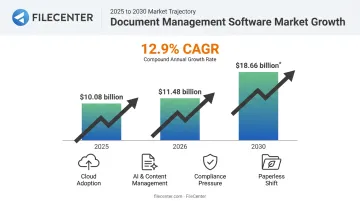
The numbers back this up. The global DMS market grew from $10.08 billion in 2025 to $11.48 billion in 2026. According to a 2025 report from Research and Markets, it's on pace to reach $18.66 billion by 2030 at a 12.9% CAGR.
What's fueling that growth? A few forces stand out:
- Adopting intelligent content management across departments
- Investing in cloud infrastructure at scale
- Facing rising information-security and compliance pressure
- Shifting steadily toward paperless operations
With that growth comes more choice, and more confusion. Below, we rank the DMS platforms available to US businesses today, across pricing tiers, deployment models, and industries.
Top Document Management Systems (DMS) for 2026
We evaluated each platform on four criteria: pricing transparency, feature depth (OCR, PDF editing, workflow automation), industry fit, and customer trust. Here's how the field shakes out.
FileCenter
FileCenter builds document management around professional-grade PDF editing, OCR, and scanning tools, without the subscription price tag that comes with most enterprise systems. It's designed for businesses that want serious functionality without a monthly invoice.
What makes it stand out:
- One-time purchase pricing across three scalable editions, no recurring fees ever
- Zonal OCR with automatic file naming, which extracts text from specific document zones (like an invoice number field) and names the file automatically
- Choice of Tesseract (open-source, included in Pro and Pro Plus) or ReadIris (premium commercial engine, Pro Plus only) OCR engines
- Bates stamping and barcode support for legal and compliance workflows
- A 30-day money-back guarantee and a fully-operational 15-day free trial
| Category | Details |
|---|---|
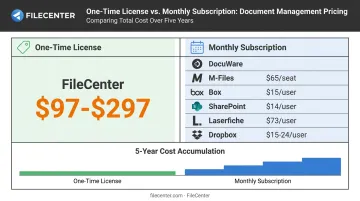
| Pricing | One-time license: Standard $97, Pro $197, Pro Plus $297. New users get 25% off their first license. |
| Key Features | Zonal OCR, PDF editing/annotation, automatic document routing, network sharing, Bates stamps, barcode support |
| Best For | Law firms, accounting practices, and cost-conscious SMBs wanting enterprise features without subscription costs |
DocuWare
DocuWare is a long-established cloud and on-premises DMS used by global brands in manufacturing, healthcare, and government. Its strength lies in deep workflow automation rather than simple file storage.
DocuWare's IDP module uses OCR for text recognition, document classification, and data extraction from both structured and unstructured documents. The platform lists 500 application integrations, and its iPaaS connectors extend reach to over 1,000 cloud apps.
| Category | Details |
|---|---|
| Pricing | Custom quote after demo/discovery call; free 30-day trial available |
| Key Features | Workflow automation, OCR, eSignature, compliance tracking, mobile apps |
| Best For | Mid-size to large enterprises needing deep process automation |
M-Files
M-Files takes a metadata-driven approach. Instead of organizing files by folder location, it organizes them by what they are, meaning a contract stays findable regardless of which department created it.
This structure lets businesses build modular, à la carte deployments. The Essentials plan runs $65 per seat/month, typically billed annually, with custom pricing for Enterprise. Its OCR extension is built for converting scans and non-searchable PDFs, though M-Files itself notes it's intended for smaller-scale conversion rather than mass digitization.
| Category | Details |
|---|---|
| Pricing | Essentials $65/seat/month (billed annually); Enterprise is custom; free trial available |
| Key Features | Metadata-based search, OCR, version control, workflow automation |
| Best For | SMBs wanting a flexible, modular DMS |
Box
Box is a cloud-native content platform trusted by 69% of the Fortune 500, according to Box's own published figures. It leans heavily into zero-trust security and AI-powered content tools.
Named security controls include Box Shield for threat detection, KeySafe for encryption-key management, and Zones for data residency. On the AI side, Box AI Hubs handle multi-document analysis, while Extract Agents auto-generate metadata. The platform connects to over 1,500 third-party applications.
| Category | Details |
|---|---|
| Pricing | Free plan (10GB storage); Business plans start around $15/user/month |
| Key Features | Cloud storage, OCR, eSignature, governance tools, AI content analysis |
| Best For | Organizations of any size needing cloud-first collaboration |
Microsoft SharePoint
SharePoint is Microsoft's document management and intranet platform, and it lives inside the Microsoft 365 ecosystem most businesses already use. That integration, with Teams, Outlook, and OneDrive, is its biggest selling point.
Beyond that ecosystem integration, its document libraries support managed metadata columns tied to local or company-wide term sets, and retention policies can retain, delete, or retain-then-delete content automatically, with retained copies stored in a Preservation Hold library.
| Category | Details |
|---|---|
| Pricing | Bundled in Microsoft 365 Business Standard at $14/user/month (paid yearly), which includes 1TB storage per user |
| Key Features | Document libraries, managed metadata, retention policies, automated workflows/alerts |
| Best For | Large enterprises already invested in the Microsoft ecosystem |
Laserfiche
Laserfiche pairs document management with business process automation and analytics, aimed squarely at content-heavy industries. Its e-forms and workflow tools eliminate manual steps across onboarding, approvals, and case management.
That automation depth comes at a cost, though: no-code process automation and custom forms sit under the Professional plan ($73/user/month billed annually, 5-user minimum), not the entry Starter tier.
| Category | Details |
|---|---|
| Pricing | Cloud Starter available; Professional from $73/user/month annually (5-user minimum) |
| Key Features | Workflow automation, e-forms, version control, ECM capabilities |
| Best For | Accounting, education, real estate, and healthcare organizations |
Dropbox Business
Dropbox Business extends the familiar file-sync platform most people already know, adding team administration and compliance features on top. Its current public tiers are labeled Standard and Advanced.
| Category | Details |
|---|---|
| Pricing | Standard $15/user/month; Advanced $24/user/month (3-license minimum) |
| Key Features | eSignature, version control, compliance tracking, offline access |
| Best For | Teams needing straightforward file sync and sharing |
Revver (formerly eFileCabinet)
Revver combines document digitization with automated governance for document-heavy operations. Its OCR converts scans and images, including handwritten content, into searchable and editable text, while no-code workflows handle routing, approvals, and notifications.
| Category | Details |
|---|---|
| Pricing | Custom quote required |
| Key Features | OCR, workflow automation, email importing, eSignature |
| Best For | Accounting, government, healthcare, and real estate firms |
How We Chose the Best DMS for 2026
Buyers make the same mistakes repeatedly: they pick a brand name without reading the fine print on subscription escalation, or they assume OCR is OCR everywhere, when accuracy actually varies a lot between engines.
To avoid these pitfalls, we weighted five factors:
- Pricing transparency: one-time license versus recurring subscription, and whether costs are published or hidden behind a "request a demo" wall
- Feature depth: real OCR performance, PDF editing quality, and workflow automation, not just checkbox claims
- Security and compliance support: certifications like SOC 2, HIPAA, and GDPR where applicable
- Ease of deployment: cloud, on-premises, or hybrid, and how much IT lift each requires
- Customer trust signals: review ratings, guarantees, and trial availability
How to Choose the Right DMS for Your Business
The "best" DMS depends entirely on your size, industry, and risk tolerance. Here's how to narrow it down.
Match the DMS to Your Size and Use Case
- Freelancers and small firms: prioritize simple OCR and PDF tools over deep workflow automation you'll never use.
- Growing SMBs: look for network sharing and multi-user access without enterprise-level complexity.
- Enterprises: need deep workflow automation, granular access controls, and multi-department scalability.
Weigh Cloud vs. On-Premises vs. Hybrid
Compliance requirements often decide this for you. Among law firms, for example, 57% now run cloud-based DMS/ECM libraries versus 28% on-premises, based on the 2023 ILTA Technology Survey of over 500 firms. Healthcare and other regulated industries frequently lean toward hybrid setups for tighter data control.
Compare Long-Term Cost, Not Just Sticker Price
Subscription platforms look cheaper upfront but compound over 3-5 years. A team of 10 paying $15/user/month on a subscription DMS spends $1,800 a year, and roughly $9,000 over five years, before storage add-ons or price increases.
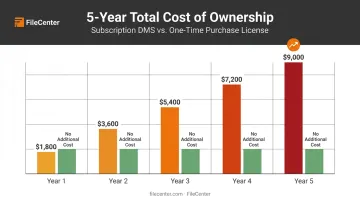
Compare that against a one-time purchase model like FileCenter, where the license cost is fixed regardless of how many years you keep using it.
Build a Feature Checklist
Before shortlisting vendors, confirm each platform covers:
- OCR accuracy (test with your actual documents, not a demo file)
- PDF editing and annotation depth
- Automatic document routing
- Security and access controls
- Integrations with tools you already use
Conclusion
The right DMS partner should fit your operational goals, budget, and compliance needs, not just show up first in a Google search. Brand recognition doesn't guarantee the OCR will read your invoices correctly or that pricing won't creep upward every renewal cycle.
Rather than take a vendor's word for it, test before you commit. Free trials and money-back guarantees exist so you can check scalability and ease of use with your own files, not a vendor's polished demo.
If a low-risk starting point sounds appealing, FileCenter's scalable editions and 30-day money-back guarantee make it easy to modernize document management without locking into another subscription.
Frequently Asked Questions
What is the best document management system for small businesses in 2026?
Small businesses often benefit most from affordable, one-time-purchase solutions like FileCenter, which include OCR and PDF editing without recurring fees. This keeps costs predictable as the business grows.
What's the difference between cloud-based and on-premises document management systems?
Cloud systems offer lower upfront cost and remote access from anywhere. On-premises systems suit organizations needing tighter data control, often required in legal or healthcare compliance settings.
How much should businesses expect to pay for a DMS in 2026?
Pricing ranges from free tiers to $14-$93 per user/month for subscriptions, or $97-$297 for one-time licenses like FileCenter. Over 3-5 years, subscription costs often exceed the one-time purchase price by a wide margin.
What is the difference between document management and enterprise content management (ECM)?
DMS focuses on capturing, storing, and routing documents through workflows. ECM extends further, covering broader enterprise content types including rich media and web content.
Do I need OCR in a document management system?
Yes. OCR converts scanned paper into searchable, editable text, and it's a core differentiator among DMS platforms. Without it, scanned documents remain unsearchable images.
Can I migrate from a subscription-based DMS to a one-time-purchase solution like FileCenter?
Most DMS platforms support standard file export formats, making migration to a one-time-purchase system straightforward. FileCenter also works directly with existing Windows folders, reducing the need for formal import steps.