The good news: modern document processing software fixes this. OCR turns scanned paper into searchable text. Automated filing routes documents without human hands. Retrieval drops from minutes to seconds.
This guide breaks down the top document processing platforms for 2026, how to evaluate them, and which type fits which business.
TL;DR
- Document processing software pairs OCR, PDF editing, and automated filing to kill manual paper handling
- The right pick depends on budget: one-time tools, premium suites, AI-driven DMS, or IDP engines
- Weigh OCR accuracy, integration depth, security compliance, and total cost before buying
- FileCenter proves enterprise-grade OCR and PDF tools don't require a recurring subscription
Overview of Document Processing Software in the Business Market
Document processing software digitizes paper and digital files, runs OCR to make them searchable, and organizes everything so employees can find what they need without opening ten folders.
This need for speed and accuracy is fueling rapid market growth. Gartner projects the global intelligent document processing market will hit $2.09 billion by 2026, growing at a 13% CAGR from 2021 through 2026, according to Gartner's IDP growth strategy report. That growth reflects real demand from document-heavy industries.
Legal firms, accounting practices, healthcare providers, real estate offices, and government agencies all depend on digitization for three reasons:
- Compliance - retention rules require organized, retrievable records
- Speed - faster retrieval means faster client response times
- Cost control - less administrative overhead spent on manual filing
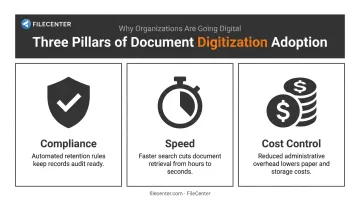
Meeting these compliance, speed, and cost demands starts with choosing the right platform. Most platforms fall into two camps: subscription-based enterprise suites billed per user, per month, or affordable one-time-purchase tools like FileCenter, which carry no recurring fees. The list below covers both, so you can compare apples to apples.
Top Document Processing Software for 2026
We evaluated each platform on five criteria: OCR accuracy, pricing transparency, PDF/editing depth, integration options, and customer trust signals like guarantees and review consistency.
FileCenter
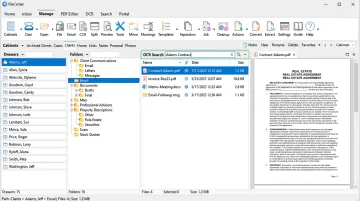
FileCenter positions itself as the low-cost leader in document management, delivering professional-grade OCR, PDF editing, and scanning across three editions: Standard, Pro, and Pro Plus.
What makes it stand out is the pricing model itself. There's no subscription. You buy the license once and own it.
Pro Plus adds Zonal OCR with automatic file naming, meaning the software reads a defined region of a document (like an invoice number or client name) and uses that text to name and route the file automatically. It also includes both the open-source Tesseract engine and the premium ReadIris engine for higher-accuracy recognition on complex scans.
| Pricing | One-time cost from $97 (Standard) to $297 (Pro Plus); 25% off first license for new users (up to $74 in savings); multi-user discounts available |
| Key Features | OCR-based full-text search, automatic document routing/separation, PDF editing and annotation, Bates stamping, barcode support, cloud compatibility with Google Drive, OneDrive, Dropbox, and SharePoint (Pro Plus) |
| Best For | Small to mid-size businesses, and legal, accounting, healthcare, or real estate professionals wanting enterprise features without recurring fees |
FileCenter also stores files in standard Windows folders instead of a proprietary database, so cloud sync tools keep working without vendor lock-in. Every edition ships with a 30-day money-back guarantee, and a 15-day free trial requires no credit card.
Adobe Acrobat (Document Cloud)
Acrobat is the name most people already associate with PDFs, and for good reason. It combines Acrobat and Acrobat Sign into one workflow for creating, editing, and e-signing PDFs from any device.
The interface is polished and mobile-friendly, which explains its heavy adoption across legal and finance teams. The tradeoff is cost. Acrobat runs on a per-license subscription, and pricing climbs quickly for teams that need advanced editing tools.
| Pricing | Acrobat Standard for teams starts at $16.99 per license/month; Acrobat Pro runs $23.99 per license/month, both billed annually |
| Key Features | PDF creation and editing, e-signature workflows, mobile access, cross-device sync, 70+ advanced PDF tools in Pro |
| Best For | Organizations centered heavily on PDF-only workflows that need polished editing and signing tools |
M-Files
M-Files takes a different approach entirely. Instead of organizing files into folders, it tags documents by metadata and content, then lets its Aino generative AI classify and surface files through natural-language search.
The AI layer proves genuinely useful for larger teams drowning in unstructured content, summarizing documents, answering questions about their contents, and integrating with Office 365 for co-authoring in Word, Excel, and PowerPoint.
Adopting M-Files does require a mindset shift, though. Moving away from folders means retraining how staff think about filing, and pricing isn't simple either.
| Pricing | Essentials starts at $65 per seat/month; Enterprise pricing is custom quote-based |
| Key Features | AI-based auto-classification, metadata-driven search, workflow automation, Microsoft 365 integration |
| Best For | Mid-size to enterprise teams needing intelligent auto-organization over manual foldering |
ABBYY Vantage / FlexiCapture
ABBYY built its reputation on OCR accuracy, and its intelligent document processing platform still leads on extraction from messy, unstructured documents.
Vantage supports OCR across more than 200 languages and 26 barcode formats, with pre-built extraction "skills" covering 150+ use cases, making it a fixture in compliance-heavy sectors like financial services running KYC checks and insurers processing claims.
Orchestration is where Vantage falls short. Full end-to-end workflow automation usually needs additional add-ons layered on top.
| Pricing | Custom enterprise pricing, quote-based only |
| Key Features | Multi-language OCR, document classification, structured/unstructured data extraction, low-code skill training |
| Best For | Enterprises in regulated sectors prioritizing extraction accuracy at scale |
DocuWare
DocuWare is a cloud-based document management platform built around workflow automation and connecting to whatever business software you already run.
Its auto-indexing is reliable, and it advertises integrations across 500 different applications, spanning email, CRM, ERP, and HR systems. This breadth suits mid-market teams that don't want to rebuild their tech stack around a new DMS.
Setup takes longer than a plug-and-play tool, though, since configuration and training factor into the total rollout.
| Pricing | Indicative cloud pricing of roughly $13 to $76 per user/month, converted from DocuWare's published UK rate card of £10-£60 per user/month, with named-user pricing declining at higher volume tiers |
| Key Features | Auto-indexing, workflow automation, 500 different app integrations, secure cloud storage |
| Best For | Mid-market to enterprise teams wanting deep integration with existing business software |
How We Chose the Best Document Processing Software
The most common buyer mistake? Picking software based on a flashy AI demo or brand recognition, then discovering six months later that OCR accuracy on real documents doesn't hold up.
We weighted these factors instead:
- OCR/extraction accuracy on actual documents - not marketing samples, since accuracy is what actually speeds up retrieval
- Pricing transparency - one-time versus recurring cost, which keeps long-term budgeting predictable
- Security and compliance credentials - encryption, access controls, audit trails, lowering exposure to compliance risk
- Integration depth - how well it fits an existing tech stack, cutting down on admin overhead
- Ease of adoption - how fast staff get productive, which keeps training costs down
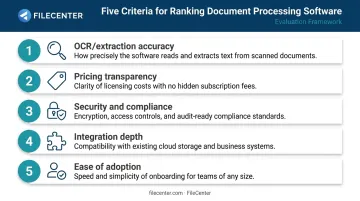
A tool that scores high on AI features but low on transparent pricing suits a specific type of buyer, not every buyer.
Conclusion
Choosing the right document processing software comes down to matching your document volume, budget, and team workflow, not chasing the biggest brand name.
Before committing, test how the platform performs on these fronts:
- Scales as document volume grows
- Costs after year one, not just at signup
- Backs its product with a real trial or guarantee
FileCenter offers a risk-free way to test that fit: a 30-day money-back guarantee, a 15-day free trial with no credit card required, and a 25% discount for new users worth up to $74. For teams tired of subscription creep, it's worth the fifteen minutes to compare.
Frequently Asked Questions
Which software is used for document processing?
It depends on document volume and complexity. Common categories include OCR-based document management systems such as FileCenter, PDF-focused suites including Adobe Acrobat, and AI-driven intelligent document processing tools like ABBYY for high-volume extraction.
Does Microsoft 365 have a document management system?
SharePoint and OneDrive offer basic document storage, versioning, and even native OCR. But advanced automated filing, records management, and compliance workflows typically require additional Microsoft services or third-party tools layered on top.
What is the difference between OCR software and full document processing software?
OCR only converts scanned images into digital text. Full document processing software adds filing, search, editing, and workflow automation on top of that text extraction.
How much does document processing software typically cost?
Pricing splits into two models: one-time purchases like FileCenter's $97 to $297 range, or recurring per-user subscriptions common among enterprise DMS vendors. These subscriptions can run into hundreds of dollars monthly at scale.
Is document processing software secure enough for sensitive business documents?
Reputable tools include encryption, access controls, and audit trails as standard features. Regulated industries like healthcare and finance should still verify specific compliance certifications, such as HIPAA safeguards or SOC 2 reporting, before adoption.
Can small businesses and freelancers benefit from document processing software?
Yes. Affordable, scalable options exist for small teams and solo professionals, letting them digitize records and automate filing without an enterprise-level budget or IT department.