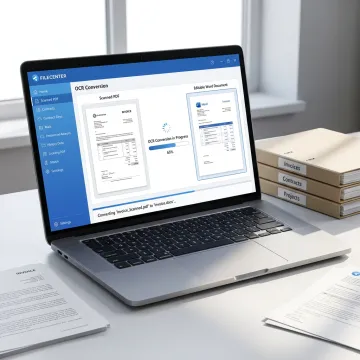
Convert Scanned PDF to Word with OCR

Turn static scanned PDFs into editable Word documents with OCR tools designed for document-heavy professionals. FileCenter helps you convert paper scans, contracts, tax forms, claims, records, and reports into usable digital files while keeping everything organized, searchable, and easy to retrieve. Get professional-grade PDF conversion without costly enterprise software or recurring subscription fees.

Scanned PDF converted to Word with OCR

Our OCR Conversion Services

FileCenter combines OCR, PDF conversion, scanning, search, and filing tools for cleaner document workflows.

PDF Conversion

Convert scanned PDFs into editable Word, Excel, or PowerPoint files, and turn Office documents into PDFs for cleaner preparation, storage, sharing, and business record management.

OCR Recognition

Use optical character recognition to turn scanned documents into searchable text, making contracts, invoices, tax forms, claims, records, and compliance files easier to locate and reuse.

Document Scanning

Digitize paper records directly into organized folders, helping teams reduce physical storage, speed up access, and create searchable files from incoming or archived documents.

PDF Management

Create, edit, annotate, merge, split, and organize PDFs without expensive third-party software, keeping routine document preparation inside one practical management system.

File Search

Find documents quickly using filenames, metadata, and full-text OCR search across large repositories, reducing time wasted opening folders or manually reviewing files.

Workflow Automation

Automate OCR processing, PDF conversion, naming, routing, and filing tasks to reduce manual sorting and support consistent document workflows across busy teams.

Editable OCR Files

Make Scanned PDFs Editable and Searchable

FileCenter helps professionals convert scanned PDFs into editable Word documents while improving the way files are stored, searched, and managed. Instead of relying on separate OCR, PDF editing, and filing tools, you can scan, convert, organize, and retrieve documents in one streamlined system built for business records, case files, client documents, and compliance-heavy workflows.
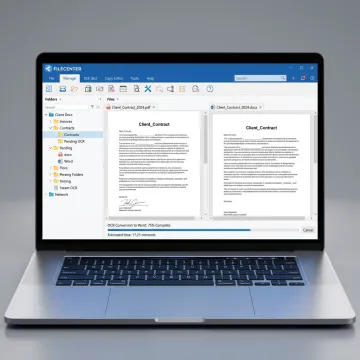
OCR converting a scanned PDF into Word
Document Workflows Improved

Success Stories

See how organized OCR conversion helps teams reclaim time and improve document control.

"I have been looking for a program like this forever! I tried M-Files, PaperMaster, PaperPort, as well as some higher end – expensive – programs. I want to say that you have a wonderful product. Your strongest point for me is the fact that I can save a file directly..."

J. G.

"I'm no techie, but I had zero problems setting up FileCenter for my office of four. In fact, it went so smoothly, I took the rest of the day off!"

V. N.

"FINALLY! I've been struggling with PaperPort for several years with buggy operation and terrible technical support. I vowed to never buy a Nuance product again. With some healthy skepticism, I tried FileCenter Pro and within 24 hours I was sold ... spent the $200 without batting an eye and it..."

M. B.

"I am sure you have many fan boys, but damn! I have been using PaperPort for 13 years as the program I use the most outside of my property management software. All I can say is thank you so much! Finally stability! "

M. B.

"Everybody has jumped on board and is LOVING it! That's really an impressive statement because we've got such a diversity of folks, from public works to public safety - and I am only hearing good things. I think this is truly a first for us."

L. O.

"I have been looking for a program like this forever! I tried M-Files, PaperMaster, PaperPort, as well as some higher end – expensive – programs. I want to say that you have a wonderful product. Your strongest point for me is the fact that I can save a file directly..."

J. G.

"I'm no techie, but I had zero problems setting up FileCenter for my office of four. In fact, it went so smoothly, I took the rest of the day off!"

V. N.

"FINALLY! I've been struggling with PaperPort for several years with buggy operation and terrible technical support. I vowed to never buy a Nuance product again. With some healthy skepticism, I tried FileCenter Pro and within 24 hours I was sold ... spent the $200 without batting an eye and it..."

M. B.

"I am sure you have many fan boys, but damn! I have been using PaperPort for 13 years as the program I use the most outside of my property management software. All I can say is thank you so much! Finally stability! "

M. B.

"Everybody has jumped on board and is LOVING it! That's really an impressive statement because we've got such a diversity of folks, from public works to public safety - and I am only hearing good things. I think this is truly a first for us."

L. O.

"I have been looking for a program like this forever! I tried M-Files, PaperMaster, PaperPort, as well as some higher end – expensive – programs. I want to say that you have a wonderful product. Your strongest point for me is the fact that I can save a file directly..."

J. G.

"I'm no techie, but I had zero problems setting up FileCenter for my office of four. In fact, it went so smoothly, I took the rest of the day off!"

V. N.

"FINALLY! I've been struggling with PaperPort for several years with buggy operation and terrible technical support. I vowed to never buy a Nuance product again. With some healthy skepticism, I tried FileCenter Pro and within 24 hours I was sold ... spent the $200 without batting an eye and it..."

M. B.

"I am sure you have many fan boys, but damn! I have been using PaperPort for 13 years as the program I use the most outside of my property management software. All I can say is thank you so much! Finally stability! "

M. B.

"Everybody has jumped on board and is LOVING it! That's really an impressive statement because we've got such a diversity of folks, from public works to public safety - and I am only hearing good things. I think this is truly a first for us."

L. O.
The FileCenter Difference

Why Choose FileCenter?

FileCenter delivers practical OCR conversion and document management without enterprise-level pricing.

Low Cost

Get OCR, PDF editing, scanning, and filing tools at a fraction of enterprise software costs.

Scalable Editions

Choose Standard, Pro, or Pro Plus to match your document volume, team size, and budget.

OCR Power

Convert scanned files with powerful OCR engines, including ReadIris and Tesseract in Pro Plus.

Risk-Free

Evaluate FileCenter confidently with a 30-day money-back guarantee on every edition.

Meet the FileCenter Team

Practical document software built for busy professionals.

FileCenter focuses on making powerful document management software accessible to individual professionals, small businesses, medium enterprises, and larger organizations. Its platform brings together PDF conversion, OCR, scanning, editing, search, and electronic filing in a cost-effective system designed to rival expensive enterprise tools. With editions for different budgets and deployment needs, FileCenter supports legal, accounting, healthcare, insurance, financial services, real estate, government, and other document-heavy teams. The company’s practical approach centers on reducing document disorganization, improving file discoverability, and helping users manage scanned and digital records without unnecessary complexity or recurring subscription costs.

3 EditionsStandard, Pro, and Pro Plus options for different workflow needs.
30-Day GuaranteeRisk-free evaluation available on all FileCenter editions.
One-Time PricingNo recurring subscription fees for core software ownership.

Frequently Asked Questions

Can FileCenter convert scanned PDFs into editable Word documents?

Yes. FileCenter’s PDF Conversion and OCR tools can transform scanned PDFs into editable Word documents by recognizing text inside the scan. This is especially useful for contracts, invoices, tax forms, patient records, claims, and compliance documents that started as paper or image-based PDFs and need to become usable digital files.

What does OCR do during PDF to Word conversion?

How accurate is OCR for scanned PDF conversion?

Who is FileCenter best suited for?

Can FileCenter help with paperless office workflows?

Does FileCenter require a monthly subscription?

Is there a guarantee if FileCenter is not a fit?

Can converted documents be searched after OCR?

Still Have OCR Questions?

Get guidance on OCR, PDF conversion, editions, and workflow fit.

Trusted OCR Tools

Awards and Recognition

30-day money-back guarantee badge

Money-Back Guarantee

Risk-free evaluation on all editions.

ReadIris OCR engine badge

ReadIris OCR Engine

Premium OCR accuracy in Pro Plus.

Tesseract OCR engine badge

Tesseract OCR Engine

Advanced recognition for scanned documents.

Ready to Convert Scanned PDFs Faster?

Tell us what you need to convert, organize, or automate, and explore the FileCenter edition that fits your workflow.

Contact Us Today

To help us assist you faster, please include the reason for your message so the relevant team can reach out as soon as possible.