Document Scanning
Scan paper records directly into organized digital folders, helping teams convert cabinets of files into searchable, accessible documents for daily work and long-term management.

Turn paper files into organized, searchable digital records with FileCenter’s practical scanning solutions. This guide highlights scanning, OCR, PDF management, automated routing, and secure filing tools that help document-heavy teams reduce clutter, retrieve information faster, and move toward a more efficient paperless office without enterprise-level costs or complicated systems.

FileCenter combines scanning, OCR, PDF tools, routing, and filing features for practical paperless document management.
Scan paper records directly into organized digital folders, helping teams convert cabinets of files into searchable, accessible documents for daily work and long-term management.
Convert scanned pages into searchable PDFs so users can quickly find contracts, invoices, patient records, tax forms, claims, and other critical documents by keyword.
Automatically name, separate, and route documents using content or barcodes, reducing repetitive filing work and keeping records consistently organized across teams.
Automate OCR processing, PDF conversion, document routing, and filing tasks to reduce manual effort and improve efficiency across document-heavy business workflows.
Edit, annotate, merge, split, convert, and organize PDF documents without needing separate expensive tools, supporting efficient management of scanned and digital files.
Store business records in centralized digital repositories while keeping documents searchable and accessible for audits, compliance needs, operational reviews, and long-term retention.
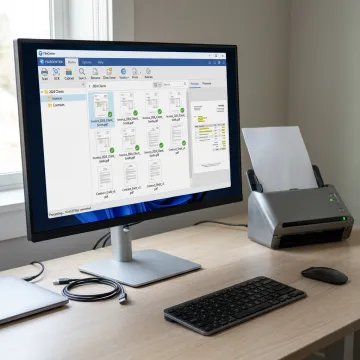
Start by scanning paper files into FileCenter’s Windows-based filing system. Documents can be saved directly into organized folders, making it easier to replace physical filing cabinets with structured digital records.
See how organized scanning workflows help teams reduce clutter, search faster, and manage records with confidence.
FileCenter brings professional document management features to everyday business workflows at accessible pricing.
One-time license pricing keeps scanning and document management affordable without recurring software subscriptions.
OCR, PDF editing, routing, and scanning features rival higher-cost enterprise competitors.
Standard, Pro, and Pro Plus editions let individuals and teams choose the right fit.
The 30-day money-back guarantee gives teams time to evaluate FileCenter with confidence.
Affordable document management software for paperless teams.
FileCenter is built for professionals and organizations that need powerful document management without enterprise complexity or recurring subscription costs. Its software brings together scanning, OCR, PDF editing, automated routing, file search, cloud compatibility, and standardized filing in a Windows-based system that feels familiar to everyday users. With editions for individual professionals, small businesses, medium enterprises, and larger deployments, FileCenter focuses on practical tools that help accounting, legal, insurance, financial services, brokerage, healthcare, real estate, and compliance-driven teams stay organized. The company’s positioning is clear: deliver professional-grade document management capabilities at a price businesses can afford, backed by a 30-day money-back guarantee.
A scanning solution converts paper records into organized digital files, typically using a scanner, document management software, OCR, and filing rules. FileCenter supports this process by scanning documents directly into structured folders, turning scans into searchable PDFs, and helping users name, route, retrieve, edit, and archive files without relying on complicated enterprise systems.
Get clear guidance on scanning, OCR, PDFs, and editions.

Risk-free evaluation for every FileCenter edition.
Premium recognition accuracy in Pro Plus.
Integrated scanning support for paperless workflows.
Share your document workflow goals, scanning volume, and edition questions. FileCenter can help you compare options and choose the right setup for your office.
To help us assist you faster, please include the reason for your message so the relevant team can reach out as soon as possible.
To help us assist you faster, please include the reason for your message so the relevant team can reach out as soon as possible.