Many teams struggle with searching through scanned archives, re-typing data from invoices, or losing hours to filing that a machine could handle in seconds. OCR (optical character recognition) software solves this by turning image-based PDFs into searchable, editable text.
This guide compares the top PDF OCR tools for 2026, covering pricing, accuracy, and deployment options across legal, accounting, healthcare, and real estate workflows, so you can pick the right fit for your document volume and budget.
TL;DR
- OCR software converts scanned or image-based PDFs into searchable, editable text and structured data
- Pick based on accuracy, pricing model, deployment flexibility, and integration ease, not brand name alone
- Top picks include FileCenter (one-time pricing) and Adobe Acrobat Pro (industry standard)
- ABBYY FineReader, Tesseract (free/open-source), and Nanonets (AI-driven automation) are also strong options
- The global OCR market is projected to grow from $551.9M in 2025 to $2.66B by 2033 (22% CAGR), per Grand View Research
Overview of OCR Software for PDFs in 2026
PDF OCR software scans image-based documents, whether that's a faxed contract or a photographed receipt, and converts the pixels into machine-readable text. Instead of a flat image nobody can search or copy, you get a document you can query, edit, export, and share in seconds.
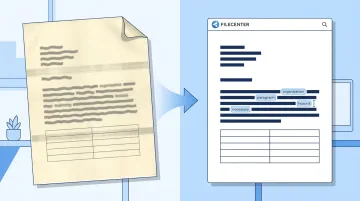
Demand for this kind of conversion keeps climbing. The OCR technology segment within automatic content recognition is growing at a 22% compound annual rate through 2033, per Grand View Research. Legal, accounting, healthcare, and insurance organizations are driving much of that growth as paper archives get digitized for compliance and searchability.
The tools below are evaluated on accuracy, pricing transparency, and business fit, not just feature checklists.
Best OCR Software for PDF in 2026
We selected these five tools based on four criteria: recognition accuracy on real-world documents, pricing transparency, feature depth, and suitability for document-heavy business workflows. Here's how each one stacks up.
FileCenter
FileCenter is an all-in-one document management and PDF OCR solution built for SMBs, legal, accounting, healthcare, and real estate professionals. Instead of billing you monthly, it's sold as a one-time license with no subscription strings attached.
What sets it apart:
- Dual OCR engines — Tesseract for everyday scans, plus the premium ReadIris engine for tougher, harder-to-read documents
- **Zonal OCR with automatic file naming**, which reads specific regions of a document (like an invoice number or client name) and uses that text to name and file the document automatically
- Bates stamping and barcode support for legal and compliance-heavy workflows
- A 30-day money-back guarantee, so testing it against your own documents carries no risk
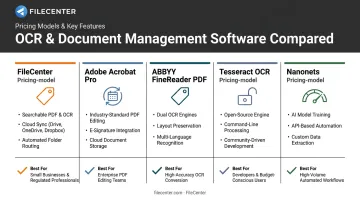
| Category | Details |
|---|---|
| Pricing | One-time cost: Standard $97, Pro $197, Pro Plus $297, plus a 25% new-user discount (up to $74 off) |
| Key OCR Features | Zonal OCR, automatic document routing/separation, Bates stamping, barcode support, full-text search across scanned archives |
| Best For | Businesses wanting professional-grade OCR and PDF editing without recurring fees or enterprise pricing |
Adobe Acrobat Pro
Acrobat has been the default PDF editor in offices for decades, and its built-in Scan & OCR tool remains a reliable way to make scanned pages searchable. Its Export PDF feature also converts documents cleanly into Word, Excel, and PowerPoint.
The appeal here is familiarity. Nearly every business already has Acrobat on someone's machine, and the Action Wizard lets you batch-apply OCR across a whole folder rather than one file at a time.
| Category | Details |
|---|---|
| Pricing | Subscription-based: $19.99/month for individuals, $23.99/month per license for teams (annual commitment) |
| Key OCR Features | Scan & OCR tool, batch processing via Action Wizard, Export PDF for format conversion |
| Best For | Individuals and teams needing everyday searchable PDFs without structured data extraction |
ABBYY FineReader PDF
FineReader is a desktop OCR powerhouse, and its reputation rests almost entirely on one thing: layout preservation. Feed it a multi-column report with embedded tables, and it holds the structure together in a way basic OCR tools don't.
It also supports 198+ recognition languages, according to ABBYY's current product pages, making it a natural fit for multilingual document sets. The Corporate edition includes Hot Folder automation for scheduled batch processing.
| Category | Details |
|---|---|
| Pricing | Standard: $99/year or $16/month. Corporate: $165/year or $24/month (per license) |
| Key OCR Features | Document comparison, multilingual recognition, table/format retention, Hot Folder batch automation |
| Best For | Legal, research, and translation teams handling structured, multilingual documents |
Tesseract OCR
Tesseract started at Hewlett-Packard Labs in the late 1980s, was open-sourced in 2005, and spent over a decade under Google's stewardship before passing to independent maintainers. It's now maintained by Stefan Weil and Zdenko Podobny under the Apache 2.0 license, meaning it's completely free.
It recognizes more than 100 languages out of the box and uses an LSTM neural-network engine for line-level recognition. There's no interface, though. Everything runs through the command line or an API, making it a fit for developers rather than everyday office use.
| Category | Details |
|---|---|
| Pricing | Free and open-source |
| Key OCR Features | LSTM neural-network recognition, custom training, command-line operation |
| Best For | Developers and technical teams building custom OCR pipelines with engineering resources |
Nanonets
Nanonets flips the OCR model entirely. Instead of installing software, you train a custom recognition model in a browser. Upload sample invoices or forms, mark the fields you care about, and let the AI learn your document layout without writing code.
Pricing runs on credits rather than seats: $50 in free credits with no card required, then $100/month for 100 credits, with per-operation rates from $0.02 to $0.30 depending on complexity.
| Category | Details |
|---|---|
| Pricing | Free trial credits, then usage-based plans starting at $100/month for 100 credits |
| Key OCR Features | Custom model training, automated data capture, API integrations |
| Best For | SMBs and teams wanting automation without heavy IT investment |
How We Chose the Best OCR Software for PDF
We evaluated each tool's accuracy on real scanned documents, not marketing screenshots, alongside pricing transparency, feature depth, and how easily it fits into an existing workflow.
The most common buyer mistake? Choosing based on brand recognition instead of testing accuracy on their own document types. A tool that nails clean invoices might stumble on faded legal contracts or handwritten intake forms. Your documents are the only benchmark that matters.
A few factors we weighted heavily:
- One-time vs. recurring cost — subscription fatigue is real, and per-page charges add up fast at scale
- OCR engine quality: dual-engine setups (like FileCenter's Tesseract-plus-ReadIris approach) tend to handle a wider range of document conditions
- Support for business workflows: automatic routing, file naming, and full-text search directly affect how much time OCR actually saves your team
Every factor above ties back to one thing: operational efficiency. The right OCR tool should reduce hours spent filing and searching, not just convert pixels to text.
Conclusion
There's no single "best" OCR software for every business. The right pick depends on whether you're prioritizing cost, accuracy, developer flexibility, or hands-off automation.
Once you know which factor matters most, test a few tools against your own contracts, invoices, or forms. Calculate the total cost of ownership over two or three years, not just the sticker price. A cheap monthly subscription can outpace a one-time license fast once you factor in per-seat fees or per-page charges.
If you want a low-risk way to evaluate professional-grade OCR without a subscription commitment, consider testing it firsthand. FileCenter's 30-day money-back guarantee and one-time pricing make it worth trying against your own document pile first.
Frequently Asked Questions
What is the best way to OCR a PDF?
It depends on your volume and technical resources. Dedicated software like FileCenter or Adobe Acrobat works well for business use, while open-source engines like Tesseract suit developers building custom pipelines.
Can I OCR a PDF for free?
Yes, using tools like Tesseract or free tiers of cloud OCR services. Free options often lack batch processing, dedicated support, and the accuracy needed for high-volume business documents.
What is the most accurate OCR software for PDFs in 2026?
Accuracy varies by document type and layout complexity. According to OmniDocBench, a CVPR 2025 benchmark of 1,651 pages, dedicated engines like ReadIris and ABBYY consistently outperform basic OCR on complex, multi-column layouts.
Does OCR work on scanned and handwritten PDFs?
Standard OCR handles typed and scanned text reliably but struggles with handwriting. According to IBM's overview of OCR technology, handwriting requires Intelligent Character Recognition (ICR), a technology some AI-driven tools now include.
Is one-time purchase OCR software better than subscription-based tools?
For stable, ongoing usage, one-time purchase software like FileCenter often costs less over time by eliminating recurring fees. Subscription models can make more sense for short-term or highly variable OCR needs.
Can OCR software integrate with existing business systems and file storage?
Most modern OCR tools support network sharing, cloud storage compatibility, or API integrations. This should be a key evaluation criterion for any team-based workflow involving shared document access.