Introduction
Legal teams in 2026 are still drowning in the same mess: contract requests buried in inboxes, intake forms scattered across spreadsheets, and approvals stuck waiting on someone who's on vacation. Business stakeholders lose patience. Legal becomes the bottleneck nobody wants to route through.
The right legal workflow software fixes this by centralizing intake, automating approvals, and giving everyone visibility into where a matter actually stands. That means faster turnaround, better compliance tracking, and a lot less time spent chasing status updates over email.
This guide compares five leading legal workflow platforms for 2026 and breaks down how to evaluate them against your team's real needs. It also explains where basic document management fits in before you commit to a bigger platform.
TL;DR
- Legal workflow software centralizes intake, routing, approvals, and reporting — no more email chains or spreadsheets
- Platform fit depends on team type: enterprise ops, contract-heavy teams, litigation firms, and small practices all need different tools
- Five platforms worth evaluating in 2026: Clio, Ironclad, Onit, Filevine, and Streamline AI
- Not every firm needs a full suite. Some just need an affordable OCR and file management tool to solve document chaos first
Overview of Legal Workflow Software in the Legal Industry
Legal workflow software automates the intake, routing, tracking, and reporting of legal requests, matters, and contracts. Instead of a paralegal manually forwarding an NDA request to three approvers, the system routes it automatically, flags overdue steps, and logs the whole history for an audit trail.
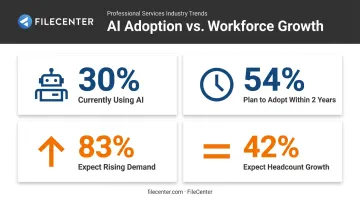
Adoption is accelerating, but there's a gap between intent and reality. According to the 2025 CLOC State of the Industry Report, just 30% of legal teams currently use AI, while 54% plan to adopt it within two years.
Meanwhile, 83% expect demand on legal to keep rising, but only 42% expect headcount to grow along with it. In other words, more work is landing on fewer people, and manual processes simply can't absorb the load.
Legal workflow needs vary enormously:
- Enterprise legal departments need matter tracking, spend management, and ERP integrations
- Contract-heavy teams need dedicated CLM automation
- Litigation firms need case-stage task chains and deadline tracking
- Solo and small practices often just need to get organized before automating anything
The five platforms below cover each of these scenarios.
Top 5 Legal Workflow Software Platforms for 2026
We built this list around five criteria: breadth of automation, ease of implementation, integration ecosystem, security and compliance certifications, and how well each platform fits different team sizes. No single tool wins on every dimension — that's the point.
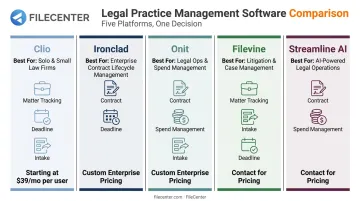
Clio
Clio is a cloud-based practice management platform built primarily for solo practitioners and small-to-mid-sized law firms. It's one of the most widely adopted tools in this category, and for good reason.
Clio's integration ecosystem spans 250+ apps, its pricing is publicly listed rather than hidden behind a sales call, and its intake-to-billing workflow (via Clio Grow and Clio Manage) is genuinely easy for non-technical staff to set up.
The tradeoff: Clio wasn't built for enterprise legal operations. If you need spend management, vendor tracking, or complex multi-department approval chains, you'll outgrow it fast.
| Attribute | Details |
|---|---|
| Best For | Small to mid-sized law firms needing all-in-one practice management |
| Key Features | Automated client intake, billing integration, document management, task automation |
| Pricing | Starts around $49/user/month, tiered plans |
Ironclad
Ironclad is an enterprise-grade contract lifecycle management (CLM) platform used heavily by legal and procurement teams at large organizations. Its standout capability is self-service contracting: business users launch pre-approved contract workflows through templates and rules, escalating to legal only when needed.
Ironclad reports that teams using self-service workflows see 60-80% fewer legal-review requests and cycle times cut by 75% or more. These are vendor-reported numbers, but directionally consistent with what teams experience when routine contracts stop clogging legal's queue.
It's excellent at contracts specifically, but it isn't a full legal ops suite: you won't manage general matters or spend inside it.
| Attribute | Details |
|---|---|
| Best For | Enterprise teams with high contract volume needing CLM automation |
| Key Features | AI contract review, workflow designer, obligation tracking, e-signature integration |
| Pricing | Custom enterprise pricing, quote-based |
Onit
Onit is an enterprise legal operations platform combining matter management, spend tracking, and workflow automation for large in-house legal departments. Its Unity platform ties together ELM and CLM functions, and its no-code App Studio lets legal ops teams build workflows without pulling in developers.
The real differentiator is depth of configurability paired with finance and ERP integrations (including SAP), which matters if legal spend needs to flow into broader corporate systems. The cost of that depth: longer implementation timelines and more IT involvement than a smaller firm would ever want to deal with.
| Attribute | Details |
|---|---|
| Best For | Large in-house legal departments managing spend, vendors, and complex workflows |
| Key Features | No-code workflow builder, legal spend management, enterprise integrations, configurable app builder |
| Pricing | Custom quote-based; industry estimates suggest a five-figure annual investment |
Filevine
Filevine is a case and matter management platform purpose-built for litigation-focused firms, with a particularly strong footprint in personal injury practices. Its taskflow engine generates tasks automatically based on case status.
Its "branch and converge" deadline chains trigger groups of deadlines off a single completion date. This matters for firms juggling statute-of-limitations risk across hundreds of cases.
Document tagging and a built-in client portal round out the platform, but smaller teams often report a steeper learning curve getting everything configured correctly.
| Attribute | Details |
|---|---|
| Best For | Litigation and personal injury firms managing high case volumes |
| Key Features | Automated task workflows, deadline tracking, document tagging, client portals |
| Pricing | Custom-built packages; third-party estimates suggest $50-$150/user/month |
Streamline AI
Streamline AI is built specifically for in-house legal teams that need a centralized "front door" for request intake. Its no-code workflow builder and AI-powered triage convert incoming requests (including email) into structured matters automatically, with legal-specific controls like role-based permissions, SSO, and audit logs built in from the start.
Pricing starts at $22,900 for the Pro tier and $26,900 for Enterprise, with implementation typically taking around 60 days. Named integrations include Ironclad, Salesforce, and NetDocuments, which is solid for CLM connectivity, though teams needing deep e-billing integration should confirm specifics before buying.
| Attribute | Details |
|---|---|
| Best For | In-house legal teams needing centralized request intake and matter tracking |
| Key Features | No-code workflow builder, AI triage, real-time dashboards, CLM integrations |
| Pricing | Starting at $22,900 (Pro) / $26,900 (Enterprise) |
How We Chose the Best Legal Workflow Software
We evaluated each platform against five core criteria, then verified those claims against real business outcomes rather than marketing copy:
- Automation depth and workflow customization
- Ease of adoption for non-technical staff
- Integration breadth with existing legal tech
- Security certifications and compliance safeguards
- Pricing transparency across all tiers
This process also revealed a common mistake teams make: choosing a platform based on brand recognition or generic project management features, rather than legal-specific requirements like privilege protection, audit trails, and conflict checks. A tool built for marketing ops or IT tickets will fall apart the moment legal needs to protect privileged communications.
The right fit also depends on scale: team size and workflow complexity should drive your decision far more than a feature checklist. A five-attorney firm doesn't need Onit's spend management module. A 200-person in-house legal department doesn't need Clio's client intake CRM. Match the tool to the actual bottleneck, not the longest feature list.
Do You Need a Full Platform, or a Document Management Foundation First?
Not every firm is ready for a $15,000+ per year enterprise legal ops platform. Many small firms and solo practitioners have a more basic problem first: scattered PDFs, unsearchable scans, and client files spread across desktops, email attachments, and a filing cabinet nobody's opened in a year.
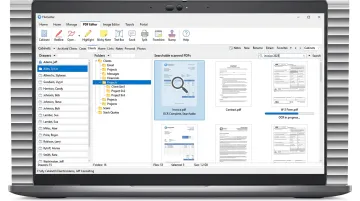
Before layering on workflow automation, it often makes more sense to solve document chaos directly. This is where a tool like FileCenter fits: a one-time-purchase document management application rather than another monthly subscription to budget for.
What FileCenter handles:
- OCR-based conversion turns scanned files, TIFF images, and old paper documents into searchable, indexable PDFs, so a deposition transcript can be found by keyword instead of manual review
- **Zonal OCR with automatic file naming** reads fields like a client name or case number to name files automatically, eliminating hours of manual renaming
- Batch conversion for digitizing an entire client archive or backlog of scanned intake forms in one pass
- Built-in PDF editing for redlines, annotations, and signatures without paying for a separate Adobe license
The Pro Plus edition ($297, one-time) adds Bates stamping and barcode support for litigation document production, plus network administration tools for firms sharing files across multiple workstations. All editions come with a 30-day money-back guarantee, so a firm can test it against real case files before committing.
Document management handles file organization, while legal workflow software manages case processes and deadlines. The two serve different purposes, and firms often benefit from both. A firm can digitize and organize its files with FileCenter first, then layer a workflow platform like Clio or Streamline AI on top once request volume actually justifies the investment.
Conclusion
There's no single "best" legal workflow platform in 2026, only the best fit for your actual bottleneck:
- Enterprise legal ops teams need Onit's depth
- Contract-heavy departments need Ironclad's CLM automation
- Litigation firms need Filevine's case-stage workflows
- In-house teams drowning in requests need Streamline AI's intake triage
- Small firms need Clio's simplicity
Pilot your shortlist with real matters before signing anything, and look past the sticker price to total cost of ownership: implementation time, training, and how well the tool scales as your caseload grows.
And if your firm isn't ready for full workflow automation yet, that's fine. Organizing and digitizing your documents first with an affordable tool like FileCenter is a practical starting point, and you can scale up to full workflow automation once your case volume demands it.
Frequently Asked Questions
What is legal workflow software?
Legal workflow software automates the intake, routing, tracking, and reporting of legal requests and matters. It replaces manual email chains and spreadsheet trackers with a centralized system that shows exactly where every request stands.
How much does legal workflow software cost in 2026?
Pricing ranges widely: small-firm practice management tools like Clio start around $49/user/month, while enterprise legal ops platforms like Onit run into five figures annually. Most enterprise platforms require a custom quote.
What's the difference between legal workflow software and contract management software?
Legal workflow software handles all request types end-to-end — intake, matters, tasks, approvals. Contract lifecycle management (CLM) tools like Ironclad focus specifically on drafting, negotiating, and tracking contracts through their lifecycle.
Do small law firms need full legal workflow software or just document management tools?
Many solo and small firms are better served starting with an affordable document management and OCR tool to organize scattered files. A full workflow platform makes more sense once request volume actually justifies the cost.
How long does implementation of legal workflow software typically take?
Simple setups can take a few weeks, while enterprise rollouts often take months. Streamline AI lists a 60-day implementation window; some enterprise CLM rollouts take over 100 days for full deployment.
Can legal workflow platforms integrate with document management tools?
Yes, most workflow platforms integrate with document storage systems like NetDocuments or SharePoint. Pairing in a dedicated OCR and PDF organization tool strengthens the stack without duplicating existing features.