Intelligent document processing (IDP) automation has become table stakes for document-heavy businesses in 2026. The right platform cuts manual data entry, improves accuracy, and lowers operational costs across finance, legal, healthcare, and real estate.
The stakes are real: the global IDP market hit $3.0 billion in 2025 and is projected to reach $3.9 billion in 2026, climbing toward $29.7 billion by 2033 at a 33.8% CAGR, according to Grand View Research. This guide breaks down which tools actually fit your business.
Key Takeaways
- IDP turns scans and PDFs into structured, actionable data using OCR, AI, and workflow rules
- Enterprise platforms like ABBYY, UiPath, and Rossum excel at scale but come with premium price tags
- SMBs typically need OCR, organization, and routing over complex AI — a gap FileCenter fills
- Match tool selection to document volume, technical resources, and budget, not AI branding
Overview of Intelligent Document Processing Automation in 2026
IDP takes a scanned document or PDF and automatically classifies it, pulls out the relevant data, validates that data, and routes it into a workflow. Legacy OCR only handles the first step: turning an image into readable text.
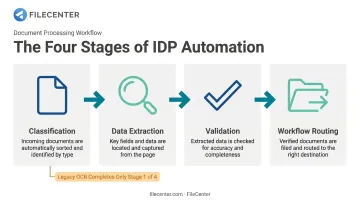
According to Gartner, IDP solutions are specialized data integration tools that enable automated extraction of data from multiple formats and layouts. This covers structured, semi-structured, and unstructured files alike.
Two trends are shaping 2026:
- Agentic, AI-native document understanding is emerging, where large language models interpret document context semantically instead of relying on fixed templates
- Rule-based OCR and document management still runs day-to-day operations for most small and mid-sized businesses, and it isn't going anywhere
The list below covers both camps — enterprise AI-driven IDP platforms and practical, cost-effective document automation tools sized for smaller teams.
Top Intelligent Document Processing Automation Tools for 2026
We evaluated each platform on extraction accuracy, deployment flexibility, integration depth, pricing model, and fit for business size. No single tool wins on every axis; the right fit depends on your document volume, budget, and technical resources.
ABBYY Vantage / FlexiCapture
ABBYY has decades of OCR heritage behind it, and Vantage represents its evolution into a mature, low-code enterprise IDP platform. It ships with pre-trained "Skills" covering 150+ use cases and support for more than 200 languages.
What makes it stand out is capture accuracy on messy, high-volume documents combined with human-in-the-loop review, where flagged edge cases route to a person and corrections feed back into the model. That combination suits large finance, logistics, and insurance operations processing thousands of varied documents daily.
| Category | Details |
|---|---|
| Best For | Large enterprises needing high-volume, multilingual document capture with governance controls |
| Pricing Model | Custom enterprise quote-based pricing requiring professional scoping |
| Key Limitation | Complex configuration and higher cost make it impractical for small teams |
UiPath Document Understanding
UiPath built its name in robotic process automation, then layered AI-based document understanding on top. The result is extraction that plugs directly into bot workflows.
That tight coupling is the differentiator: extracted data flows straight into ERP or CRM systems for straight-through processing, with no manual handoff between the "read the document" step and the "act on it" step. Pricing runs on Platform Units — classification costs 0.04 PU per page, extraction adds 0.16–0.2 PU per page, and generative validation tacks on another 0.2 PU per page.
| Category | Details |
|---|---|
| Best For | Enterprises automating end-to-end back-office processes like AP and KYC |
| Pricing Model | Feature and volume-based metering with custom enterprise plans |
| Key Limitation | Requires dedicated automation/IT teams to manage licensing and bot governance |
Rossum
Rossum built its platform specifically for transactional documents: invoices, purchase orders, bills of lading, certificates of analysis. It's cloud-first and template-free by design.
The AI learns document layouts from millions of business documents rather than requiring rigid templates for each vendor format, and its validation screen is built for fast human review of exceptions. Pricing starts at $18,000 per year with a one-year minimum commitment, scaling up from there based on volume, per Rossum's published pricing.
| Category | Details |
|---|---|
| Best For | AP, finance, and logistics teams processing high volumes of variable transactional documents |
| Pricing Model | Quote-based pricing that scales with document volume |
| Key Limitation | Pricing structure geared toward mid-market and enterprise, less accessible for small businesses |
Azure AI Document Intelligence (or Google Document AI)
Both major clouds offer document extraction as a consumption-based API service, with prebuilt models for invoices, receipts, IDs, and tax forms alongside custom model training.
The appeal here is infrastructure fit. If your team already runs on Azure or Google Cloud, these services plug into existing identity and data pipelines without adding a new vendor relationship. Azure's Read API starts at $1.50 per 1,000 pages, while custom extraction models run $30 per 1,000 pages. Google Document AI follows a similar structure.
| Category | Details |
|---|---|
| Best For | Organizations already standardized on a major cloud platform building custom document pipelines |
| Pricing Model | Consumption-based, per-page pricing |
| Key Limitation | Cloud lock-in and setup that requires technical/developer expertise |
LlamaParse (Agentic Document Processing)
This is the newest category: AI-native, agentic parsing that uses LLMs to understand semantic context instead of matching against a template library.
LlamaParse converts PDFs, scans, tables, and charts into structured Markdown, text, or JSON, supporting 130+ file types, with bounding-box-aware output that preserves spatial relationships for downstream AI agents. It represents where the IDP market is heading. Pricing starts free at 10,000 credits/month, with Starter at $50/month and Pro at $500/month.
| Category | Details |
|---|---|
| Best For | Developer teams building AI agents or RAG pipelines over complex, messy documents |
| Pricing Model | Usage-based SDK/API pricing |
| Key Limitation | Steeper learning curve; less suited to non-technical business users |
FileCenter
Not every business needs a machine learning model trained on millions of documents. Many just need scanned paperwork to become searchable, organized, and automatically filed without a six-figure implementation project. That's the gap FileCenter fills for SMBs, freelancers, and professional-services teams in legal, accounting, healthcare, and real estate.
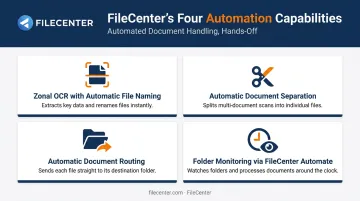
FileCenter delivers IDP-style automation through practical tools rather than enterprise AI infrastructure, handling classification, extraction, and organization with:
- Zonal OCR with automatic file naming — extracts specific data fields from defined regions and names files accordingly
- Automatic document separation — splits scanned batches into individual files using cover sheets, barcodes, or content rules (Pro and Pro Plus)
- Automatic document routing — sends documents to the right folder based on content, available in Pro Plus
- FileCenter Automate folder monitoring — watches scanner output folders and processes new files continuously, even overnight
Unlike quote-based enterprise platforms, FileCenter is a one-time purchase: Standard at $97, Pro at $197, Pro Plus at $297, backed by a 30-day money-back guarantee. New users also get 25% off their first license.
| Category | Details |
|---|---|
| Best For | SMBs, freelancers, legal/accounting/healthcare/real estate teams needing automated document organization and OCR without enterprise IDP costs |
| Pricing Model | One-time purchase across three editions (Standard, Pro, Pro Plus), no recurring subscription fees |
| Key Limitation | Not built for large-scale AI model training on highly variable unstructured documents like enterprise IDP platforms |
How We Chose the Best IDP Automation Tools
The common mistake businesses make? Chasing the tool with the most AI horsepower instead of matching automation depth to actual document volume and budget.
A 20-person accounting firm doesn't need agentic parsing for millions of documents. A global insurer processing claims across a dozen countries can't run on desktop OCR alone. We weighed:
- Extraction accuracy across structured and unstructured formats
- Integration options with existing ERP, CRM, or cloud infrastructure
- Deployment flexibility: cloud, on-premises, or desktop
- Total cost of ownership, not just sticker price, relative to each platform's ideal business size
A composite model on AP automation found a 111% ROI with payback in under six months for enterprise-scale deployments — a figure that only makes sense once volume justifies the investment, per Forrester's ROI research.
Conclusion
The best IDP automation partner matches your document volume, technical resources, and budget. Flashy AI branding matters far less than fit.
Pilot two or three shortlisted tools against your real documents. Track exception rates and review time before committing to anything.
For SMBs and document-heavy professional teams, fast and affordable OCR and document automation matter more than enterprise complexity. FileCenter's risk-free trial and 30-day money-back guarantee make it a low-risk place to start.
Frequently Asked Questions
What are the top document processing automation tools?
Enterprise IDP platforms like ABBYY, UiPath, and Rossum lead for high-volume AI extraction. Cloud-native options like Azure and Google Document AI suit developer teams. Affordable tools like FileCenter fit SMBs needing OCR and organization.
What are the top document management systems?
Document management systems like FileCenter focus on centralized filing, retrieval, and OCR-based search alongside automation, rather than the deep AI model training found in pure IDP platforms.
What is the difference between OCR and intelligent document processing?
OCR converts scanned images into readable, searchable text. IDP builds on that by adding classification, contextual data extraction, and validation layers on top of the raw text.
How much does intelligent document processing software cost?
Enterprise IDP is typically quote-based, often running into thousands of dollars annually. SMB-focused tools like FileCenter offer one-time pricing starting at $97.
Is intelligent document processing suitable for small businesses?
Full enterprise IDP is often overkill for small businesses. Lighter OCR and document automation tools deliver similar day-to-day organization benefits at a fraction of the cost.
What industries benefit most from IDP automation?
Finance, insurance, healthcare, legal, and real estate see the fastest returns, since these industries handle high volumes of forms, claims, contracts, and records daily.