OCR Conversion
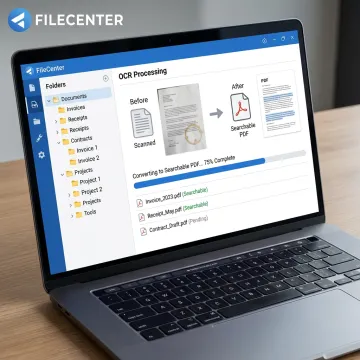
Convert scanned documents into searchable PDFs so teams can quickly find contracts, invoices, patient records, tax forms, insurance claims, and compliance documents by text content.

Turn scanned paperwork into searchable, editable, organized digital files with FileCenter OCR Software. Built for document-heavy teams in legal, accounting, healthcare, insurance, financial services, and compliance-driven industries, FileCenter combines OCR, scanning, PDF conversion, automated routing, and full-text search so your records are easier to find, manage, and use.
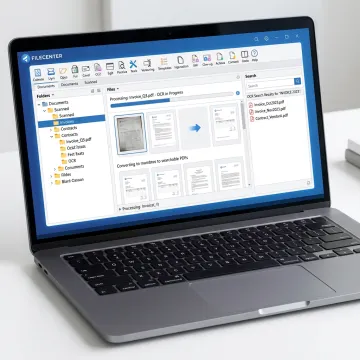
FileCenter combines OCR, scanning, PDF conversion, search, routing, and workflow automation in one document platform.
Convert scanned documents into searchable PDFs so teams can quickly find contracts, invoices, patient records, tax forms, insurance claims, and compliance documents by text content.
Digitize paper records directly into organized folders, helping teams reduce filing cabinets and build efficient, searchable digital document repositories.
Locate files across large repositories using filenames, metadata, and full-text OCR search, improving speed and accuracy for document-heavy teams.
Convert Office files into PDFs and transform scanned PDFs into editable Word, Excel, or PowerPoint documents for faster document preparation.
Automatically name documents based on contents, barcodes, or zonal OCR data, then route files into the correct folders for consistent organization.
Automate OCR processing, PDF conversion, document routing, and filing tasks to reduce repetitive work and improve operational efficiency.
FileCenter OCR Software helps teams move from scattered paper and image-based PDFs to structured, searchable digital records. With scanning, OCR, PDF conversion, full-text search, automatic naming, and workflow automation, it reduces manual filing while improving access to critical information. Choose from scalable editions with one-time pricing and a 30-day money-back guarantee.
See how document-heavy teams simplify scanning, searching, filing, and PDF workflows with FileCenter.
FileCenter delivers practical OCR and document management features without enterprise-level complexity or cost.
One-time license pricing helps businesses control software costs without recurring subscription fees.
OCR, scanning, PDF editing, conversion, search, and routing work together in one platform.
Standard, Pro, and Pro Plus editions support individuals, small teams, and enterprise deployments.
A 30-day money-back guarantee lets teams evaluate OCR workflows before committing.
Practical document software built for busy teams.
FileCenter is built around a simple goal: powerful document management software at a price businesses can afford. The platform serves individual professionals, small businesses, medium enterprises, and large organizations that need practical tools for scanning, OCR, PDF editing, searchable filing, and workflow automation. Rather than forcing teams into expensive enterprise systems or recurring subscriptions, FileCenter offers scalable one-time purchase editions with professional-grade features. Its focus on low-cost, high-function document management makes it a strong fit for legal, accounting, healthcare, insurance, financial services, real estate, government, and other document-heavy industries.
The best OCR software depends on your document volume, workflow, and need for search, editing, and automation. FileCenter is designed for businesses that want OCR plus document management, PDF tools, scanning, file search, automated naming, and folder organization in one system. It is especially useful for accounting, legal, healthcare, insurance, financial, and compliance-heavy teams.
Get practical guidance on scanning, OCR, and document workflows.

Risk-free evaluation for every edition
Premium OCR accuracy in Pro Plus
Advanced recognition for scanned documents
Tell us how your team stores, scans, and searches documents so we can help you choose the right FileCenter edition.
To help us assist you faster, please include the reason for your message so the relevant team can reach out as soon as possible.
To help us assist you faster, please include the reason for your message so the relevant team can reach out as soon as possible.