Introduction
PDFs are still the backbone of business paperwork in 2026: contracts, invoices, medical records, and compliance filings all pass through them daily. Many teams struggle with the same problems: bloated subscription costs, weak OCR on scanned files, and editors that can't keep sensitive documents secure.
The market is shifting. Businesses are pushing back against recurring SaaS fees and looking for one-time-purchase tools that still deliver professional editing, accurate OCR, secure storage, and real document organization, not just basic annotation.
This guide compares the top PDF editors of 2026 across pricing, features, OCR accuracy, security, and platform support. Use it to match the right tool to your actual workflow, not just a familiar brand name.
Key Takeaways
- Adobe Acrobat Pro offers the most complete editor, but $239.88/year adds up fast for teams.
- FileCenter delivers professional PDF editing and OCR for a one-time $97 to $297 fee.
- Foxit, PDF Expert, and PDF-XChange Editor serve budget-conscious Windows and Mac users.
- Free tools like PDFgear handle basic edits but struggle with OCR and security.
- Match your choice to editing depth, OCR accuracy, and pricing, not brand name.
Overview of PDF Editors in the Document Management Market
A PDF editor does more than a reader or annotator. Readers let you view and mark up files. Editors let you rewrite text, rebuild pages, convert scans into searchable text, and lock down sensitive content with redaction and encryption.
That distinction matters across legal, healthcare, accounting, real estate, and government workflows, where documents move through review, signature, and archiving stages every day. Demand for this category keeps climbing as more organizations digitize these processes.
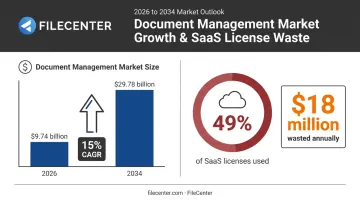
The global document management system market is projected to grow from $9.74 billion in 2026 to $29.78 billion by 2034, a 15% annual growth rate.
At the same time, buyers are questioning what they're actually paying for. Organizations used only 49% of their provisioned SaaS licenses in 2024, wasting an average $18 million annually on unused software. That kind of waste has pushed many teams toward one-time-purchase alternatives that skip recurring fees entirely.
None of this means one editor wins for everyone. The right pick depends on:
- Editing depth - light annotation versus full text and image rewriting
- OCR quality - how well the tool converts scanned paper into searchable, editable text
- Security - encryption, redaction, and where files get processed
- Pricing model - subscription versus one-time purchase
- Platform support - Windows, Mac, mobile, or cross-platform
We evaluated the tools below against each of these factors, not just brand recognition.
Top PDF Editors in 2026
Each tool was selected based on editing depth, OCR and document intelligence, security, pricing model, and platform support, using the same criteria outlined above.
Adobe Acrobat Pro
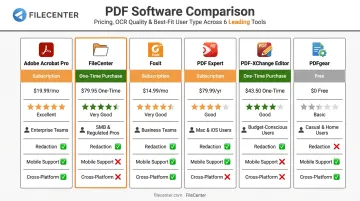
Adobe Acrobat Pro is the original PDF editor and still the industry benchmark for full-featured editing and cloud collaboration. It packs in redaction, form creation, and an AI assistant that summarizes documents and answers questions with citations.
That breadth comes at a cost: the Pro tier runs $239.88 per year, and the lighter Standard tier still costs $179.88 per year, a recurring expense that adds up fast for teams of any size.
| Pricing | Standard: $179.88/year · Pro: $239.88/year |
| Key Features | Full text/image editing, e-signatures, AI Assistant summarization, redaction, advanced security |
| Best For | Enterprises and professionals who need an all-in-one, cloud-connected solution regardless of cost |
FileCenter
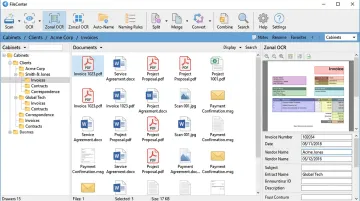
FileCenter takes a different approach. It's built for organizations that need to organize, search, and edit high volumes of documents, not just mark up individual PDFs. It combines professional-grade PDF editing with Zonal OCR, automatic file naming, and network administration tools, sold as a one-time purchase instead of a subscription.
Because FileCenter operates as an overlay on the Windows file system rather than its own database, files stay in standard Windows folders. That means Dropbox, Google Drive, and OneDrive sync normally, and your existing network security controls carry over automatically.
Every edition ships with a 30-day money-back guarantee and a 15-day free trial that requires no credit card.
| Pricing | One-time purchase: Standard $97 · Pro $197 · Pro Plus $297. No recurring fees; multi-user and competitor-migration discounts available |
| Key Features | PDF editing/annotation, Zonal OCR with ReadIris and Tesseract engines (Pro Plus), automatic document routing, Bates stamping, barcode support |
| Best For | Law firms, accounting practices, healthcare providers, and other document-heavy businesses that need editing plus organization in one tool |
Foxit PDF Editor
Foxit has competed with Adobe for years, offering a familiar ribbon interface and business-ready collaboration tools. Its Editor+ plan adds AI Smart Redact for batch-identifying sensitive information, mobile editing, and legally binding e-signatures, landing close to Adobe's functionality at a lower price and lighter system footprint.
| Pricing | PDF Editor: $129.99/user/year · PDF Editor+: $159.99/user/year (volume discounts up to 30% for larger teams) |
| Key Features | Content editing, e-signatures, AI-assisted redaction, cloud storage integration, batch processing |
| Best For | Teams wanting an Adobe alternative with enterprise document tracking features |
PDF Expert
PDF Expert fills a gap Apple never addressed: a native, full-featured PDF editor for iOS. It syncs across Mac, iPhone, and iPad, and its AI Chat assistant summarizes long documents with clickable page references.
| Pricing | Premium: $79.99/year (Mac, iPhone, iPad) · Lifetime: $139.99 one-time (Mac only) |
| Key Features | Page management, scan-to-editable conversion, annotation, AI-powered document chat, OCR |
| Best For | Mac, iPad, and iPhone users who need a native, cross-device editing experience |
PDF-XChange Editor
PDF-XChange Editor is frequently cited as the best low-cost alternative to Adobe on Windows. It bundles OCR, advanced annotation, measurement tools, and JavaScript support into a customizable interface for a fraction of what premium competitors charge.
| Pricing | Editor: $62 perpetual license · Editor Plus: $79 perpetual license (includes one year of maintenance) |
| Key Features | Text editing, OCR via Tesseract 5.3, stamps, JavaScript support, split-page tools |
| Best For | Windows power users who want maximum features per dollar |
PDFgear
PDFgear is completely free across Windows, macOS, Android, and iOS, covering merging, splitting, converting, and basic editing with no sign-up or credit card required. The catch: independent testing found its OCR can produce unusable results on scanned documents, and editing can disrupt paragraph flow.
| Pricing | Free |
| Key Features | Merge/split, compress, basic text editing, screenshot-based OCR |
| Best For | Casual users making occasional edits who don't need advanced OCR or security |
How We Chose the Best PDF Editors
We scored every tool on this list against five factors: editing depth, OCR and document intelligence, security, pricing model, and platform support. Brand recognition and marketing budget played no role in these rankings.
The most common buying mistake? Picking a tool based on name recognition or sticker price alone, without checking whether its OCR accuracy or document organization features actually match daily workflow. A law firm scanning decades of case files needs zonal OCR and automatic naming far more than a flashy AI chat feature.
Security carried heavy weight in this evaluation, especially for regulated industries. HHS guidance makes clear that a cloud service handling protected health information counts as a business associate under HIPAA, even if it only stores encrypted data and never holds the decryption key.
Uploading sensitive files to a cloud-based converter can create compliance exposure that a local, offline editor avoids entirely.
We looked specifically at:
- Whether redaction is truly permanent or just a visual overlay
- How OCR engines handle multi-language and complex layouts
- Whether files are processed locally or routed through third-party servers
- How pricing scales for a five-person team versus a 500-person enterprise
Tools that failed on irreversible redaction or reliable OCR lost points, regardless of how polished their interface looked.
Free vs. Paid PDF Editors: What Do You Actually Need?
Free tools typically cover the basics: overlay annotations, simple merges, and light format conversions. Paid tools unlock in-place text editing, accurate OCR, batch processing, and compliance-grade security, the features document-heavy businesses rely on.
| Capability | Free Tools | Paid Tools |
|---|---|---|
| Form handling | Basic form filling | Advanced form creation and data extraction |
| File processing | Single-file only | Batch automation across folders |
| Security | Password lock only | Redaction, encryption, audit-ready sanitization |
| OCR | Inconsistent, screenshot-based | Multi-language, zonal, high-accuracy engines |
| Editing | Overlay annotations | True in-place text and image editing |
The gap shows up fastest with OCR. A free tool might scan a contract and produce readable-looking text that's riddled with errors — fine for a quick reference, risky for anything you'll rely on later.
That reliability gap is exactly where one-time-purchase tools split the difference between free and premium subscriptions. FileCenter, for example, packages professional-grade document tools for a single upfront payment:
- OCR powered by ReadIris and Tesseract engines (Pro Plus edition)
- True in-place text editing and automated document routing
- One-time pricing from $97 to $297, no monthly bill, ever
- 30-day money-back guarantee to test it against your actual workflow
Conclusion
There's no single best PDF editor for 2026, only the best fit for how you actually work. Casual users editing a handful of files a year can get by fine with a free tool like PDFgear. But document-heavy businesses in legal, healthcare, accounting, or real estate need something sturdier: accurate OCR, real redaction, and built-in organization.
Before you commit, weigh total cost of ownership, not just the sticker price. A $239.88-a-year subscription might look manageable until you multiply it across a ten-person team for five years. A one-time purchase can look expensive upfront and still cost far less over time.
If you're ready to move past recurring subscription fees without giving up professional editing and OCR, FileCenter offers a full-featured alternative starting at $97 with no monthly bill attached. The 30-day money-back guarantee makes it a low-risk way to test the switch.
Frequently Asked Questions
Which PDF editor is best?
Adobe Acrobat Pro is the most complete editor overall, thanks to its redaction and AI-powered forms tools. But one-time-purchase options like FileCenter or PDF-XChange Editor match its core editing and OCR capability for a fraction of the ongoing cost.
What is the safest PDF editor?
The safest tools combine encryption, password protection, and true redaction that removes hidden text and metadata, not just a black box overlay. Local or offline processing adds another layer of safety since files never leave your system.
What is the best free PDF editor in 2026?
PDFgear covers merging and splitting PDFs, plus basic edits, across four platforms at no cost. Its OCR and formatting accuracy still lag behind paid tools, so it's best reserved for occasional, low-stakes edits.
Can I edit a PDF without Adobe Acrobat?
Yes. FileCenter, Foxit, and PDF-XChange Editor all handle text editing and annotation at a lower cost than Adobe, with PDF conversion built in and a one-time or lower-cost licensing option instead of a subscription.
What's the best PDF editor for document-heavy businesses like law firms or healthcare providers?
For these industries, OCR accuracy and automatic document organization matter more than basic editing. FileCenter's Zonal OCR and automatic file naming are built for exactly this kind of high-volume, compliance-sensitive workflow.
Do PDF editors work on mobile devices?
Most modern editors, including Adobe, Foxit, and PDF Expert, offer mobile apps for viewing and annotating documents, plus signing on the go. Deep editing tasks like redaction or batch OCR are still best handled on desktop.