Introduction
Most offices in 2026 aren't paperless. They're stuck in an awkward hybrid: scanned PDFs, email attachments, shared drives, and the occasional paper folder someone still swears by. That mix creates chaos.
Atlassian's 2024 State of Teams study found that 55% of 5,000 knowledge workers across the US, Australia, India, Germany, and France struggled to find information they needed. Teams using better-structured search and workflow tools cut their search time in half.
Document workflow management software fixes this by automating how files move from intake to storage to retrieval. For legal, healthcare, and finance teams, this speed can decide whether you pass an audit or scramble through folders while a regulator waits.
This guide breaks down what document workflow software actually does, six platforms worth considering in 2026, and how to pick the right one for your budget and industry.
TL;DR
- Automates document intake, routing, storage, and retrieval, replacing manual filing bottlenecks
- Reduces operational costs and compliance risk across document-heavy industries like legal, healthcare, and finance
- Prioritize OCR/PDF accuracy, pricing transparency, scalability, and compliance support over brand recognition
- Compares six platforms: FileCenter, DocuWare, M-Files, eFileCabinet, PandaDoc, and Laserfiche
Overview of Document Workflow Management Software in 2026
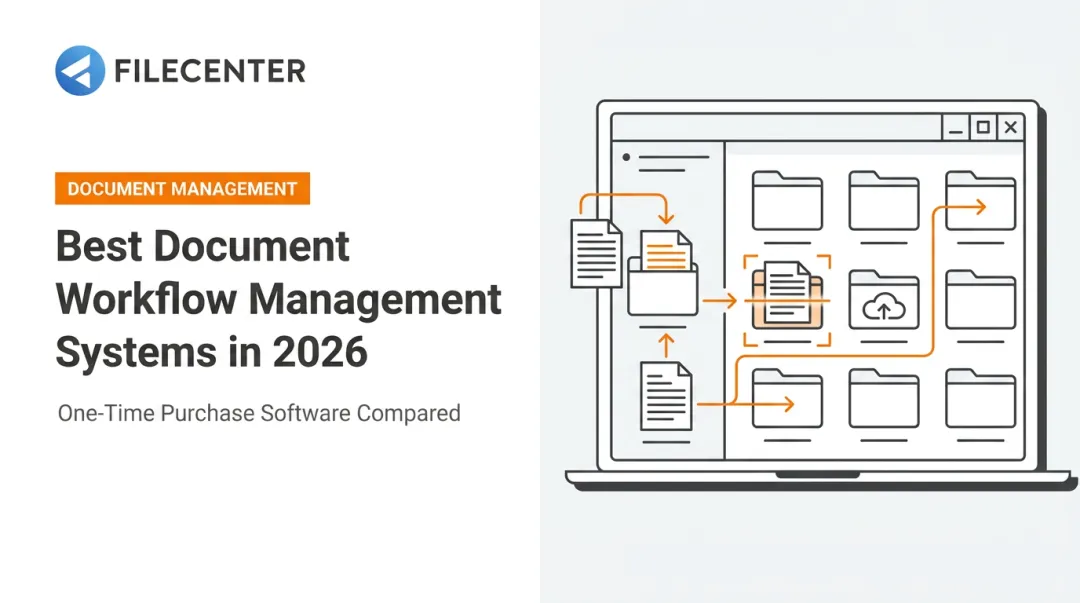
Document workflow management software automates the path a file takes from the moment it's captured to the moment someone needs it again. No one has to manually sort, name, or email it along the way. As hybrid work becomes standard practice, more businesses are digitizing that path end to end.
The numbers back up the shift. Fortune Business Insights values the document management systems market at $8.32 billion in 2025, projecting growth to $9.74 billion in 2026 and $29.78 billion by 2034, a 15% compound annual growth rate. The broader workflow automation category, which includes document routing alongside other business processes, is expected to hit $26.01 billion in 2026 according to Mordor Intelligence.
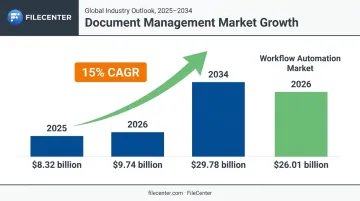
That growth isn't abstract. It reflects real teams replacing filing cabinets and shared drives with systems that actually track where a document is in its lifecycle.
With that lifecycle in mind, this guide covers two things: the process stages every document moves through (intake, routing, storage, retrieval) and the specific platforms built to manage each one.
Top Document Workflow Management Software for 2026
Every platform on this list was evaluated against four criteria: OCR and PDF accuracy, pricing transparency (one-time versus subscription), scalability across business sizes, and industry-specific compliance support.
FileCenter
FileCenter is built for professionals and businesses who want centralized filing, OCR, and PDF editing without signing up for a subscription. It's a one-time purchase, which sets it apart from nearly every competitor on this list.
What makes it stand out:
- One-time pricing across three editions (Standard, Pro, Pro Plus) with no recurring fees
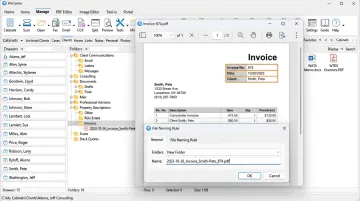
- Zonal OCR with automatic file naming, so scanned documents get sorted and labeled without manual input
- Access to both **ReadIris and Tesseract OCR engines** in the Pro Plus edition for text recognition
- A 30-day money-back guarantee on every edition
| Category | Details |
|---|---|
| Key Features | Automatic document routing/separation, OCR-based full-text search, PDF editing and annotation, Bates stamping, network sharing (Pro Plus) |
| Pricing | One-time fee: Standard $97, Pro $197, Pro Plus $297. New users get 25% off (up to $74 in savings), and competitor-migration discounts are available |
| Best For | Small to mid-sized businesses, legal and accounting firms, and document-heavy teams that want enterprise-grade features without enterprise-grade bills |
FileCenter Automate, part of the Pro Plus tier, monitors scanner output folders and handles OCR, PDF conversion, and routing automatically. That's useful for teams running high-speed network scanners across multiple departments.
A common use case: a law firm creates one named separator per case, scans a stack of mixed documents, and FileCenter automatically splits and files each one into the correct case folder, no manual sorting required.
DocuWare
DocuWare is a cloud-based platform built for distributed and remote teams that need secure, preconfigured document processes without building automation from scratch.
Its differentiators center on how it finds and handles documents:
- Intelligent Indexing classifies documents automatically and extracts index terms without manual data entry
- Flexible metadata search with wildcard support for tracking down files fast
- Annotation tools that mark up documents without altering the original file
| Category | Details |
|---|---|
| Key Features | Digital invoice indexing, preconfigured workflows, advanced search with wildcards |
| Pricing | Subscription-based, per named user. US pricing is quote-based and scales with user count and configuration needs |
| Best For | Distributed and remote teams needing cloud-first collaboration |
M-Files
M-Files organizes documents by what they are, not where they're saved. Instead of nested folders, it uses metadata and AI to build relationships between files.
The core differentiator is dynamic retrieval:
- Documents surface through metadata tags (client name, contract type, project number) rather than a folder path
- A knowledge graph connects related files through business context automatically
- Built-in workflow automation routes documents for approval based on their metadata state
| Category | Details |
|---|---|
| Key Features | AI-powered metadata tagging, version control, workflow automation for approvals |
| Pricing | Tiered. Essentials starts at $65/seat/month; Enterprise pricing is quote-based depending on scale and compliance needs |
| Best For | Enterprises and regulated industries needing advanced metadata search and audit trails |
eFileCabinet
eFileCabinet, now operating under the Revver brand, is built for cross-departmental use across HR, finance, legal, and IT, with encrypted sharing baked in.
Two features do the heavy lifting here:
- A dual-screen Version Comparison View that shows two document versions side by side
- No-code automated workflows that route documents based on harvested form data, with support for multiple approvers
| Category | Details |
|---|---|
| Key Features | Encrypted portal sharing, automated file routing, side-by-side version comparison |
| Pricing | Per-user monthly. Basic starts at $25/user/month, Essentials at $67/user/month, Full at $87/user/month |
| Best For | Mid-size organizations coordinating workflows across multiple departments |
PandaDoc
PandaDoc skips general document storage entirely and focuses on the sales pipeline: creating, sending, tracking, and signing proposals and contracts.
What makes it fast for closing deals:
- Template-based document creation for proposals and contracts
- Real-time tracking and analytics showing when a prospect opens or lingers on a document
- Legally binding e-signatures built directly into the workflow, no third-party tool needed
| Category | Details |
|---|---|
| Key Features | Document creation templates, tracking and analytics, legally binding e-signatures |
| Pricing | Starter plan is $19/seat/month billed annually; Business is $49/seat/month. A free plan covers up to 60 documents per year |
| Best For | Sales teams needing quick proposal-to-signature workflows |
Laserfiche
Laserfiche has spent years embedded in compliance-heavy sectors like government and healthcare, and its feature set reflects that history.
Its strengths lean toward records governance:
- Records retention scheduling that automates how long documents are kept before disposition
- Configurable business process automation for approvals and routing
- Audit trail reporting for regulatory documentation
| Category | Details |
|---|---|
| Key Features | Records retention scheduling, configurable workflow automation, audit trail reporting |
| Pricing | Plans start around $50/user/month; published annual plans include Professional at $73/user/month (five-user minimum) and Business at $93/user/month. Larger deployments are quote-based |
| Best For | Government agencies and compliance-driven organizations managing high-volume records |
How We Chose the Best Document Workflow Management Software
The most common mistake businesses make is picking software based on brand recognition instead of matching features to actual document volume and compliance requirements. A five-person accounting firm doesn't need the same platform as a hospital system managing HIPAA-regulated records.
We weighted four factors against measurable outcomes:
- OCR accuracy: This directly affects how much manual correction your team does after scanning, which eats into any time savings
- Pricing transparency: One-time versus subscription pricing changes your total cost of ownership dramatically over three to five years
- Integration compatibility: How well a platform connects with existing tools determines rollout speed and disruption
- Security certifications are non-negotiable for regulated industries, where audit failures carry real financial penalties
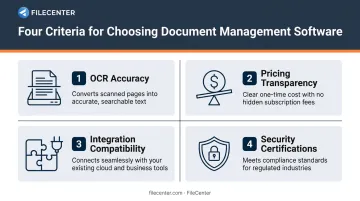
Platforms that scored well delivered on at least three of these without forcing a trade-off.
Conclusion
The right document workflow platform depends on your document volume, industry compliance needs, and budget, whether you run a five-person firm or a multi-department enterprise.
Before committing, test scalability and ask about ongoing support. Then calculate total cost, including any hidden subscription fees that creep in over time.
For businesses that want professional-grade OCR, PDF editing, and workflow automation without recurring charges, FileCenter's 15-day free trial and 30-day money-back guarantee make it a low-risk place to start comparing.
Frequently Asked Questions
What is the document management workflow process?
It's the structured path a document follows through its lifecycle: intake, routing, review or approval, storage, and retrieval. Software automates each stage so files don't get lost between steps.
What are the stages of document management?
The core stages are capture/intake, organization/indexing, storage, retrieval, and archiving/disposal. Each stage builds on the last to keep documents findable and compliant.
What is the difference between document management software and document workflow software?
Document management software focuses on storing and retrieving files. Workflow software builds on that foundation with automated routing and approval tracking.
How much does document workflow management software cost in 2026?
Pricing ranges from one-time purchases (like FileCenter's $97–$297 editions) to per-user monthly subscriptions ($19–$93+ per seat). Cost mainly depends on user count and whether the deployment is cloud-hosted or on-premises.
Can document workflow software integrate OCR and PDF editing in one platform?
Yes. Most modern platforms, including FileCenter, combine OCR-based scanning, searchable text conversion, and PDF editing in a single tool, eliminating the need for separate third-party software.
Is document workflow management software suitable for small businesses?
Yes, especially budget-scalable options with tiered editions. One-time pricing models like FileCenter's avoid the recurring subscription costs that make enterprise platforms harder to justify for smaller teams.