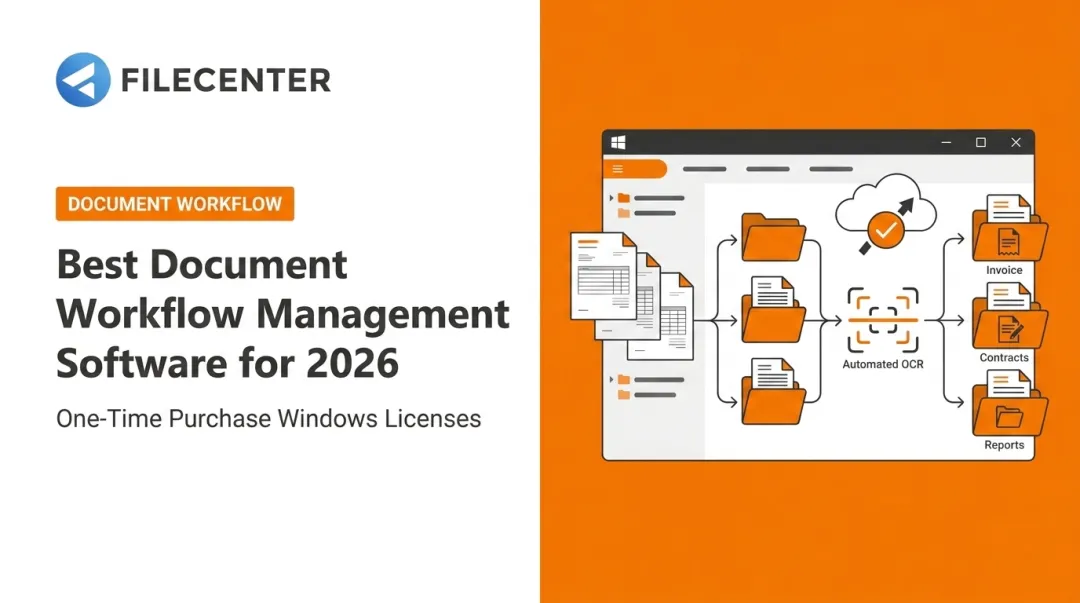
That chaos has a direct cost. A document workflow management system fixes it by automating routing, approvals, and storage in one connected process, instead of relying on shared drives and email chains that break down the moment someone's out of office.
This guide compares the top document workflow management systems heading into 2026, from affordable one-time-purchase tools like FileCenter to enterprise platforms like DocuWare and SharePoint, so you can match the right system to your actual workflow, not just your budget.
Key Takeaways
- Document workflow systems automate routing, approvals, OCR, and version control—not just storage
- Options range from FileCenter's one-time purchase to enterprise platforms like DocuWare, M-Files, and SharePoint
- Your best fit depends on OCR needs, integrations, industry compliance, and total cost of ownership
- Prioritize ease of use, security, and scalability, not just the sticker price
Overview of Document Workflow Management Systems in 2026
A document workflow management system governs a document's full lifecycle: creation, routing, approval, storage, and retrieval. That's a meaningful step up from basic file storage, where documents just sit until someone remembers to look for them.
The market reflects that shift. Grand View Research projects the global document management system market will reach $9.9 billion in 2026, climbing to $18.1 billion by 2030. Businesses aren't just digitizing paper anymore. They're automating the decisions and handoffs that used to require a person chasing down approvals.
The systems below made this list for their automation depth, affordability, and fit across document-heavy industries like legal, accounting, healthcare, and real estate.
What Is a Document Workflow Management System?
A workflow system automates handoffs. Instead of emailing a contract to three people and hoping someone replies, the system routes it automatically, notifies the next approver, and logs every step.
Two terms often get used interchangeably, though they're not quite the same. Document workflow describes the movement of a single document through defined steps: draft, review, approve, file. Document management workflow covers the broader lifecycle, including storage, retrieval, retention, and deletion.
Most modern platforms handle both. But if you're evaluating software, know which one you actually need. A small firm might just need reliable routing. A regulated business needs the full lifecycle, with audit trails to prove it.
Key Features to Look For
Not every "document management" tool actually manages workflow. Here's what separates the two:
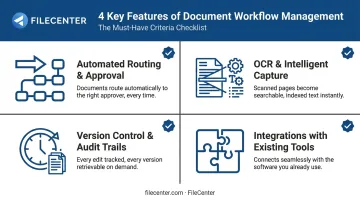
- Automated routing and approval rules: documents move to the right person without someone manually forwarding them
- OCR and intelligent capture: scanned paper becomes searchable, editable, and automatically named
- Version control and audit trails: every edit and approval is tracked for compliance and accountability
- Integrations with existing tools: Microsoft 365, accounting software, and CRMs so the system becomes a hub, not another silo
Skip any of these, and you're likely buying a glorified filing cabinet with a search bar.
Top Document Workflow Management Systems in 2026
We evaluated each system on automation depth, affordability, security, industry fit, and how quickly it can actually be deployed. Some of these are enterprise-grade platforms with custom pricing. Others, like FileCenter, are built for teams that want capable automation without a subscription bill showing up every month.
FileCenter
FileCenter is document management software built for individual professionals, small-to-medium businesses, law firms, accounting practices, and other document-heavy industries that need affordable digital filing without enterprise overhead.
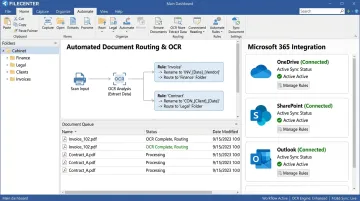
Unlike subscription competitors, FileCenter sells software as a one-time purchase. You get professional-grade OCR, PDF editing, and automated document routing without a recurring bill chipping away at your budget every month.
| Category | Details |
|---|---|
| Pricing | One-time purchase across three editions — Standard ($97), Pro ($197), Pro Plus ($297). No recurring fees, 25% off your first license, 30-day money-back guarantee |
| Key Features | Zonal OCR with automatic file naming, automatic document routing and separation, barcode support, network administration tools (Pro Plus) |
| Best For | Small businesses, legal, accounting, healthcare, and real estate professionals wanting affordable workflow automation with no subscription |
The Pro Plus tier is where automation gets serious:
- Barcode-based routing that sorts incoming documents automatically
- Content-based file naming pulled straight from document text
- Network administration tools that let a small IT team push settings across every workstation instead of configuring machines one by one
It also integrates directly with OneDrive, SharePoint, and Outlook, so it slots into a Microsoft-based office without forcing a workflow overhaul.
Businesses switching from tools like PaperPort or Neat Desk may also qualify for special upgrade pricing — worth a quick call to FileCenter's sales team before you commit elsewhere.
DocuWare
DocuWare pairs document management with a built-in workflow engine, connecting metadata-driven storage to automated invoice, HR, and contract workflows.
Its strength is triggers: when a document's status changes, DocuWare kicks off the next workflow step automatically. Both cloud and on-premises deployment options make it viable for regulated industries that can't put everything in the cloud.
| Category | Details |
|---|---|
| Pricing | Custom quote after a discovery call or demo. UK pricing runs £57 to £20 per named user on a sliding scale; US pricing isn't published |
| Key Features | Workflow Designer, intelligent indexing, e-signature integration, deep ERP and accounting connections |
| Best For | Mid-size to large organizations automating invoice processing, HR files, and contract management |
If you're already running SAP or Sage, DocuWare's integration library (500+ applications) makes it a strong contender. Just budget time for the implementation workshop most vendors this size require.
M-Files
M-Files takes a different approach entirely. Instead of forcing you to migrate everything into a new system, it uses metadata to unify documents across the systems you already have.
That means less disruption during rollout, and it's why smaller teams that don't want a full platform migration tend to gravitate toward it.
| Category | Details |
|---|---|
| Pricing | Essentials starts at $65 per seat/month, typically billed annually. Enterprise tier requires a custom quote. 30-day free trial available |
| Key Features | OCR-enhanced search, automated workflow rules, compliance tracking, granular access permissions |
| Best For | Small to mid-sized businesses wanting flexible, metadata-based workflow automation |
The flexibility cuts both ways, though. You're paying only for what you use, but Enterprise-level compliance features require a custom quote, so pinning down your final cost takes a sales conversation.
Laserfiche
Laserfiche combines document management with broader business process automation, including electronic forms and analytics dashboards.
It leans heavily on industry-specific templates for accounting, construction, education, and healthcare, which shortens the setup curve if your workflows already match a common pattern.
| Category | Details |
|---|---|
| Pricing | Cloud Starter begins at $53 per user/month, billed annually. Professional (with forms and analytics) starts at $73/user/month |
| Key Features | Business process management, electronic forms, workflow analytics, enterprise content tools |
| Best For | Organizations automating case management, onboarding, or approval-heavy processes |
One thing to watch: custom forms and process analytics live in the Professional tier, not Starter. If those features are the reason you're considering Laserfiche, budget for the higher plan from the start.
SharePoint
Microsoft's long-standing document management solution stays relevant because of one thing: deep integration across the Microsoft 365 ecosystem.
If your team already lives in Outlook, Teams, and Excel, SharePoint's alerts and workflows feel native rather than bolted on.
| Category | Details |
|---|---|
| Pricing | SharePoint Online Plan 1 has historically started around $5/user/month standalone; bundled Microsoft 365 Business plans start at $7/user/month |
| Key Features | Document libraries, metadata-based content management, automated alerts and workflows, role-based site access |
| Best For | Large organizations needing segmented access policies within the Microsoft ecosystem |
SharePoint's deep Microsoft integration only pays off if your organization is already standardized on Microsoft 365. If your team runs a mixed toolset, the setup gets more complex fast.
How We Chose the Best Document Workflow Management Systems
The most common mistake businesses make? Picking a system because everyone's heard of it, or because it has the longest feature list. Neither of those tells you whether it fits how your team actually works.
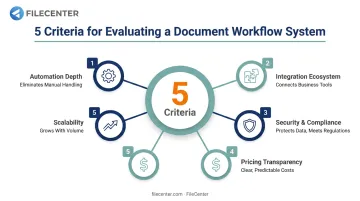
We weighed five factors instead, each tied to a real business outcome:
- Automation depth: does it actually reduce manual routing, or just digitize the same manual process?
- Integration ecosystem: does it connect to tools you already use, cutting duplicate data entry?
- Security and compliance support: audit trails and permission controls that hold up under regulatory scrutiny
- Pricing transparency: can you get a real number without three sales calls?
- Scalability: will it still work when your team doubles, or your document volume triples?
A system that scores well on automation but poorly on transparency might still be the right call for a large enterprise with a dedicated procurement team. A five-person accounting firm needs the opposite: clear pricing upfront and automation that works without a six-week onboarding process.
How Much Does a Document Workflow Management System Cost?
Pricing in this category splits into two models, and picking the wrong one can drain your budget over a few years.
Per-user monthly subscriptions:
- Laserfiche Cloud Starter: $53/user/month
- M-Files Essentials: $65/seat/month
- SharePoint Plan 1: roughly $5-7/user/month standalone or bundled
One-time license purchases: FileCenter charges $97 to $297 per license, paid once, with no recurring fee.
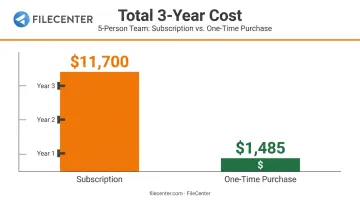
Run the math over three years and the gap becomes obvious. A five-person team on a $65/seat monthly plan pays roughly $11,700 over three years. The same team on FileCenter's Pro Plus edition pays a one-time $1,485 total, with no renewal to think about.
Watch for these hidden costs before signing anything:
- Implementation workshops (some vendors require multi-day onboarding sessions)
- Data migration from legacy systems
- Training time, especially for platforms with steep learning curves
- Add-on modules for compliance or reporting features not included in base pricing
A one-time purchase model with a 30-day money-back guarantee, like FileCenter's, reduces that risk considerably. You're not locked into a subscription while you figure out whether the software actually fits your workflow.
Conclusion
The best document workflow management system matches your compliance requirements, your team size, and how your documents actually move through your business. Popularity alone doesn't guarantee the right fit.
Before you commit, weigh these factors:
- Scalability as your team and document volume grow
- Compatibility with the tools you already use
- Total cost of ownership over three to five years, not just the first invoice
If you're a small business, legal practice, or accounting firm tired of recurring subscription costs, FileCenter's 30-day money-back guarantee gives you a risk-free way to test affordable workflow automation firsthand.
Frequently Asked Questions
What is a workflow in a document management system?
A workflow is the defined path a document follows through creation, review, approval, and storage. Automated rules determine who acts next, removing the need for manual follow-up.
What is the difference between DMS and ECM?
A DMS focuses on storing, organizing, and retrieving individual documents. ECM (Enterprise Content Management) is broader, covering content across an entire organization, including workflows, records, and governance.
What features should I look for in a document workflow management system?
Prioritize automated routing, OCR and data capture, version control, permission-based security, and integrations with the business software you already use.
How much does document workflow management software typically cost?
Costs range from one-time purchase licenses, like FileCenter's $97-$297 tiers, to per-user monthly subscriptions running $50-$65 per seat. Factor in setup and training costs too.
Can document workflow systems integrate with tools like Microsoft 365 or QuickBooks?
Most modern systems integrate with common business tools. Confirm compatibility with your specific software stack upfront to avoid duplicated data entry later.
Is a one-time purchase document management system better than a subscription model?
One-time purchases eliminate recurring fees and often lower long-term costs for smaller teams. Subscriptions tend to suit businesses needing constant cloud updates and rapid scaling flexibility.