Document Management
FileCenter organizes scanned and digital files through a familiar Windows-based filing system, helping teams store, retrieve, and manage records without proprietary database complexity.

FileCenter helps businesses choose a smarter way to organize, scan, search, edit, and secure documents in 2026. With affordable one-time pricing, OCR, PDF tools, workflow automation, and cloud-compatible access, it gives professionals the features of higher-cost enterprise systems without subscription complexity or unnecessary overhead.
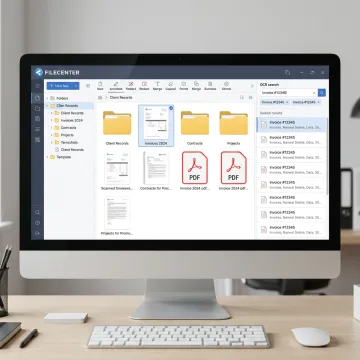
Explore FileCenter features for scanning, OCR, PDFs, search, workflow automation, and organized digital filing.
FileCenter organizes scanned and digital files through a familiar Windows-based filing system, helping teams store, retrieve, and manage records without proprietary database complexity.
Scan paper records directly into structured folders, making it easier to transition from physical files to searchable digital document collections across departments or clients.
Convert scanned documents into searchable PDFs so teams can quickly find contracts, invoices, forms, claims, case files, and compliance records by text.
Automate OCR processing, PDF conversion, routing, and filing tasks to reduce manual document handling and improve consistency across recurring business workflows.
Create, edit, annotate, merge, split, convert, and organize PDFs without relying on separate expensive tools for everyday document preparation.
Locate documents quickly using file names, metadata, and full-text OCR search across large repositories, improving productivity for document-heavy teams.
FileCenter brings scanning, OCR, PDF editing, file search, folder templates, and automated routing into one practical document management platform. Instead of forcing teams into complex enterprise systems, it works with familiar Windows folders and everyday office workflows. The result is faster filing, easier retrieval, lower software costs, and a cleaner path from paper-heavy processes to organized digital records.

See how smarter filing, searchable records, and automated workflows help document-heavy teams work faster.
FileCenter combines professional-grade document tools with pricing built for real-world business budgets.
One-time purchase options help teams avoid recurring subscription costs and budget more confidently.
Scanning, OCR, PDF editing, search, and routing work together in one practical platform.
FileCenter works with familiar Windows folders, Office workflows, and common save/open dialogs.
Standard, Pro, and Pro Plus editions support individuals, small businesses, and larger deployments.
Practical software expertise for document-heavy businesses and professionals.
FileCenter is built for professionals and organizations that need powerful document management without enterprise-level cost or complexity. Its platform focuses on practical digital filing, scanning, OCR, PDF editing, automated routing, and fast search for the way real offices manage records every day. Serving users across the United States, FileCenter supports individual professionals, small businesses, medium enterprises, and larger organizations in fields where documents drive daily operations. With scalable Standard, Pro, and Pro Plus editions, the company gives teams flexibility to start simple, expand functionality, and maintain control over pricing through one-time purchase options instead of recurring subscription fees.
The most common document management systems include cloud storage platforms, enterprise content management tools, industry-specific filing systems, and Windows-based electronic filing software like FileCenter. Businesses often compare options based on scanning, OCR, PDF editing, search, security, workflow automation, and cost. FileCenter is designed for document-heavy teams that want professional features without high enterprise pricing or ongoing subscription fees.
Get clear answers before choosing your document management software.

Risk-free evaluation across all editions.
Transparent pricing without recurring subscriptions.
Advanced text recognition for searchable files.
Tell us about your document volume, workflow needs, and preferred edition so you can choose the right FileCenter solution with confidence.
To help us assist you faster, please include the reason for your message so the relevant team can reach out as soon as possible.
To help us assist you faster, please include the reason for your message so the relevant team can reach out as soon as possible.