The good news: OCR has moved well past simple text scanning. Today's tools read a document the way a bookkeeper would, pulling out vendor names, VAT numbers, line items, and totals, then dropping that data straight into your accounting stack.
This guide compares the top OCR solutions for accounting in 2026. You'll get pricing models, standout features, and a clear framework for picking the tool that actually fits your document volume and budget.
Key Takeaways
- OCR now extracts structured accounting data (VAT, line items, totals), not just raw text
- Pricing spans one-time-purchase software like FileCenter to per-document SaaS subscriptions
- Only 4% of mid-market finance teams have automated accounts payable, per a 2026 Ottimate survey
- Most finance teams still rely on hybrid, review-based workflows
- Integration depth with QuickBooks, Xero, or Sage matters more than marketing claims about accuracy
Overview of OCR in the Accounting Industry
OCR in accounting means converting scanned invoices, receipts, and statements into digital, searchable data that bookkeeping software can immediately use. As document volume grows and finance teams stay remote or hybrid, manual entry simply doesn't scale.
The technology has changed shape. Basic OCR used to just capture text on a page. Now, AI-driven extraction identifies specific fields, like invoice totals, tax codes, and multi-currency amounts, without a human retyping any of it.
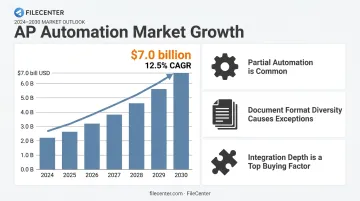
That shift is showing up in market numbers too. The global accounts payable automation market is projected to hit $7.0 billion by 2030, growing at a 12.5% CAGR from 2024, according to Grand View Research. Adoption is accelerating, but it's not universal:
- Most firms run partial automation, not full hands-off processing
- Document quality and format diversity still cause exceptions
- Integration with existing accounting software remains a top buying factor
With that backdrop, here's how the leading OCR tools for accounting stack up against each other.
Top 5 Best OCR Solutions for Accounting in 2026
We evaluated these tools on extraction accuracy, support for accounting-specific fields, integration depth, pricing structure, and fit across business sizes — from solo bookkeepers to enterprise AP teams.
FileCenter
FileCenter is document management and OCR software built for accounting firms, small businesses, and other document-heavy operations that need organized, searchable financial records without a monthly bill.
What sets it apart:
- One-time purchase pricing: no subscriptions, ever
- Zonal OCR with automatic file naming, which reads specific regions of a scanned invoice (like the vendor name or invoice number) and uses that text to name the file automatically
- ReadIris and Tesseract OCR engines included in Pro Plus for stronger text recognition
- Built-in PDF editing, so you're not paying for a separate PDF tool on top of your document manager
For a firm scanning stacks of invoices daily, this matters: FileCenter's Automated Scanning feature separates, names, and routes each document in a batch scan using separator sheets, no manual sorting required.
| Category | Details |
|---|---|
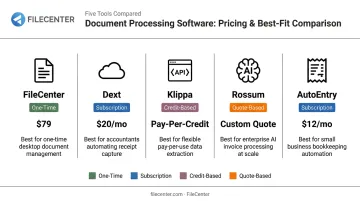
| Pricing | One-time cost from $97 (Standard) to $297 (Pro Plus), plus a 25% first-license discount (up to $74 off) and a 30-day money-back guarantee. No recurring fees. |
| Key Features | Zonal OCR, automatic document routing/separation, full-text search across scanned files, network sharing for team collaboration |
| Best For | Accounting firms and SMBs wanting affordable, on-premise document control without ongoing SaaS costs |
Dext
Dext is a pre-accounting automation platform that captures and categorizes data from invoices, receipts, and bank statements for accounting firms and small-to-mid-sized businesses.
Its edge is combining high-volume OCR accuracy with automatic transaction categorization, plus native integrations with QuickBooks, Xero, and Sage. Dext claims 99.9% accuracy on its capture, though that figure comes from the vendor rather than an independent audit.
| Category | Details |
|---|---|
| Pricing | Subscription-based, starting around $25/month equivalent ($302.50 billed annually) for a 250-documents/month, 5-user configuration |
| Key Features | Mobile capture, automatic categorization, integrations with 30+ accounting platforms |
| Best For | Accounting firms and bookkeepers managing multiple clients |
Klippa
Klippa (now operating under Doxis AI.dp) is an AI-driven document automation platform built around a flexible API for invoices, receipts, and purchase orders.
The differentiator here is developer access. Klippa offers a genuinely strong API, recognizes invoices across 100+ countries with multilingual and multi-currency support, and includes a manual validation interface so accountants can review and correct AI output before it hits the ledger.
| Category | Details |
|---|---|
| Pricing | License or usage-based, with a EUR 25 (~$27 USD) trial credit; exact rates require contacting sales |
| Key Features | Structured data extraction, multi-format support (JSON, CSV, XML, UBL), ERP/DMS integration via 50+ options |
| Best For | Companies needing custom integration into an existing accounting software ecosystem |
Rossum
Rossum is an Intelligent Document Processing (IDP) platform that uses AI to extract and validate data without relying on rigid templates.
That template-free approach is the real selling point. Rossum's deep-learning system keeps extracting accurately even when a vendor changes their invoice layout, which is a common headache for large enterprises processing thousands of documents monthly from different suppliers.
Rossum's own 2026 industry benchmarks cite 50-70% lower processing time and exception rates below 5% as achievable targets for document automation, per Rossum's Document Automation Trends 2026 report. These are cited industry figures, though, not results guaranteed for every deployment.
| Category | Details |
|---|---|
| Pricing | Starter plan from $18,000/year; Business, Enterprise, and Ultimate tiers are quote-based |
| Key Features | Template-free extraction, smart validation, ERP integration with SAP, NetSuite, Coupa, and Sage |
| Best For | Large enterprises and mid-sized companies processing diverse, high-volume documents |
AutoEntry (by Sage)
AutoEntry is a cloud-based OCR data entry automation tool built for accountants and bookkeepers, integrating directly with Sage, Xero, and QuickBooks.
It stands out for line-item capture, automatic supplier and nominal account memory (so it learns your coding preferences over time), and duplicate invoice prevention, a genuine time-saver for firms juggling dozens of clients.
Pricing runs on a credit system. Standard invoices use 1 credit, line-item invoices and supplier statements use 2, and bank or card statements use 3 per page. Credits roll over for up to 90 days.
| Category | Details |
|---|---|
| Pricing | Six monthly tiers from $13 (50 credits) to $469 (2,500 credits) |
| Key Features | Mobile app capture, purchase order matching, tax summary extraction |
| Best For | Bookkeeping firms managing high client volumes needing native Sage ecosystem integration |
How We Chose the Best OCR Accounting Software
We didn't rank these tools on brand recognition. Our process focused on three things:
- Extraction accuracy across formats: how each tool handles scanned PDFs, photographed receipts, and multi-page statements
- Accounting-specific field recognition — whether the software reliably pulls VAT numbers, IBANs, and invoice totals, not just generic blocks of text
- Integration depth, meaning native connections to QuickBooks, Xero, Sage, or ERP systems, versus requiring manual export/import
These three factors alone ruled out several well-known names. Pricing structure caused just as many mismatches, though for a different reason.
The most common buyer mistake is choosing based on name recognition alone, without checking whether a subscription or one-time-purchase model actually fits their document volume. A firm processing 50 invoices a month doesn't need an $18,000/year enterprise contract, and a firm processing 5,000 monthly probably shouldn't rely on a capped credit plan.
We also weighed each tool against real business outcomes:
- Scalability during seasonal volume spikes (tax season is brutal on AP teams)
- Audit and compliance support, including searchable archives
- Total cost of ownership over 3-5 years, not just the sticker price in year one
Conclusion
There's no single "best" OCR tool for accounting. It depends on your document volume, your budget model, and what's already in your software stack.
Before you commit, run through this quick checklist:
- Weigh one-time versus subscription pricing honestly
- Test extraction accuracy on your own real documents, not a vendor's demo file
- Confirm integration with your existing accounting platform before signing anything
If your team wants professional-grade OCR and document management without another recurring line item on the budget, FileCenter is worth a look. Its 30-day money-back guarantee gives you a risk-free way to see if it fits your workflow.
Frequently Asked Questions
What is OCR in accounting?
OCR converts scanned or photographed financial documents into searchable, structured digital data that accounting software can use directly. It eliminates the need to manually retype invoice details.
How accurate is OCR software for accounting documents?
Modern OCR reaches high character-level accuracy, but field-level accuracy for invoice numbers or totals varies by document quality and software sophistication. Accuracy for critical fields like invoice numbers and totals typically ranges from 85-98% on clean scans, dropping sharply with low-quality images or handwriting.
Is OCR accounting software worth it for small businesses?
Yes. Even low document volumes benefit from reduced manual entry and fewer errors. Affordable one-time-purchase options, like FileCenter, exist for smaller budgets that can't justify a subscription.
What's the difference between OCR and AI-powered document extraction?
Basic OCR reads text on a page. AI-driven extraction understands document structure, automatically identifying fields like vendor name, tax amount, and individual line items.
Does OCR accounting software integrate with QuickBooks, Xero, or Sage?
Most modern OCR tools, including Dext, AutoEntry, and Rossum, offer native or API-based integration with popular accounting platforms. This avoids duplicate data entry between systems.
How much does OCR accounting software typically cost?
Pricing ranges from subscription-based SaaS tools charging per document or per user, to one-time-purchase licenses like FileCenter starting at $97. Total cost should factor in document volume and how many years you'll use the software.