Introduction
Open any shared drive at a law firm, accounting office, or medical practice in 2026, and you'll find the same mess: duplicate files, cryptic folder names, and PDFs buried three subfolders too deep. Digital paperwork keeps piling up, and manual sorting can't keep pace.
Many teams struggle with the same core problem — files exist, but nobody can find them fast enough. That drag on productivity shows up everywhere: missed deadlines, duplicate work, costly rework, and compliance headaches in industries like legal, accounting, healthcare, and real estate.
The right file organization software fixes this problem. According to IDC research, employees waste up to 1.8 hours a day searching for misplaced files. Modern systems cut that time to seconds, tighten security, and often deliver ROI within months.
This guide compares the best file organization software for 2026, from general cloud storage platforms to dedicated document management systems built specifically for document-heavy offices, including FileCenter.
TL;DR
File organization software stores, tags, indexes, and retrieves digital files so nothing gets lost in folder chaos. The right pick depends on your priorities:
- Need OCR, scanning, and PDF tools? FileCenter offers one-time pricing built for document-heavy offices.
- Just need cloud collaboration? Google Drive, Dropbox, or OneDrive cover the basics.
- Running an enterprise with automation needs? M-Files and Zoho WorkDrive add AI-driven workflows.
- Pricing ranges from free cloud tiers to affordable one-time-purchase desktop software.
Overview of File Organization Software in 2026
File organization software is any tool that captures, indexes, and retrieves digital documents so teams stop hunting through folders manually. That matters most in legal, accounting, healthcare, and real estate offices, where a single misplaced contract or scan can stall a deal or trigger a compliance issue.
The scale of the problem keeps growing. An IDC analyst brief found that 90% of enterprise data is now unstructured, according to a 2024 IDC report published via Shelf.io. That volume is expected to grow at a 30% compound annual rate over the next five years.
Most of that unstructured data is exactly what fills legal case files, medical charts, and property documents.
Legal offices are already adjusting. The American Bar Association reported that 73% of law firms now use cloud-based legal tools, with document management ranking among the top adopted categories, per its 2025 legal technology survey.
Below, we evaluate the leading platforms on five criteria:
- Search capability
- OCR/scanning quality
- Security controls
- Third-party integrations
- Pricing transparency
Best File Organization Software for 2026
Every platform below gets judged the same way: how fast can you retrieve a document, how well it handles scanned paper, and how secure it is. Just as important is what it connects to and what it actually costs once you factor in every user seat.
FileCenter
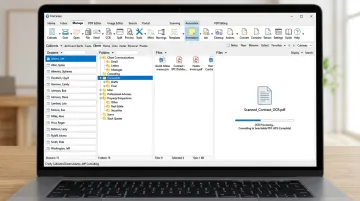
FileCenter is the low-cost leader in document management software. It uses an electronic file cabinet interface that mirrors how offices already think about paper filing, which makes onboarding faster for teams switching from physical cabinets or scattered network folders.
It's built specifically for law firms, accounting practices, healthcare offices, and real estate teams still dealing with paper-heavy intake.
What sets it apart:
- Dual OCR engines: Tesseract ships in the Pro edition; Pro Plus adds the ReadIris engine for higher accuracy across languages and document types
- Zonal OCR (Pro Plus): extracts text from specific regions of a form and auto-names files based on that content
- Built-in PDF editing and annotation: no need for separate PDF software
- Bates stamping and barcode support: sequential numbering and barcode-driven routing for legal and compliance workflows
- Automatic document routing and separation: sorts scanned batches into the right folders without manual sorting
| Details | |
|---|---|
| Pricing | One-time purchase: Standard $97, Pro $197, Pro Plus $297. No subscriptions. New users get 25% off their first license (up to $74 off), plus a 30-day money-back guarantee |
| Key Features | OCR-driven scanning, searchable PDF creation, network sharing and admin tools (Pro Plus), cloud compatibility with Google Drive/OneDrive/Dropbox/SharePoint, ScanSnap integration |
| Best For | Document-heavy SMBs and regulated teams in legal, accounting, healthcare, and real estate who want enterprise-grade features without recurring fees |
FileCenter stores files in standard Windows folders rather than a locked proprietary database, so cloud sync tools keep working alongside it instead of being blocked out.
Google Drive
Google Drive is Google's cloud storage and sharing platform, tightly woven into Docs, Sheets, and Gmail. Organization here still depends mostly on manual folders, though Gemini can now suggest moving loose files into existing or new folders based on content.
| Details | |
|---|---|
| Pricing | Free up to 15 GB (shared with Gmail and Photos); Business Starter from $7/user/month, scaling to Business Plus at $22/user/month |
| Key Features | Cloud sync, easy sharing, deep Google Workspace integration, Gemini-assisted search and folder suggestions |
| Best For | Small teams and freelancers already living inside the Google ecosystem |
Dropbox
Dropbox built its reputation on cross-platform sync reliability. It layers in document-specific tools like watermarking and eSignature templates, but file organization still relies on the user's own folder discipline.
| Details | |
|---|---|
| Pricing | Free tier at 2 GB; Standard at $15/user/month, Advanced at $24/user/month (3-user minimum) |
| Key Features | File sync, watermarking, password-protected and trackable share links, basic PDF editing |
| Best For | Cross-platform teams that need simple, secure file sharing without heavy document workflows |
Microsoft OneDrive
OneDrive plugs directly into the Microsoft 365 suite, which makes it the default choice for organizations already running Word, Excel, and Teams. Copilot now summarizes files and answers questions across multiple documents without opening them.
| Details | |
|---|---|
| Pricing | Free tier at 5 GB; Business Basic $7/user/month, Business Standard $14/user/month, Business Premium $22/user/month (with Teams) |
| Key Features | Office app integration, Copilot AI suggestions, Microsoft Purview compliance and audit logs |
| Best For | Microsoft 365 organizations needing tight SharePoint and Teams integration |
Box
Box positions itself around secure, governed collaboration for larger organizations. Its private Collections feature lets individuals group files without disturbing the underlying folder structure, and admin controls go deep.
| Details | |
|---|---|
| Pricing | Free plan at 10 GB (250 MB file limit); Business Starter from $5/user/month, scaling through Enterprise tiers |
| Key Features | Private Collections, granular permission controls, centralized admin console for provisioning and security |
| Best For | Larger organizations needing secure, governed file collaboration across many teams |
M-Files
M-Files skips traditional folders altogether. It organizes documents by metadata and relationships, meaning a contract gets tagged by client, project, and status rather than filed in a single location.
| Details | |
|---|---|
| Pricing | Essentials starts at $65/seat/month; higher editions route through sales for a quote |
| Key Features | AI-assisted classification via M-Files Aino, metadata-driven organization, audit trails, industry-specific templates |
| Best For | Enterprises wanting automated document lifecycle management without manual folder maintenance |
Zoho WorkDrive
Zoho WorkDrive fits teams already using Zoho's broader app suite. TrueSync gives desktop access to files without storing everything locally, and Smart Search reads both metadata and OCR-scanned content.
| Details | |
|---|---|
| Pricing | Starter $2.50/user/month, Team $4.50/user/month, Business $9/user/month (3-user minimum, billed annually) |
| Key Features | Team folders, external sharing with expiring links and passwords, AI-enhanced Smart Search |
| Best For | Larger teams already using Zoho apps for collaboration |
Key Features to Look for in File Organization Software
Before picking a platform, check it against the features that actually determine whether files get found or lost.
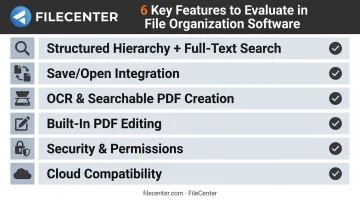
- Structured hierarchy plus full-text search — a clean folder structure only helps if paired with search that indexes every word inside a document, not just the file name
- Save/Open integration — the software should hook into the programs you already use (Word, Excel, email) so files never end up scattered outside the system
- OCR and searchable PDF creation — essential for any office that still scans paper; a 2025 AIIM and Deep Analysis survey found 78% of 600 enterprises already use AI-driven document processing
- Built-in PDF editing — annotation, conversion, and basic markup tools mean you're not paying for a separate PDF app on top of your document system
- Security and permission controls — encryption, role-based access, and audit trails matter most in regulated fields like healthcare and legal, where a data leak carries real liability
- Cloud compatibility — sync with Dropbox, Google Drive, OneDrive, or SharePoint so remote staff can access files without a VPN
How We Chose the Best File Organization Software
The most common mistake in this category: picking software based on brand recognition or free storage size alone, without checking whether it actually fits the workflow.
A firm scanning hundreds of paper contracts a week needs OCR accuracy and automatic routing. A remote marketing team just needs reliable sync and sharing. Those are different problems, and they don't share a solution.
We weighed each platform against:
- Search and retrieval speed: how fast a user can actually find a document by content, not just file name
- OCR accuracy: critical for any office converting paper to digital
- Security and compliance controls: encryption, permissions, and audit trails
- Integrations: whether the tool connects to existing programs and cloud drives
- Total cost of ownership: subscription fees stacked over years versus a one-time purchase
Each factor maps to a real business outcome. Some criteria save employees hours every week; others cut compliance risk or trim the software bill over time.
Conclusion
The best file organization software for 2026 is the one that matches how your documents actually move through your office, whether that's scanned paper contracts or cloud-native spreadsheets. Brand recognition and free storage tiers matter far less than that fit.
Before deciding, weigh three things: how well the tool scales with your team, whether its security controls meet your industry's requirements, and what it actually costs over three to five years. Subscription fees add up fast, so factor those into the total.
If your office handles scanned paperwork, contracts, or client files regularly, FileCenter's 30-day money-back guarantee makes it a low-risk way to test professional-grade OCR, scanning, and PDF tools before committing.
Frequently Asked Questions
What is the best file organizer program?
It depends on your workflow. FileCenter suits document-heavy offices that need OCR, scanning, and PDF tools with one-time pricing. Google Drive or Dropbox work better for teams that just need basic cloud sync.
Which program is primarily used to organize files and folders in Windows?
Windows File Explorer, built into every Windows PC, handles basic file and folder organization. For advanced search and cabinet-style structure, dedicated software like FileCenter adds a layer on top.
Are there free folder organizers available?
Yes. Google Drive and Windows File Explorer are both free. FileCenter also offers a 15-day free trial so you can test premium OCR and PDF features before buying.
What's the difference between cloud storage and dedicated file organization software?
Cloud storage focuses on syncing and sharing files across devices. Dedicated document management software adds OCR, structured retrieval, and workflow automation on top of storage.
Is file organization software worth it for small businesses?
For document-heavy small businesses, yes. The ROI comes from time saved searching for files, fewer lost documents, and easier compliance during audits or client requests.
Does file organization software support OCR for scanned paper documents?
Leading tools do. FileCenter, for example, includes both Tesseract and ReadIris OCR engines, converting scanned paper into searchable, editable text automatically.